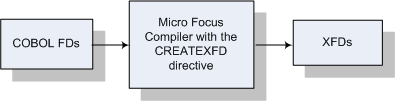
Figure 3-1: XFD Files
At the heart of Database Connectors™ are the eXtended File Descriptors (XFDs) that map COBOL records to database fields. These are called XFDs because they're based on standard COBOL File Descriptors (FDs). An XFD file may be created either as a simple text file or as an XML file. In either case, the XFD contains a description of a COBOL indexed, sequential, or relative file based on its fields. XFDs are used by Database Connectors to interface to database management systems.
To create an XFD, use the CREATEXFD directive. When you specify the CREATEXFD directive with no parameters, an .xfd file is created for each indexed data file specified in the compiled program. XFDs are generated in XML format in the latest XFD version available (Version 6). XFDs are stored in your source code directory by default.
Specify "all" to generate XFDs for all indexed, relative, and sequential files, and specify an XFD path if you want to store your XFDs in a directory other than your source code directory.
Once you compile with the CREATEXFD directive, each COBOL file has a corresponding .xfd file. The directive creates .xfd files without changing anything in the object code.
Figure 3-1: XFD Files
Creating XFD files at compile time offers two significant advantages:
XFDs enable the Database Connectors interface to create a table (or access an existing one) in the database for each indexed file. Each column in the table contains the values for one field. The column names are essentially the field names.
The table that is built is based on the largest record in the COBOL file and contains the fields from that record plus any key fields (key fields are those that are named in KEY IS phrases of SELECT verbs in the FILE CONTROL section). This ensures that data from all of the COBOL records will fit within the table and simplifies the storage and retrieval process. If you were to examine the database columns, only the fields from the largest record, and the key fields, would appear. For additional information, see the section "Defaults Used in XFD Files."
Note: If the field named in the KEY IS phrase is a group item, it will not become a column in the database table. Instead, each of the elementary items subordinate to the named group item will become a column. You can force a group item to be a column by using the USE GROUP XFD directive.
With multiple record formats (level 01), not all COBOL fields are represented in the database by name, but all fields are storable and retrievable. The XFD maps fields from all records of a file to the corresponding locations in the master (largest) record of the file, and thus to the database table. Since Database Connectors has access to the XFD, it knows where the data from a given COBOL record fits in the database tables. This activity is invisible to the COBOL application.
For example, if your program has one file with the three records shown below, the underlined fields will be included in the database table by default (this example assumes that "ar-codes-key" is named in a KEY IS phrase). Some fields will not appear in the table, but the XFD will map them to the master field names. Database Connectors thus will eliminate redundancies and give you optimum performance.
01  ar-codes-record.
    03  ar-codes-key.
        05  ar-code-type      pic x.
        05  ar-code-num       pic 999.
01  ship-code-record.
    03  filler                pic x(4).
    03  ship-weight           pic s999v9.
    03  ship-instruct         pic x(15).
01  terms-code-record.
    03  filler                pic x(4).
    03  terms-rate-1          pic s9v999.
    03  terms-days-1          pic 9(3).
    03  terms-rate-2          pic s9v999.
    03  terms-descript        pic x(15).
The following diagram shows how Database Connectors creates database columns for some of the fields in the COBOL record, while the XFD maps other fields to those columns; this means that all of the fields are accessible to the COBOL program.
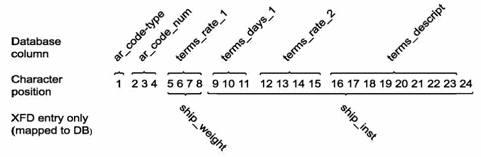
Figure 3-2: Making Field Accessible to COBOL Programs
For a description of the rules that Database Connectors follows as it builds the database table and an explanation of how you can override those rules when necessary, see the section Defaults Used in XFD Files.
Several elements of COBOL require special handling when XFDs are built. These include multiple record definitions REDEFINES, FILLER, and OCCUR. This section describes how the Compiler handles each of these situations.
Note that in many instances you can override the default behavior described below by placing special comment lines in the FDs of your COBOL code. These comments are called XFD directives, and are described in the chapter "Using XFD Directives." For example, the WHEN XFD directive allows you to use multiple definitions for a single set of data by specifying when each definition should be used.
Databases generally do not support the notion of multiple definitions for the same column. As the following paragraphs explain, whenever a COBOL program gives more than one definition for the same data, the Compiler makes a choice about which definition to use in the XFD. Then it disregards the rest.
Fields named in KEY IS phrases of SELECT statements are included as column names. Other fields that occupy the same areas as the key fields (by either explicit or implicit redefinition) are not included by name, but are mapped to the key field column names by the XFD.
Remember, if the field named in the KEY IS phrase is a group item, it will not become a column in the database table unless a USE GROUP XFD directive is used (see the section "How XFDs are Formed"). Instead, the subordinate fields of the group item will be used.
Fields contained in a redefining item occupy the same positions as the fields being redefined. The Compiler needs to select only one of the field definitions to use. The default rule that it follows is to use the fields in the item being redefined as column names; the XFD maps fields that appear subordinate to a REDEFINES clause to column names.
This same rule extends to multiple record definitions. In COBOL, multiple record definitions are essentially redefinitions of the entire record area. This leads to the same complication that is encountered with REDEFINES: multiple definitions for the same data. So the Compiler needs to select one definition to use.
Because the multiple record types can be different sizes, the Compiler needs to use the largest one, so that it can cover all of the fields adequately. Thus, the Compiler's rule is to use the fields in the largest record defined for the file. If more than one record is of the largest size, the Compiler uses the first one.
Note that group items are, by default, never included in an XFD for the same reason that REDEFINES are excluded: they result in multiple names for the same data items. You can, however, choose to combine grouped fields into one data item by specifying the USE GROUP XFD directive.
In a COBOL FD, FILLER data items are essentially place holders. FILLER items are not uniquely named and thus cannot be uniquely referenced. For this reason, they are not placed into the XFD. The XFD maintains the correct mapping of the other fields, and no COBOL record positional information is lost.
Sometimes you need to include a FILLER data item, such as when it occurs as part of a key. In such a case, you could include it under a USE GROUP XFD directive or give it a name of its own with the NAME XFD directive.
An OCCURS clause always requires special handling, because the run-time system must assign a unique name to each database column. The run-time system accomplishes this by appending sequential index numbers to the item named in the OCCURS clause.
For example, if the following were part of a file's description:
03  employee-table occurs 20 times.
    05  employee-number            pic 9(3)
these column names would be created in the database table:
employee_number_1
employee_number_2
.
.
.
employee_number_10
employee_number_11
.
.
.
employee_number_20
Note that the hyphens in the COBOL code are translated to underscores in database field names, and the index number is preceded by an underscore.
Fields defined with an OCCURS clause are assigned unique sequential names. Fields without names are disregarded. When multiple fields occupy the same area, the Compiler chooses only one of them unless you have a WHEN XFD directive to distinguish them. To choose, the Compiler:
In COBOL, you distinguish fields with identical names by qualification. For example, there are two fields named "RATE" in the following code, but they can be qualified by their group items. Thus, you would reference RATE OF TERMS-CODE and RATE OF AR-CODE in your program:
01  record-area.
    03  terms-code.
        05  rate                   pic s9v999.
        05  days                   pic 9(3).
        05  descript               pic x(15).
    03  ar-code.
        05  rate                   pic s9v999.
        05  days                   pic 9(3).
        05  descript               pic x(15).
However, database systems consider duplicate names an error. Thus, if more than one field in a particular file has the same name, the XFD will not be generated for that file.
The solution to this situation is to add a NAME XFD directive that associates an alternate name with one or both of the conflicting fields.
To meet the SQL requirements of some relational database management systems (RDBMSs), the Database Connectors run-time for those systems truncates long field names to the maximum allowed by the RDBMS. (In the case of the OCCURS clause described above, the truncation is to the original name, not the appended index numbers. However, the final name, including the index number, is limited to the RDBMS maximum.) It's a good idea to make sure that your field names are unique (and meaningful) within the first 18 characters.
The database you are connecting to may allow longer names, and if so, more characters will be used. Names longer than 30 characters will generate a warning. Instead of allowing default truncation, you can use the WHEN XFD directive to give a shorter alias to a field with a long name. Note that within the COBOL application you can continue to use the original name. The NAME XFD directive affects only the XFD connection to the RDBMS table.
The Compiler needs to give a name to each XFD file that is built. It attempts to build the name from your COBOL code, although there are some instances where the name in the code is nonspecific, and you must provide a name.
Each XFD name is built from a starting name that is derived (if possible) from the SELECT statement in your COBOL code. The following table explains how that occurs.
| ASSIGN name is a variable | If the SELECT for the XFD file has a variable ASSIGN name (ASSIGN TO filename), you must specify a starting name for the .xfd file via a FILE XFD directive in your code. This process is described in the chapter Using XFD Directives |
| ASSIGN name is a constant | If the SELECT for the XFD file has a constant ASSIGN name (such as ASSIGN TO "COMPFILE"), that name is used as the starting name for the .xfd file name |
| ASSIGN name is generic | If the ASSIGN phrase refers to a generic device (such as ASSIGN TO "DISK"), the Compiler uses the SELECT name as the starting name for the XFD |
From the starting name, the final name is formed as follows:
| COBOL code | File name |
|---|---|
ASSIGN TO "usr/ar/customer.dat" |
customer.xfd |
SELECT TESTFILE, ASSIGN TO DISK |
testfile.xfd |
ASSIGN TO FILENAME |
(you specify) |
At run time, it is possible to use a single XFD for files that have different names. For example, suppose a site has customer files that have identical structures but different names (such as CUST0001, CUST0002, and CUST0003). It's not necessary to have a separate XFD for each file, as long as their record definitions are the same.
The individual files can all be mapped to the same XFD via an ACUFH configuration variable called XFD_MAP. The following paragraphs describe how this works.
Suppose your COBOL application has a SELECT with a variable ASSIGN name, such as customer-file. This variable assumes different values (such as CUST0001 and CUST0002) during program execution.
Before compiling the application, you would use the FILE XFD directive to provide a base name for the XFD. Suppose you provide "CUST" as the base. The Compiler would then generate an XFD named cust.xfd. (The Compiler always converts XFD names to lower case.)
To ensure that all customer files, each having a unique name, will use this same XFD, you make this entry in your ACUFH configuration file:
XFD_MAP CUST* = CUST
The asterisk ("*") in the example is a wildcard that matches any number of characters. Note that the extension .xfd should not be included in the map. This statement would cause the XFD cust.xfd to be used for all files whose names begin with "CUST".
The XFD_MAP variable has this syntax:
XFD_MAP [pattern = base-xfd-name] ...
where pattern consists of any valid filename characters and may include "*" or "?". These two characters have special meanings in the pattern:
| * | matches any number of characters |
| ? | matches a single occurrence of any character |
For example:
| CUST???? | matches CUST0001 and CUSTOMER;
does not match CUST001 or CUST00001 |
| CUST* | matches all of the above |
| CUST*1 | matches CUST001 and CUST0001 and CUST00001;
does not match CUSTOMER |
| *OMER | matches CUSTOMER;
does not match CUST001 or CUST0001 |
The XFD_MAP variable is read during the open file stage of any Connector interfaces linked into the run-time system.
XFD values can be replaced or added to the end of existing XFD map values by setting the XFD_MAP_RESETS ACUFH configuration variable. This variable determines whether setting XFD_MAP adds to or replaces the existing value. When this variable is set to "0" (off, false, no), setting XFD_MAP adds new value patterns to the end of the existing value. When XFD_MAP_RESETS is set to "1" (on, true, yes), setting XFD_MAP replaces the existing value with a new value. The default value is "1" (on, true, yes).
This variable may be useful if you need to include multiple XFD_MAP lines in an ACUFH configuration file and want to avoid setting and resetting the variable. When multiple lines exist, all patterns are used in the order they are listed.
Copyright © 2009 Micro Focus (IP) Ltd. All rights reserved.
 Related Topics