 on the OO COBOL toolbar to start
the Class Wizard.
on the OO COBOL toolbar to start
the Class Wizard. 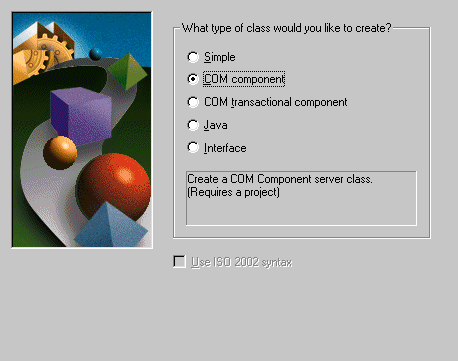
Figure 3-1: The Class Wizard with COM Component Selected
You need to read the chapters in this book in the order shown by the Tutorials map.
In this chapter, you use the Class and Method Wizards to create a COM object.
When you make an application into a COM object, you enable client applications to call it. Because COM deals with objects, the easiest way to prepare a COBOL application for deployment as a COM object is to write it as a set of inter-related object-oriented classes. But if you have an existing application written in traditional procedural COBOL, you can wrap each COBOL program in an object-oriented class - the client application calls the class's methods, which then call the procedural COBOL routines. Net Express has facilities to help create this wrapper class and register it as an COM object. They are the Class Wizard and the Method Wizard.
If you have closed Net Express, reopen it. If any project window or other windows are open, close them.
To create a COM object:
on the OO COBOL toolbar to start
the Class Wizard.
Figure 3-1: The Class Wizard with COM Component Selected
You then create methods in the class, using
 on the OO COBOL toolbar to
start the Method Wizard. The Wizard creates empty methods, for you to insert
your code. You create one method for each business routine, and simply insert a
line to call the business routine.
on the OO COBOL toolbar to
start the Method Wizard. The Wizard creates empty methods, for you to insert
your code. You create one method for each business routine, and simply insert a
line to call the business routine.
If you wish, you can call your COM object from a .NET managed code client application, which you write using Visual Studio. To see how to do this, continue at the chapter .NET Client for COM in your Interface Mapping Tutorials.
If you want to take a break first, you can close Net Express and/or the project - you will need to re-open them during the next chapter.
Copyright © 2006 Micro Focus (IP) Ltd. All rights reserved.