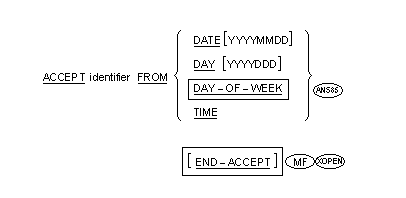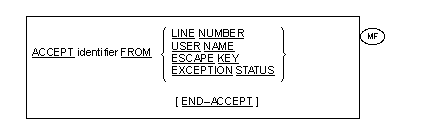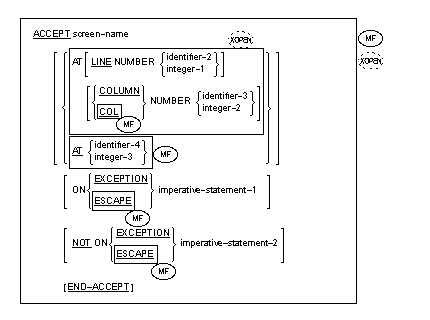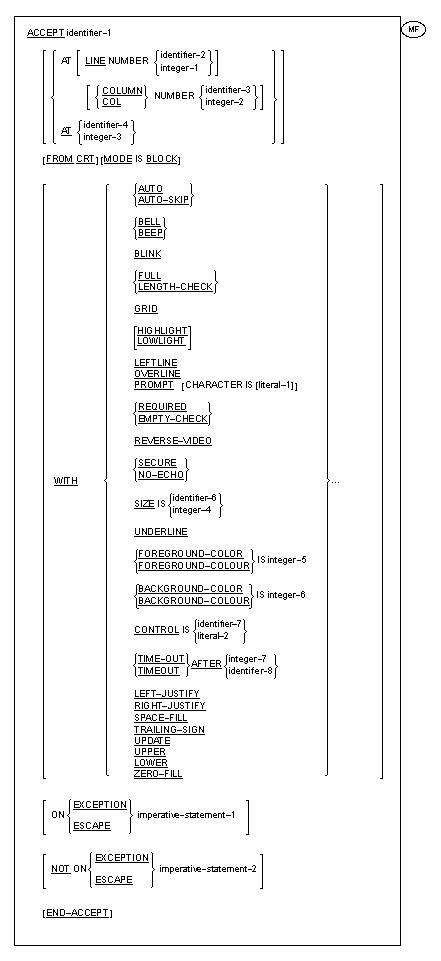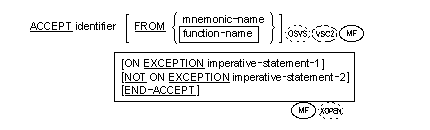
The ACCEPT statement causes data keyed at the console or supplied by the operating system to be made available to the program in a specified data item.
 Format
3Format
4Format
5
Format
3Format
4Format
5 This format is not
currently supported in the .NET environment.
This format is not
currently supported in the .NET environment.

 Alternatively,
function-name can itself be used instead of an associated mnemonic-name.
Alternatively,
function-name can itself be used instead of an associated mnemonic-name.  When mnemonic-name is
associated with ARGUMENT-NUMBER in the Special-Names paragraph, then identifier
must be an unsigned integer. When
mnemonic-name is associated with ARGUMENT-VALUE or ENVIRONMENT-VALUE in the
Special-Names paragraph, then identifier must be an alphanumeric data item.
Identifier can be a USAGE
DISPLAY-1 (DBCS) item or an external floating-point data item.
When mnemonic-name is
associated with ARGUMENT-NUMBER in the Special-Names paragraph, then identifier
must be an unsigned integer. When
mnemonic-name is associated with ARGUMENT-VALUE or ENVIRONMENT-VALUE in the
Special-Names paragraph, then identifier must be an alphanumeric data item.
Identifier can be a USAGE
DISPLAY-1 (DBCS) item or an external floating-point data item.
 Identifier can be an
internal floating-point data item.
Identifier can be an
internal floating-point data item.
The EXCEPTION
phrase may be specified only if FROM is specified with either ENVIRONMENT-NAME
or ARGUMENT-VALUE, or with the mnemonic-names associated with them. Identifier can be of any
class, category or usage, including an internal floating-point or external
floating-point item but not a boolean item.Format
3No restrictions apply to the class, category or
usage of the identifier. However, the actual value placed into the identifier
and the validity of moving such values to the identifier are dependent on the
FROM clause. See the Format 3 General Rules for more information. Format
4Screen-name cannot be an item with an OCCURS clause.
Formats
4 and 5The LINE and COLUMN phrases can appear in any order.
EXCEPTION and ESCAPE are equivalent. Identifier-4 must be a PIC 9(4) or a PIC 9(6) data
item. Format
5Identifier-8 must be an integer. It can be signed.
Integer-7 can be signed. An ACCEPT statement whose operand is not a
screen-name is treated as a Format 5 ACCEPT statement if it has an AT phrase, a
FROM phrase with the CRT option, a WITH phrase, a MODE IS BLOCK phrase, or an
EXCEPTION phrase; or if it has no FROM phrase but the CONSOLE option clause is
specified in the Special-Names paragraph. If it has the FROM phrase with the
CONSOLE option, or if it has no FROM phrase and the CONSOLE IS CRT clause is
not specified in the Special-Names paragraph, it is treated as a Format 1
ACCEPT statement. The phrases following the identifier can be in any
order. The SPACE-FILL, ZERO-FILL, LEFT-JUSTIFY,
RIGHT-JUSTIFY, PROMPT and TRAILING-SIGN options are allowed only if the operand
is an elementary item. Elementary data items in identifier-1 must be of
USAGE DISPLAY. No elementary item in identifier-1 may be longer
than 8191 bytes. If the MODE IS BLOCK phrase is used, the whole of identifier-1
must be no longer than 8191 bytes. The size of a data transfer is determined by the device and the run-time environment (see the topic The Special-Names Paragraph for a list of function-names that can be used and your COBOL system documentation for details of devices and the limits of data transfer sizes).
If the device is capable of transferring data of the same size as the receiving data item, the transferred data is stored in the receiving data item. If otherwise, then:
If the FROM option is not given, it is equivalent to specifying FROM CONSOLE.
If the function-name COMMAND-LINE, or a mnemonic-name
associated with the function-name COMMAND-LINE, is specified, the contents of a
system-dependent command-line buffer are transferred to the receiving data
item. If the mnemonic-name
associated with the function-name ARGUMENT-NUMBER is used, identifier receives
the number of arguments contained in the command line. (This includes all
arguments, those before the program-name, the program-name itself, and any
arguments following the program-name. Hence no portability from types of
program invocation is expected.) When mnemonic-name is
associated with ARGUMENT-VALUE, the current command-line argument is placed
into identifier. The determination of which command-line argument is current is
as follows:
If the current command-line argument number is 0, it is intended that the program-name of the main program of the run unit will be returned. However, the effects of variations on program invocation can impact these results so that a utility or calling program can be returned instead.
If the current command-line argument number
is not in
the range 0 to 99 inclusive or
exceeds the number of arguments on the command line when this ACCEPT statement is executed, imperative-statement-1, if specified, is executed.
If the mnemonic-name
associated with the function-name ENVIRONMENT-VALUE is used then,
The effect of retrieving
command-line arguments and the number of arguments in a program that is called
by another program is defined as the same as if they were retrieved by the
first program in the run unit.  DAY-OF-WEEK,
and TIME are conceptual data items and, therefore, are not described in the COBOL program.
| Char | Contents |
|---|---|
| 1-2 | The two right-most numeric characters of the year in the Gregorian calendar. |
| 3-4 | Two numeric characters of the month of the year in the range 01 through 12. |
| 5-6 | Two numeric characters of the day of the month in the range 01 through 31. |
| Char | Contents |
|---|---|
| 1-4 | Four numeric characters of the year in the Gregorian calendar. |
| 5-6 | Two numeric characters of the month of the year in the range 01 through 12. |
| 7-8 | Two numeric characters of the day of the month in the range 01 through 31. |
| Char | Contents |
|---|---|
| 1-2 | The two right-most numeric characters of the year in the Gregorian calendar. |
| 3-5 | Three numeric characters of the day of the year in the range 01 through 366. |
| Char | Contents |
|---|---|
| 1-4 | Four numeric characters of the year in the Gregorian calendar. |
| 5-7 | Three numeric characters of the day of the year in the range 01 through 366. |
DAY-OF-WEEK is composed of a
single data element whose content represents the day of the week. DAY-OF-WEEK,
when accessed by a COBOL program, behaves as if it had been described in a
COBOL program as an unsigned elementary numeric integer data item one digit in
length. In DAY-OF-WEEK, the value 1 represents Monday, 2 represents Tuesday,
... , 7 represents Sunday. Format
3The value returned from the ACCEPT FROM LINE NUMBER
phrase is always numeric. The value is implementation-dependent. The FROM USER NAME option returns
spaces. The FROM ESCAPE KEY option returns the two-digit
code generated by a termination key. The EXCEPTION STATUS item contains a three-digit
numeric value that identifies the type of exception condition that has occurred
during the execution of a CALL statement.
If EXCEPTION STATUS is to be examined this should be done immediately following the CALL statement. There must be nothing between the CALL and ACCEPT FROM EXCEPTION STATUS. File I/O operations will alter the exception status value making it unpredictable.
Format
4This format of the ACCEPT statement accepts screen
items,which are defined in the Screen Section of the program, and allows full
access to the enhanced screen handling facilities. Formats
4 and 5The order of execution of an ACCEPT statement is
always:
The AT phrase gives the absolute address on the
screen where the ACCEPT operation is to start. If integer-3 or identifier-4 is 4 digits long, the
first two digits specify the line, the second two the column. If 6 digits long,
the first three digits specify the line, while the second three specify the
column. Certain combinations of line and column numbers have
special meanings, as follows:
Prior to the execution of this
ACCEPT statement, a DISPLAY statement which specifies the same screen-name or
identifier-1 as is specified in this ACCEPT statement must have been executed.
There must not have been any ACCEPT or DISPLAY statement executed since then.
If the ON EXCEPTION phrase is specified,
imperative-statement-1 is executed if the ACCEPT operation finishes with
anything other than a normal termination. If the NOT ON EXCEPTION phrase is
specified, imperative-statement-2 is executed if the ACCEPT operation
terminates normally. (See the rules for the CRT STATUS clause in the topic
The Special-Names
Paragraph for possible types of termination.) Format
5The ACCEPT operation starts at line 1, column 1 if
no AT phrase is specified. If identifier is a group item and no MODE IS BLOCK
phrase exists, then those elementary subordinate items which have names other
than FILLER are accepted. They are positioned on the screen in the order their
descriptions appear in the Data Division and are separated by the lengths of
the FILLER items in the group. For this purpose, the first position on a line
is regarded as immediately following the last position on the previous line.
The items are accepted in the same order.
Unless otherwise specified in the CURSOR IS clause (see the rules for the CURSOR IS clause clause in the topic The Special-Names Paragraph), the cursor is initially positioned at the start of the first item. As the ACCEPT operation into each item is terminated, the cursor moves to the start of the next item.
If identifier-1 is a group item that has a
variable-occurrence data item subordinate to it, the ACCEPT statement acts as
if the MODE IS BLOCK clause were specified. If identifier-1 is a group item that
has a variable-occurrence data item subordinate to it, the ACCEPT statement
acts as if the MODE IS BLOCK clause were specified. The MODE IS BLOCK phrase indicates that the
identifier is to be treated as an elementary item. Thus, even if it is a group
item it is displayed as one item.
The effect of specifying the PROMPT option is as described
in the topic
The PROMPT
Clause. If the PROMPT option is not specified, no character
is output to the screen to mark empty character-positions; those
character-positions into which the operator does not enter data produce spaces
in the data item.
The WITH phrase allows you to specify certain options
available during the operation. (See the topic
Screen Section Entry
Skeleton for descriptions of these options.)
In addition to the options available as screen description clauses, the following options can be used in the WITH phrase; SPACE-FILL, ZERO-FILL, LEFT-JUSTIFY, RIGHT-JUSTIFY TRAILING-SIGN and UPDATE. ZERO-FILL appears in this list and as a screen description clause because it has two different uses. Its second use is documented later in this chapter.
A configuration option is available which allows the entry of data into numeric and numeric edited screen fields in free format mode. In COBOL, nonedited numeric data items are intended for holding data in an internal form; however, this format enables such data items to appear on the screen. See your COBOL system documentation on user interfaces for more details. If free format mode is in effect, the data appears automatically reformatted as follows:
The SPACE-FILL, ZERO-FILL, LEFT-JUSTIFY, RIGHT-JUSTIFY and TRAILING-SIGN options amend this format.
The SPACE-FILL option causes data in free format nonedited
numeric data items to appear on the screen with zero-suppression in all integer
character positions. This option affects only free format, nonedited numeric
data items. This takes effect when initial data in the data item is displayed
and again when the ACCEPT operation into the data item is terminated. Any
leading sign is displayed in the rightmost space.
The ZERO-FILL option causes data in free format nonedited
numeric data items to appear on the screen with no zero-suppression. This takes
effect when initial data in the data item is displayed and again when the
ACCEPT operation into the data item is terminated. (See the topic
The ZERO-FILL
Clause for this option's effect when used with
alphabetic or alphanumeric data items.)
The LEFT-JUSTIFY option is documentary only.
The RIGHT-JUSTIFY option causes operator-keyed characters
to be moved on the screen to the rightmost character positions of the field.
This option affects only free format nonedited numeric data items. This takes
effect upon display of the initial data (the current contents displayed) in the
data item and also upon termination of the ACCEPT operation.
The TRAILING-SIGN option causes the operational sign to
appear in the rightmost character position of the field. This takes effect upon
display of initial data in the data item and also upon termination of the
ACCEPT operation. This option affects only signed, nonedited numeric data items
which are in free format mode.
The UPDATE option causes the current contents (initial
data) of the data item to be displayed before the operator is prompted to key
in new input. If the operator does not key in any new data, the initial data is
then treated as though it were operator-keyed. If the UPDATE option is not
specified, the display of initial data is a configuration option. (See your
COBOL system documentation on user interfaces for details of configuration
options.)
The UPPER option forces input into upper case.
The LOWER option forces input into lower case. If REDEFINES is used with identifier-1, the first
description of the redefined data area is used and subsequent descriptions are
ignored. If OCCURS or nested OCCURS are used the repeated data item is expanded
into the full number of times it occurs, so that one definition is repeated for
many fields. If identifier-8 or integer-7 has a negative value,
this represents a request that no time-out "exception" should occur no matter
how long there is between/before key-strokes. If identifier-8 or integer-7 is zero, no timeout
occurs if characters are waiting (when the ACCEPT is processed). However, if no
characters are waiting, then a timeout occurs immediately. The ON EXCEPTION clause, if present, will be
executed when a timeout occurs and a TIMEOUT clause is specified. The NOT ON
EXCEPTION clause, if present, will be executed when a TIMEOUT clause is
specified but no timeout (or other exception) occurs. If a timeout exception occurs, then the contents of
any ACCEPT resultant-field are defined as follows:
If at run time a positive timeout interval greater
than 2,147,483,647 hundredths of a second is detected the timeout value is
reset to 2,147,483,647 hundredths of a second (which is approximately eight
months). The TIMEOUT value specifies the number of seconds
(or tenths of a second) after the ACCEPT statement begins processing until a
timeout exception occurs. An ADISCF configuration option controls whether or
not the timeout clock is reset each time a new keyboard action is detected. An
application which wants some ACCEPT statements to be handled with a RESET and
some without, can make specific calls to the ADIS run-time interface before or
after the ACCEPT statements that need changes from the default. For example
when ADIS was configured not to do resets, if a program had:
ACCEPT INPUT-FIELD TIME-OUT AFTER +10
a timeout would occur after 10 seconds had elapsed from the beginning of the ACCEPT, even if some characters were entered after 5 seconds into the ACCEPT processing.
If, on the other hand, ADIS were configured to do resets, if a program had the same code given above, then each time a new character were entered, the TIMEOUT clock would be reset to zero.
If a timeout exception occurs and no ON EXCEPTION
phrase is specified, the CRT Status keys (if specified) are updated, the
application continues to the next logical phrase, and the contents of the
ACCEPT receiving field are as defined above. (The above is true whether or not
a NOT ON EXCEPTION phrase is specified.) All references to (NOT) ON EXCEPTION phrases also
apply to (NOT) ON ESCAPE phrases. For alphanumeric data items, the
size of the field that is accepted from the screen during an ACCEPT statement
is exactly the same size as the target field. Therefore, if you want data to
appear at the right hand side of a field, you must enter it there.