A.3 Example of a Secure Handshake for the Client
The web server example shows how a sever receives a certificate from a well-known certificate authority (CA) to be able to communicate securely with any client. This examples show how the secure handshake occurs between a client and a server so that they can create their own secure communication channel that no other entities can uses or access.
Figure A-3 A Browser Establishes a Secure Communication Channel to a Web Server
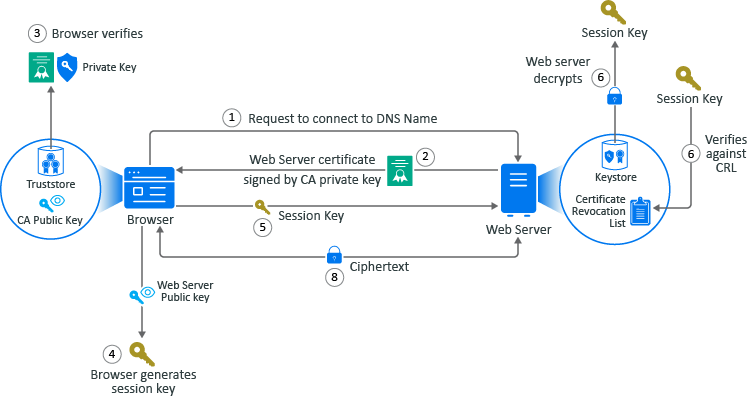
The example is of Adam the administrator logging into the administration console that is a web application. Every action except for Adam entering the URL of the web browser happens automatically between the browser and the web server. No user interaction is required.
-
Adam adds a the URL into the browser. The browser sends a request to connect to the fully qualified DNS names of the web server.
-
The web servers sends a copy of its server certificate that has been signed by the private key of a well-known CA.
-
The browser access the public key of the well-known CA that is stored in the browser’s TrustStore. The browser uses the public key of the well-known CA to decrypt the signature on the web server’s certificate to verify that the certificate is valid.
-
The browser generates a session key using the public key in the web server’s certificate.
-
The browser sends the newly generated session key back to the web server.
-
The web server uses its private key stored in the KeyStore to decrypt the session key.
-
The web server verifies that the session key is not on the certificate revocation list (CLR). At this point the secure handshake between the browser and web server is established.
-
The web server encrypts the data using the session key and sends the data back in ciphertext to the browser. The browser uses the session key to decrypt the data and then uses the session key to encrypt data and then it sends the data back in ciphertext. This secure communication continues until the session ends.