How Access Manager Uses Signing and Interacts with the netHSM Server
The netHSM server provides a signing certificate that is used instead of the one provided by Access Manager. Requests, responses, assertions, or payloads can be signed when there are interactions during single sign-on or during attribute queries between service providers and identity providers using any of SAML2 or ID-SIS protocols.
Access Manager Services That Use the Signing Certificate
The following services can use signing:
Protocols
The protocols can be configured to sign authentication requests.
To view your current configuration:
-
On the page, click > [cluster name].
-
In the section, view the setting for the option. If it is selected, all authentication requests from identity providers are signed.
-
In the section, view the settings for the s and S options. If these options are selected, assertions and authentication requests are signed.
Protocols communicate directly with a provider using the SOAP backchannel. This channel is used for artifact resolutions and attribute queries for the Identity Web Services Framework.
To view your current configuration for the SOAP backchannel:
-
On the page, click > > [application name] .
-
View the section. If the option is selected, signing is enabled for the SOAP backchannel.
Profiles
Any of the Web Service Provider profiles can be enabled for signing by configuring them to use X.509 for their security mechanism. For current configuration, see Web Service Provider API (https://<admin-console-host>:<admin-console-port>/nps/swagger-ui.html). If either or has been selected as the security mechanism, signing has been enabled for the profile.
Understanding the Interaction of the netHSM Server with Access Manager
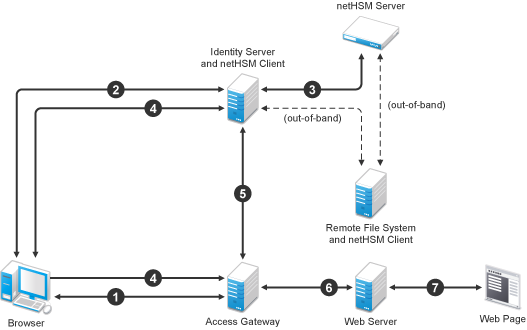
Figure 14-2 outlines one of the basic flows that might occur during single sign-on to Identity Server when authentication requests have been configured for signing.
Figure 14-2 Basic Flow for an Authentication Request Using netHSM
-
A user requests Access Gateway to provide access to a protected resource.
-
Access Gateway redirects the user to Identity Server, which prompts the user for a username and password.
-
Identity Server authenticates the user. If signing is enabled, the payload is signed by the netHSM server through the Java JSSE security provider.
-
Identity Server returns the authentication artifact to Access Gateway.
-
Access Gateway ESP retrieves the user’s credentials from Identity Server.
-
Access Gateway verifies that the credentials allow the user access to the resource, then sends the request to the web server.
-
The web server returns the requested web page.