Mapping the Branch to the Stream
Once you have specified the AccuRev Server connection, you can map Git branches to AccuRev streams.
-
In the
Branch-Stream Mappings section, click the
Add button.
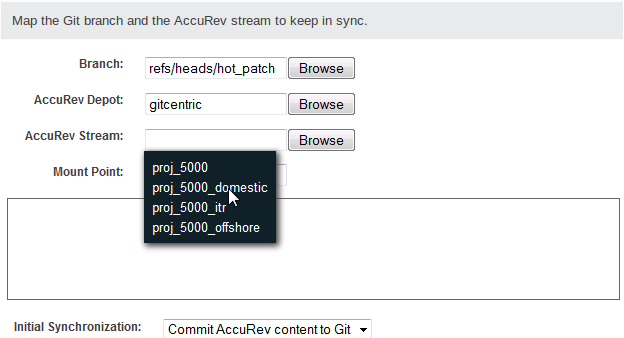
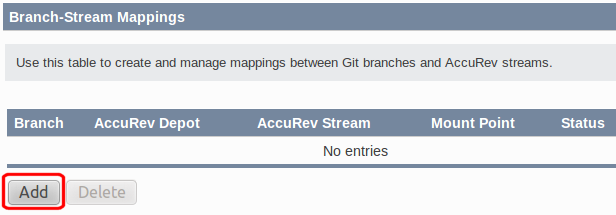 GitCentric opens a panel beneath the table, as shown in the following image.
-
In each of the fields in this panel, you can click a
Browse button to navigate to the value you wish to specify. Most fields are self-explanatory, but the
Mount Point warrants additional discussion.
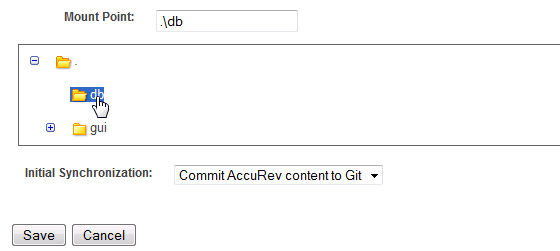
The Mount Point is the directory within the stream that will synchronize AccuRev and Git content. GitCentric provides a display that allows you to navigate to the desired directory. You can select the root of the file system within this stream, or a subdirectory, which populates the field. The folder you select determines which AccuRev-controlled files will populate your repository.
 Note: This step assumes that you have carefully planned out your branch-to-stream-mapping, and that you have either created a new stream or have identified an existing stream that is appropriate for mapping. See Keeping Git Merges and AccuRev Promotes in Sync for more information.
 - Specify in which direction the files should flow when the Git repository and the AccuRev stream are first mapped. If you are mapping a repo with content to a new stream, select Commit AccuRev content to Git. If you are mapping an existing stream with files to a new repository, select Commit Git content to AccuRev.
- Repeat these steps for each branch and stream that you want to map.
-
When you are done, click
Save to save the branch-stream mapping. The next time you view the
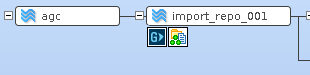
AccuRev stream, a
G icon will be displayed for every stream that you have mapped to a
GitCentric repo via the
AccuRev Connector.