Storage rules create a mapping between device groups and storage groups. Doing so enables you to store events from specific sources to a specific storage group. You can configure these storage groups with different retention policies, and thus retain event data based on the source of incoming events. For example, all events from firewall devices can be subject to a short retention period. To accomplish this, manually assign the firewall devices to a device group and then create a storage rule that maps the device group to a storage group with the desired short retention period.
Tip: Events that are not subject to any storage rule are sent to the Default Storage Group.
Before you add a storage rule, make sure that the storage group to which you want to store the events and the device group that contains the devices whose events you want to store exist. For information on how to create device groups, see Device Groups.
Logger allows you to create up to 40 storage rules. If you create additional rules, an error might be generated.
To add a storage rule:
Click Add. The Add Storage Rule page displays.
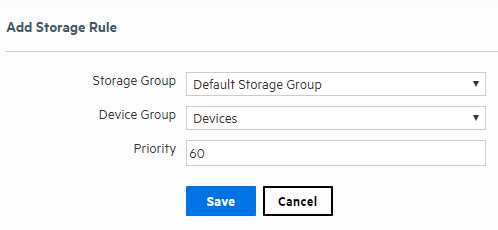
Enter the following parameters:
|
Parameter |
Description |
|---|---|
|
Storage Group |
Select a storage group from the drop-down list. The storage groups must already be set up before any storage rules are added. |
|
Device Groups |
Select a device to associate with the storage group.
Note: If you want to include events from more than one device in the storage group, create a Device Group which contains all the Logger Devices you want and then select that Device Group for the Storage Rule.
|
|
Priority |
An integer that indicates the new rule’s priority. The number must be unique for each storage rule. The smaller the number, the higher the rule’s priority. |
To edit or reorder a storage rule:
To delete a storage rule: