Requests integrated with external storage vendor systems
You can integrate Content Manager advanced requests with an external storage vendor and their systems, which enables you to seamlessly manage requests for records that are stored with the vendor from Content Manager, including the initial request, authorisation, processing, tracking and delivery information.
To install and set up the integration, see CM23.4_WarehouseIntegration.pdf.
When the integration is set up, Content Manager users can use the advanced requests features to submit, process and administer requests. See below for some use cases.
For every storage provider you are integrating Content Manager with, you need to set up a Content Manager Location of type Storage Provider. In its Content Manager properties Storage Provider tab, you set the parameters that govern the processing of requests to this storage provider. See Location Storage Provider page
For example, the storage provider may require approval of requests before processing them, or need requests to be submitted by a certain time each day to be able to deliver them within the agreed service levels. The processes between storage providers may vary widely.
Please keep this in mind when reviewing the use cases below, which describe example processes for Content Manager's advanced request types.
Use cases
To request a file temporarily, use the record right-click command Requests - Retrieve - Temporary.
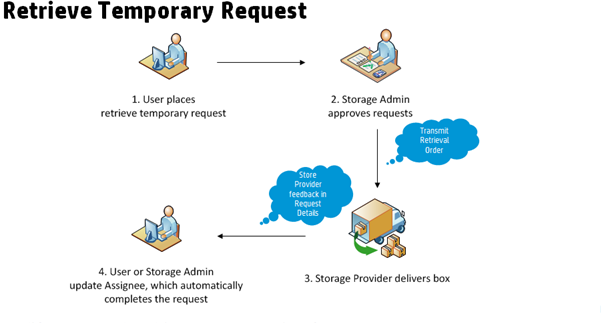
- In this use case, a user has performed a search in Content Manager and found a file that is of interest to her. Because it is a paper file, she needs to get it delivered to her to review it.
The user uses Requests - Retrieve - Temporary on the Content Manager record. - If the storage provider requires approval of requests, the storage administrator approves the request before a retrieval order gets sent to the external vendor
- The external vendor retrieves the file or box from storage and delivers it to the delivery location.
If the record is in a container, and with a storage provider that automatically treats requests for contained items as requests for the container, then they automatically pick the box that contains the file. The request field Content Reference will show the actual file that was requested.
The external vendor delivers the item to the delivery location, which may be the requestor, or a records centre, for example. After delivery, they send a notification. - From when the item arrives at the delivery location, Content Manager tracks it using its Assignee field. The record request must be marked as "Complete" for the Assignee field to be updated to the Requested By Location. Otherwise, the request will always have a status of "On Vendor Pick List" and the Assignee will show that the record is still at its Home Location.
The external vendor integration utility does the following:
- Send the retrieval order to the storage provider
- Update the Status Detail field of the request with the vendor feedback notification
NOTE: This field is for information only; it does not update the request status or any Location information. For retrieval requests, any status report should be based on the Assignee field and physical tracking of the item through Content Manager and on site.
If the storage provider is an internal records centre, they can search for Retrieve - Temporary requests for records in their storage in Content Manager, and then pick and deliver the items.
After scanning the item to the person who requested it, Content Manager completes the request automatically.
To request a file permanently, use the record right-click command Requests - Retrieve - Permanent.
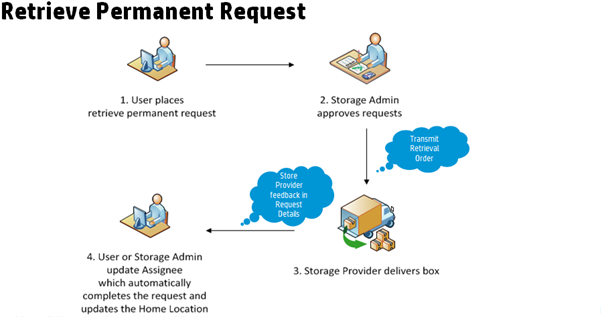
In this use case, a Content Manager makes the decision to withdraw an item from the storage provider. This is usually the case when it is more cost-effective to store the item elsewhere, for example, when the record is needed often.
- The Content Manager uses the command Requests - Retrieve - Permanent on the record in Content Manager.
- If the storage provider requires approvals, the storage administrator approves the request before a permanent retrieval order is sent to the external vendor.
- The external vendor retrieves the item from storage and delivers it to the delivery location. After delivery, the storage provider sends a notification message.
- From when the item arrives at the delivery location, Content Manager tracks it using its Assignee field. This ensures that Content Manager reflects the actual physical location of the item, rather than one based on vendor feedback. Content Manager completes the request automatically when the Assignee and Home field Location is the same as the Requested By Location on the retrieval request.
Use the command Complete on the request to automatically set Assignee and Home Locations to the Location in the Requested By field.
The external vendor integration utility does the following:
- Send the retrieval order to the storage provider
- Update the Status Detail field of the request with the vendor feedback notification
NOTE: This field is for information only; it does not update the request status or any Location information. For retrieval requests, any status report should be based on the Assignee field and physical tracking of the item through Content Manager and on site.
There is no good use case for permanent retrieval requests from an internal storage area.
You would usually handle this scenario by changing the record Home Location in Content Manager.
To request a pickup of a new file, use the record right-click command Requests - Pickup - New Record.
Pickup with in-house labeling
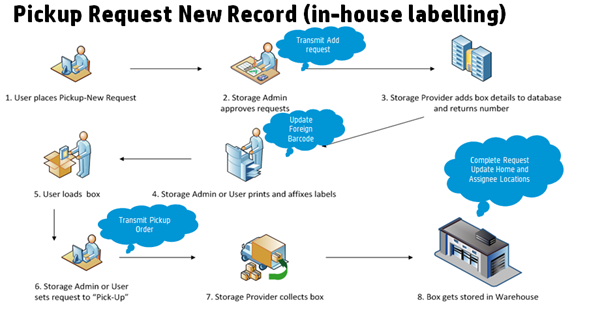
This process is split into two distinct steps. It is only used for external storage providers and breaks out the addition from the requested box to the storage provider’s database from the step of actually ordering the pickup.
This enables someone internal to the requestor organisation to print and affix labels to new boxes after their Foreign Barcode field has been updated with the information from the vendor.
The storage provider does not receive the transmission of the pickup order until labelling of the boxes is complete, and the user signs them off using the command Pick Up on the record.
The external vendor integration utility does the following:
- Transmit the initial addition request to the storage provider
- Update the box record in Content Manager with the foreign barcode number from the storage provider feedback
- Transmit the pickup request to the storage provider when the boxes are marked for pickup
- Complete the request and change Home and Assignee Location based on the completion feedback from the vendor
To request a pickup for a file to be returned to the storage provider, use the right-click command Requests - Pickup - Return.
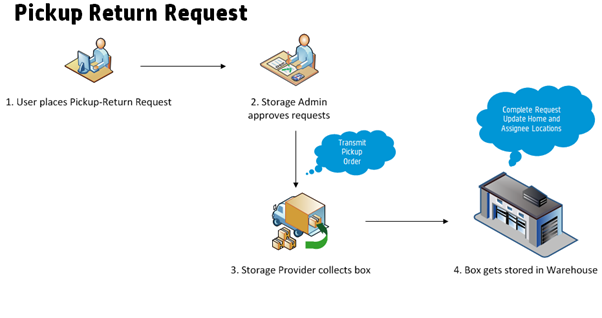
In this use case, the user is finished working with a box that they have previously retrieved from the storage provider.
- To have it returned to the warehouse, they use the Content Manager command Requests - Pickup - Return on the record
- If the storage provider requires approval, the storage administrator approves the request before a pickup order is sent to the vendor
- The storage provider picks up the box from the pickup location
- The box is transferred to the warehouse. The vendor sends a confirmation message.
The external vendor integration utility does the following:
- Transmit the initial request to the storage provider
- Complete the request and update the Assignee Location on the Content Manager record based on the completion feedback from the vendor
If the storage provider is an internal record centre, they can search Content Manager for all Pickup - Return requests for their storage, pick up the boxes and scan them to their Home Location.
Content Manager completes the request automatically when the record Assignee Location matches the Home Location.
 Related information