Creating a User Remote Desktop Services Home Folder Policy
Remote Desktop Services provides users network access from remote client machines. File Dynamics provisions and manages these users’ home folders through User Remote Desktop Services Home Folder policies.
Create the Policy
- In the Admin Client, click the Identity Driven tab.
- Click Policies.
- In the Manage menu, select New > User Remote Desktop Services Home Folder.
The following dialog box appears: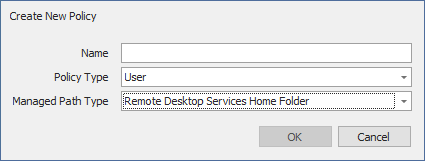
- Specify a name in the Name field and click OK.
The Policy Options page appears. - Select the options and setting that you want the policy to use:
Policy Options: The fields presented on the Policy Options page are identical to those presented when you create a User Home Folder policy. For an explanation of the page, along with procedures for setting policy options, see Setting Policy Options.
Associations: The Associations page is identical to the Associations page presented when you create a User Home Folder policy. For an explanation of the page, along with procedures for setting associations, see Setting Associations
Provisioning Options: The fields presented on the Provisioning Options page are identical to those presented when you create a User Home Folder policy. For an explanation of the page, along with procedures for setting provisioning options, see Setting Provisioning Options.
Target Path Options: The fields presented on the Target Path Options page are identical to those presented when you create a User Home Folder policy. For an explanation of the page, along with procedures for setting target paths, see Setting Target Paths
Quota Options: The fields presented on the Quota Options page are identical to those presented when you create a User Home Folder policy. For an explanation of the page, along with procedures for setting quota options, see Setting Quota Options
Move Schedule: The fields presented on the Move Schedule page are identical to those presented when you create a User Home Folder policy. For an explanation of the page, along with procedures for setting the move schedule, see Setting the Move Schedule.
Cleanup Options: The fields presented on the Cleanup Options page are identical to those presented when you create a User Home Folder policy. For an explanation of the page, along with procedures for setting cleanup options, see Setting Cleanup Options.
Vault: The fields presented on the Vault Rules page are identical to those presented when you create a User Home Folder policy. For an explanation of the page, along with procedures for setting vault rules, see Setting Vault Rules.
Groom: The fields presented on the Groom Rules page are identical to those presented when you create a User Home Folder policy. For an explanation of the page, along with procedures for setting grooming rules, see Setting Groom Rules.