Global Statistics Collector
The Global Statistics Report (GSR) Collector is a multi-purpose mechanism that collects data for storage usage statistics and policy-based storage redistribution, generates reports on anomalies such as a user with a non-existent home folder, and catalogs objects and their paths for historical purposes.
The data collected by the GSR Collector has four primary uses:
- GSR Collector Anomaly Analysis
- Global Statistics
- History
- Policy-based Path Redistribution
Your usage of the GSR Collector data may be specific to all of these or some subset. You should analyze your needs of the feature set it provides and weigh them with the frequency and scope that best suits your needs.
For example, Anomaly Analysis may be an important tool for helping you determine the state of your unmanaged data when you have no configured policies or when you’re initially implementing File Dynamics. Thereafter, you may not need to examine the reports on a daily basis. In this case, after your policies are configured and users are managed, you might opt to change the schedule of the GSR Collector to run weekly.
GSR Anomaly Analysis is discussed in Anomaly Reports.
The Global Statistics provided by the GSR Collector offer insight into how your storage is being consumed by the supported categories of objects (e.g. user and collaborative) but it comes at a price. It can be expensive to run if you do not have quotas enabled via File Storage Resource Manager (FSRM) or your managed storage resources primarily consist of NAS devices.
Alternatively, you might find that the Global Statistics are less important in lieu of your need for a finer granularity of historical data. The same size data used for the Global Statistics is also used for Policy-based Path Redistribution. Depending on the policies for which you plan to redistribute data, you might configure the GSR Collector to perform a Complete Inspection on the paths for a specific policy. Thus eliminating the need to wait for Complete Inspection to be performed needlessly against all storage resources.
The GSR Collector is designed to be run on a scheduled interval so that you can collect the appropriate data to provide the necessary granularity for your needs. By default, the GSR Collector will not run unless you run it manually or configure it to run based on a schedule.
Performance Caveats
Due to the number of objects, amount of data to scan, and your configuration, the GSR Collector can be resource intensive and long running. By default, it will collect data on all objects and accessible shares in Active Directory. This default configuration is not ideal for most File Dynamics deployments. However, the configuration of the GSR Collector allows you to scope it according to your needs. You are encouraged to scope it according to the objects and shares that will be managed by File Dynamics. You should be careful when running the GSR Collector during peak traffic load on the Engine.
Global Statistics Collector Interface
The GSR Collector interface is the means of running and scheduling the GSR Collector, as well as viewing the results of when it was run previously.
Global Statistics Collector 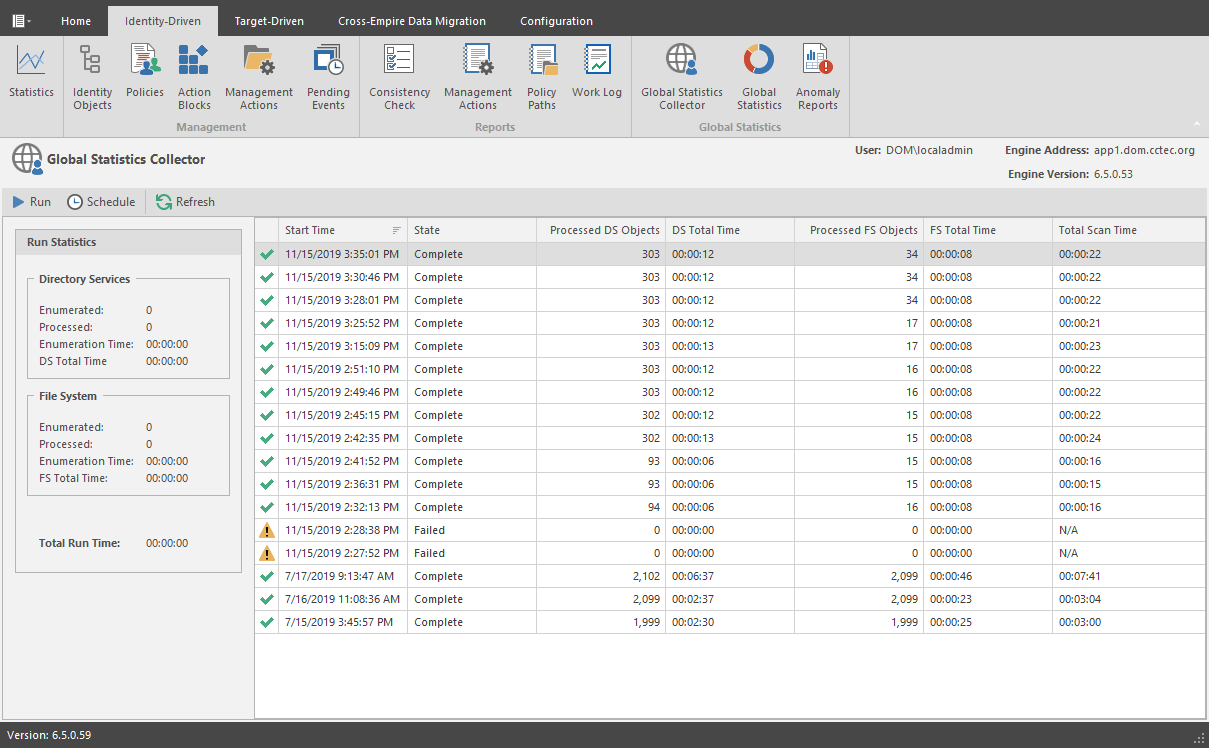
Run: Runs the GSR Collector according to the current GSR Collector configuration. For information on the GSR Collector configuration, see Global Statistics Configuration.
Schedule: Lets you schedule when the GSR Collector is run.
Refresh: Refreshes the list of GSR Collector runs listed in the right pane of the page.
Run Statistics: Displays statistics as the GSR Collector is being run. Once the GSR Collector has completed its run, the statistics are appended to the top of the list in the pane on the right side of the page.