Searching globally
Regardless of the view you have open, you have access to the global Search box on the header. Any search string you type here is applied across all application versions, issues, reports, comments, and users.
The search box is visible only if Enable global search was selected during Application Security setup. For more information, see Configuring Application Security for the first time.
To use the global Search box:
From any view, type a search string into the Search box.
Application Security displays the first several items that match your search string, grouped by category. The application version is also displayed.
To go to a specific item listed, click the item.
To see a list of all search results, below the listed items, click See All Results.
Example: Finding issues
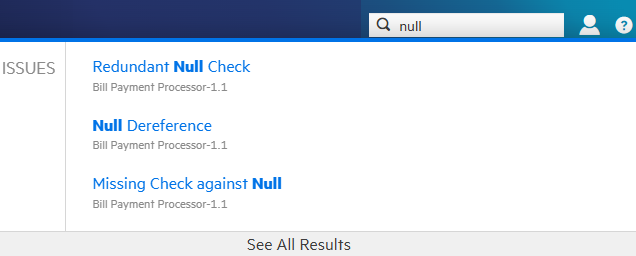
After you select an issue from the listed results, Application Security takes you to the corresponding version page with the issue expanded to full view.
If you select See All Results, Application Security takes you to the Search Results page. From here, you can open the first match with the issue expanded to full view. From there, you can use the next and previous buttons  to page through all of the results.
The search results for issues might include removed, hidden or suppressed issues. If the AUDIT page does not display an item you selected, check the viewing preferences set for the application version to ensure that you have the appropriate settings enabled to display removed, hidden, and suppressed issues. For instructions, see Setting issue viewing preferences.
See Also
Searching applications and application versions from the Applications view