Configuring local analysis options
The analysis options enable you to customize the security content and the amount of memory OpenText SAST uses during a local analysis. You can also specify the SQL type in your project. The source code analysis options are available only if the analysis plugin is installed.
To configure the analysis options:
-
Select Fortify > Options.
-
In the left pane, select Default Project Configuration.
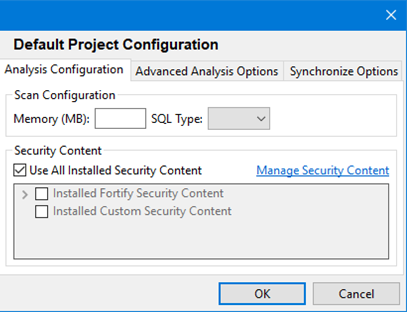
The Analysis Configuration tab opens.
This configuration requires that you specify local installation path for OpenText SAST. You can configure the location of the OpenText SAST executable file on the Security Content Management page.
-
To specify the amount of memory to use for the scan, type an integer in the Memory (MB) box.
Do not allocate more than two thirds of the available physical memory.
-
By default, OpenText SAST treats SQL files as though they use the T-SQL procedural language on Windows systems and PL/SQL on other platforms. To specify the SQL type, from the SQL Type list, select TSQL or PLSQL.
The SQL Type option notifies OpenText SAST about the SQL type that the project uses. SQL code is only scanned if it is included in the project.
- To use specific security content to scan the project (instead of all security content), under Security Content, clear the Use All Installed Security Content check box, and then select the check boxes for the installed Fortify and custom security content to use.
-
To update or import custom security content, click Manage Security Content.
For more information, see Updating Security Content.
- Click OK.