Vulnerability Rollup
Some sites contain a vulnerability class that is endemic throughout the site. For example, a cross-site scripting vulnerability may exist in every POST and GET method for every parameter on an entire site due to lack of input validation. This means that numerous cross-site scripting vulnerabilities will be listed on the Findings tab in the summary pane. To prevent overwhelming your development team, you can roll up such vulnerabilities into a single instance that is prefixed with the tag “[Rollup]” in Fortify WebInspect, Fortify WebInspect Enterprise, and reports.
What Happens to Rolled Up Vulnerabilities
When you select multiple vulnerabilities and use the rollup feature, all vulnerabilities except the first selected vulnerability are marked as ignored. The first selected vulnerability remains visible and represents the rollup. Although the rest of the selected vulnerabilities are marked as ignored, they do not appear as ignored vulnerabilities in the Recover Deleted Items window.
Caution! Rolling up vulnerabilities indicates that they share the same root cause, and that fixing the root cause will fix all rolled up vulnerabilities. Future scans will automatically ignore rolled up vulnerabilities if found. If any of the rolled up vulnerabilities do not share the same root cause, they will still be ignored.
Rollup Guidelines
The following guidelines apply to vulnerability rollup:
-
Scans that include vulnerability rollups can be rescanned and bulk retested.
-
Only the visible vulnerability is retested during bulk retest. The rest of the vulnerabilities are ignored and will not show up as rolled up on the retest.
-
Rollup is local to a scan and is not propagated between scans.
-
Rollup works only when you select multiple vulnerabilities that have not been rolled up. Inadvertently selecting a currently rolled up vulnerability will prevent the Rollup Vulnerability option from appearing in the shortcut menu.
-
You can only undo a rollup if you single select a vulnerability that is currently rolled up.
Rolling Up Vulnerabilities
To rollup vulnerabilities:
-
On the Findings tab in the summary pane, select several vulnerabilities to rollup.
-
Right click and select Rollup Vulnerabilities from the shortcut menu.
The following warning appears:
Rolling up these vulnerabilities indicates that they share the same root cause, and that fixing the root cause will fix all rolled up vulnerabilities. Future scans will automatically ignore rolled up vulnerabilities if found. If any of these vulnerabilities do not share the same root cause, they will still be ignored. Do you wish to continue?
-
Do one of the following:
-
Click OK to rollup the vulnerabilities.
-
Click Cancel to leave the vulnerabilities as they are.
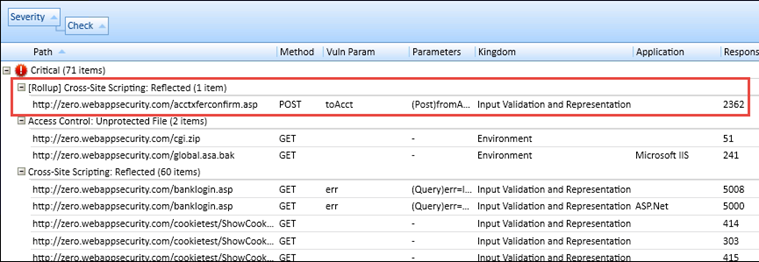
If you click OK, the selected vulnerabilities are rolled into a single instance and the check name is prefixed with the tag “[Rollup]”, as shown below. Additionally, a note is added to the Attachments on the Session Info panel detailing the URLs that were rolled up and affected by the same vulnerability. For more information, see Viewing Notes for a Selected Session.
-
Undoing Rollup
The rollup feature is reversible. To undo a rollup:
-
On the Findings tab in the summary pane, right-click any vulnerability that has been rolled up.
-
Select Undo Rollup Vulnerabilities.
The rollup is reversed, and the vulnerabilities appear on the Findings tab. Additionally, the note detailing the rolled up vulnerabilities is removed from the Attachments on the Session Info panel.
Note: If you undo a rollup in a scan that has been published to Fortify Software Security Center, the note that was added to the Attachments on the Session Info panel detailing the roll up will be removed temporarily from Fortify WebInspect, but will reappear after synchronization with Fortify Software Security Center.
See Also