Auditing web services
Web services are programs that communicate with other applications (rather than with users) and answer requests for information. Most web services use Simple Object Access Protocol (SOAP) to send XML data between the web service and the client web application that initiated the information request. Unlike HTML, which only describes how web pages are displayed, XML provides a framework to describe and contain structured data. The client web application can readily understand the returned data and display that information to the end user.
A client web application that accesses a web service receives a Web Services Description Language (WSDL) document so that it understands how to communicate with the service. The WSDL document describes what programmed procedures the web service includes, what parameters those procedures expect, and the type of return information the client web application will receive.
 Web Services Scan image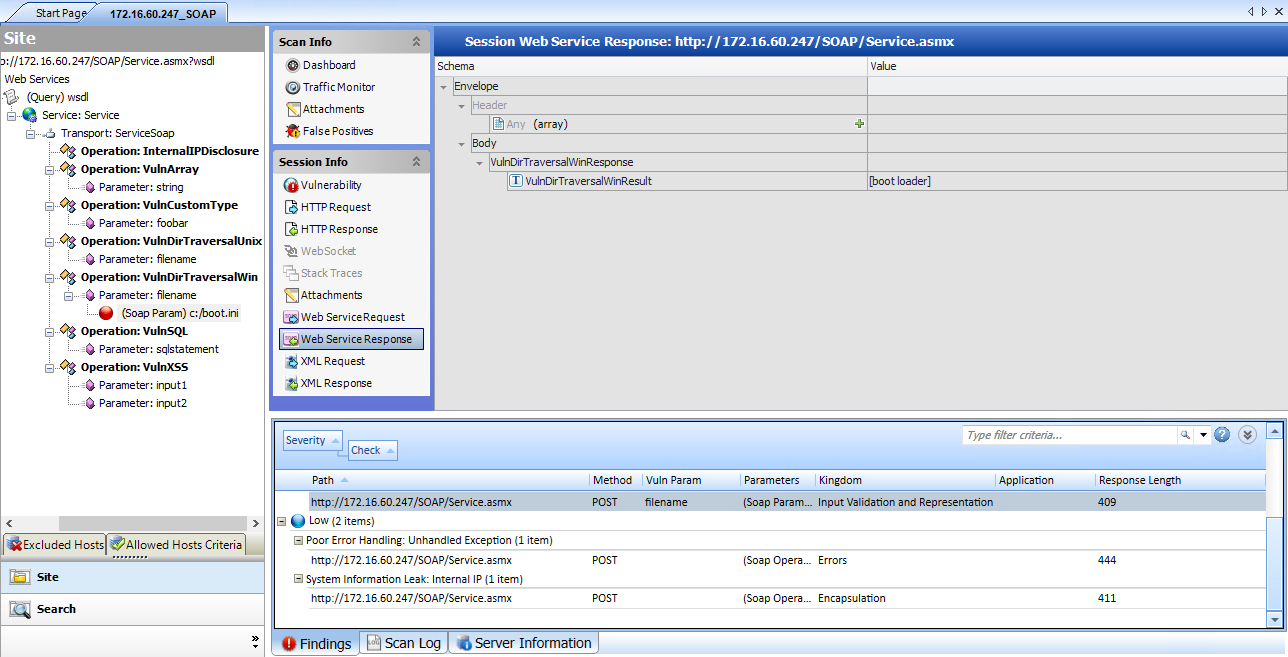
Options Available from the Session Info Panel
The following table describes the options that are available from the Session Info panel.
| Option | Definition |
|---|---|
|
Vulnerability |
Displays the vulnerability information for the session selected in the navigation pane. For more information, see Navigation pane. |
|
HTTP Request |
Displays the raw HTTP request sent by OpenText DAST to the server hosting the site you are scanning. |
|
HTTP Response |
Displays the server's raw HTTP response to OpenText DAST's request. Note: If you select a Flash (.swf) file, OpenText DAST displays HTML instead of binary data. This allows OpenText DAST to display links in a readable format. |
| Stack Traces | This feature is designed to support OpenText DAST Agent when it is installed and running on the target server. For certain checks (such as SQL injection, command execution, and cross-site scripting), OpenText DAST Agent intercepts OpenText DAST HTTP requests and conducts runtime analysis on the target module. If this analysis confirms that a vulnerability exists, OpenText DAST Agent appends the stack trace to the HTTP response. Developers can analyze this stack trace to investigate areas that requires remediation. |
|
Attachments |
Displays all notes, flags, and screenshots associated with the selected session. To create an attachment, do one of the following:
OpenText DAST automatically adds a note to the session information whenever you send a defect to OpenText Application Lifecycle Management (ALM). |
| Web Service Request | Displays an exploded view of the SOAP envelope, header, and body elements for the request. |
| Web Service Response | Displays an exploded view of the SOAP envelope, header, and body elements for the response. |
|
XML Request |
Displays the associated XML schema embedded in the request (available when selecting the WSDL object during a Web Service scan). |
|
XML Response |
Displays the associated XML schema embedded in the response (available when selecting the WSDL object during a Web Service scan). |
For more information on how to conduct a web services vulnerability scan, see Using the API Scan Wizard.