5.1 Understanding the Components of Secure Communication
Configuring secure communication between your OpenText products, infrastructure products, and any administrative tools requires that you have a good understanding of the components that allow the secure communication to occur. OpenText products use industry standards of X.509 certificates, public key infrastructure (PKI), and transport layer security (TLS).
This section provides a basic introduction to these components. For more detailed information, see the following online resources:
-
Internet X.509 Public Key Infrastructure Certificate and Certificate Revocation List (CRL) Profile
-
The Transport Layer Security (TLS) Protocol Version 1.2
-
The Transport Layer Security (TLS) Protocol Version 1.3
You should secure the communication channels between servers and clients to protect your data and stop security breaches from occurring in your environment. The following graphic depicts the different components required for secure communication using certificates, PKI, TLS, and tools to manage the keys.
Figure 5-1 Components of Secure Communication
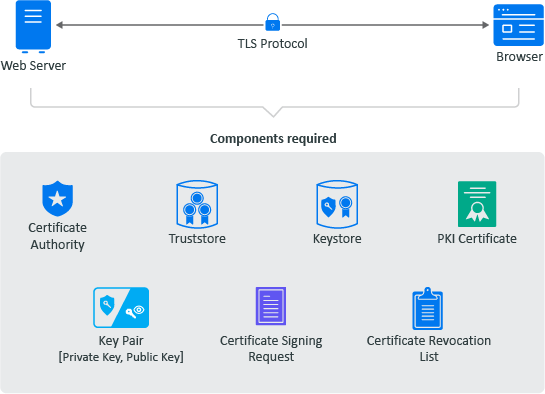
The secure communication occurs between a server and a client. In Figure 5-1, the web server represents the server and the browser represents the client. The following are important terms that you need to understand to create a secure connection between a server and a client.
-
Certificate Authority: An entity that issues digital certificates. A certificate authority (CA) acts as a trusted third party—trusted both by the subject (owner) of the certificate and by the party relying upon the certificate. There are two different types of CAs:
-
Well-known: A certificate authority that provides server certificates signed by well-known CAs such as IdenTrust or DigiCert.
-
Self-signed: A certificate authority that generates self-signed certificates through other products such as OpenSSL®, OpenText™ eDirectory, and Microsoft® Active Directory™. You can create self-signed certificates through the certificate authorities in these other products to use in test environments.
NOTE:A security best practice is to use a well-known CA to issue certificates in production environments.
-
-
Public Key Infrastructure (PKI) Certificates: Digital certificates that the CA issues that prove ownership of the certificate. The CA can issue certificates for users, applications, or devices. PKI certificates contain the following information:
-
Version number
-
Unique serial number
-
CA digital signature and algorithm used
-
Validity period
-
Certificate usage
-
Subject name, URL, and email address
-
Public and private keys (sometimes only the public key)
-
-
Key Pair: A private key and public key that work together to encrypt and decrypt messages. PKI is based on the fact that everyone will trust any communication encrypted with a public key or trust any certificate signed by a private key.
-
Private Key: A cryptographic key that you use to decrypt any communication encrypted by the public key. Only the private key of the key pair can decrypt the communication encrypted with the corresponding public key. You keep the private key private and do not share it.
-
Public Key: A cryptographic key that you use to encrypt communications to keep the communication secure. Only someone with the private key can decrypt the communications. You share the public key so that anyone with access to the public key can verify that any communication signed with this public key is really from the sending source.
-
-
Certificate Revocation List (CRL): A list that the CA creates and manages that contains a list of unique serial numbers that it has revoked. The CA uses the certificate revocation list (CRL) to deny requests from any user, application, or device that has a serial number listed on the CRL.
-
Certificate Signing Request (CSR): A message sent from an applicant to the CA to apply for a PKI certificate. Usually the certificate signing request (CSR) contains a copy of the public key of the applicant making the request, identifying information such as a domain name, and a digital signature.
-
KeyStore: A secure Oracle® Java® repository that stores the private key and identity certificate for the server in the trust relationship. The information is stored encrypted on the server with a KeyStore password that you set and manage. Use either the keytool or keytoolgui tool to set and manage the KeyStore passwords.
-
TrustStore: A secure Oracle® Java® repository that stores the certificates signed by a CA in a secure repository on the client. The information is stored and encrypted on the client with a TrustStore password that you set and manage. Use either the keytool or keytoolgui tool to set and manage the TrustStore passwords.
-
Transport Layer Security (TLS) Protocol: The secure protocol created by all of the components defined in this section. It allows the server and client to communicate securely using certificates and key pairs to prove identity on the server and client.
5.1.1 Example of Establishing Secure Communication for a Web Server
When you install a web server, the communication is not secure by default. Or, if the communication is secure, it is usually using a self-signed certificate. The following example shows how the web server obtains a server certificate signed by a well-known certificate authority (CA) to use in establishing secure communication with any client.
Figure 5-2 Obtaining a Signed Server Certificate from a Well-known Certificate Authority
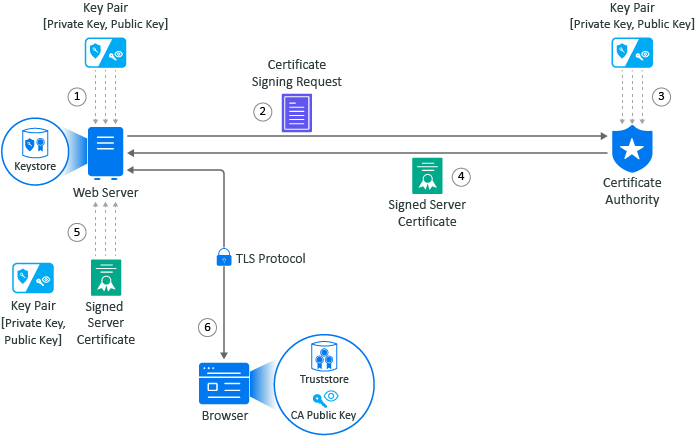
In this example, Adam the administrator requests a signed server certificate from the well-known CA and uses the certificate to establish secure communication with a client that is a web application.
-
Adam generates a key pair on the web server using keytool. Adam uses the key pair to create a certificate signing request (CSR) using keytool. The CSR contains the fully qualified DNS name of the server, the key pair, and other such information to help identify the web server.
-
Adam sends the CSR containing the web server’s information to a well-known CA such as DigiCert.
-
The CA uses the CSR to generate a server certificate for the web server. The server certificate contains the key pair and the web server’s information included in the CSR. The CA signs the certificate with its private key.
-
The CA sends the signed web server certificate back to Adam.
-
Adam imports the signed web server certificate into the web server, and the web server’s certificate and private key are stored in the KeyStore on the web server.
-
When a browser accesses the web server, the web server sends a certificate signed by the private key of the CA to the browser. The browser has a copy of the CA’s public key in its TrustStore and uses the public key to decrypt the signature of the CA. The browser now trusts any communication coming from this web server. For more information, see Example of a Secure Handshake for the Client.
5.1.2 Example of a Secure Handshake for the Client
The following example shows how a server receives a certificate from a well-known certificate authority (CA) to be able to communicate securely with any client. This example shows how the secure handshake occurs between a client and a server so that they can create their own secure communication channel that no other entities can use or access.
Figure 5-3 A Browser Establishes a Secure Communication Channel to a Web Server
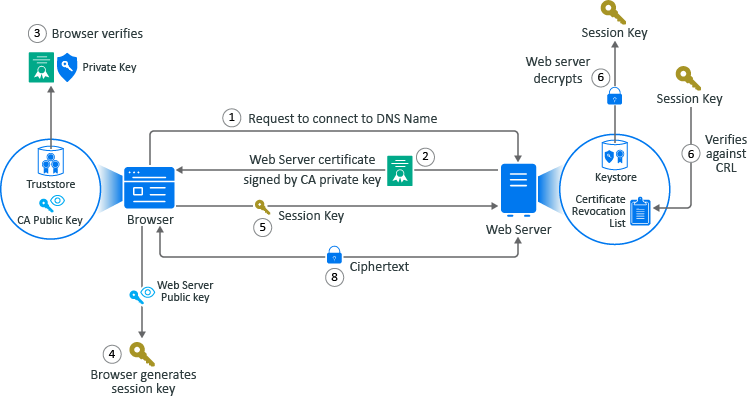
In this example, Adam the administrator logs in to the administration console that is a web application. Every action except for Adam entering the URL of the web browser happens automatically between the browser and the web server. No user interaction is required.
-
Adam enters the URL into the browser. The browser sends a request to connect to the fully qualified DNS name of the web server.
-
The web server sends a copy of its server certificate that has been signed by the private key of a well-known CA.
-
The browser accesses the public key of the well-known CA that is stored in the browser’s TrustStore. The browser uses the public key of the well-known CA to decrypt the signature on the web server’s certificate to verify that the certificate is valid.
-
The browser generates a session key using the public key in the web server’s certificate.
-
The browser sends the newly generated session key back to the web server.
-
The web server uses its private key stored in the KeyStore to decrypt the session key.
-
The web server verifies that the session key is not on the certificate revocation list (CRL). At this point the secure handshake between the browser and web server is established.
-
The web server encrypts the data using the session key and sends the data back in ciphertext to the browser. The browser uses the session key to decrypt the data, then uses the session key to encrypt data, and finally sends the data back in ciphertext. This secure communication continues until the session ends.