2.1 Making Decisions on How to Install OpenText Identity Governance
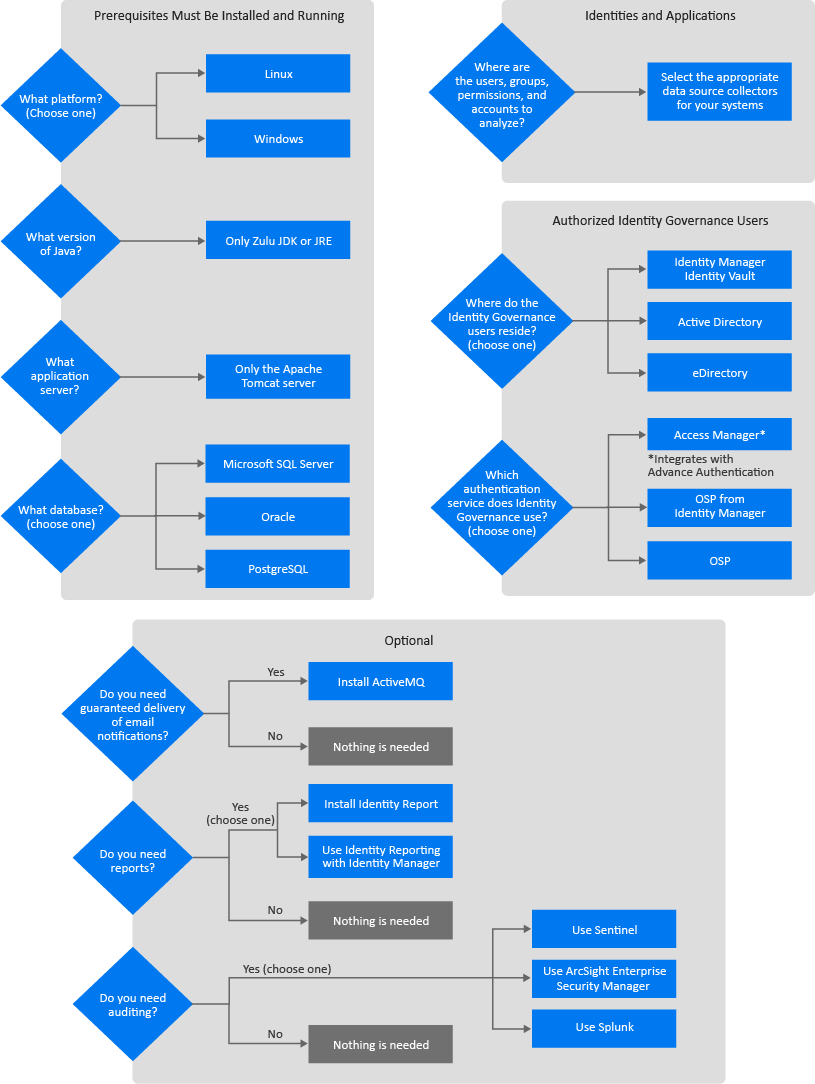
There are many decisions that you must make before you can start the installation of OpenText Identity Governance. OpenText Identity Governance has many options to allow you to add it to your IT environment. There are some main high-level choices you must make to properly install and configure OpenText Identity Governance. Use the following Figure 2-1 to make the decisions that are appropriate for your environment and then use the worksheet in Table 2-1 to capture those choices.
Figure 2-1 OpenText Identity Governance Decision Flow
This worksheet is a place to record the decisions you make about deploying OpenText Identity Governance and the additional components. To complete the installations successfully, use this worksheet in conjunction with the installation worksheets for the different components so that you will have all of the information required before starting the installations. For more information, see:
This worksheet does not list the specific supported versions of the different components. To see that information, see Section 2.4, Hardware and Software Requirements.
Table 2-1 OpenText Identity Governance Planning Worksheet
|
Item |
Options |
Choice |
|---|---|---|
|
Platform |
Select one of the following options:
|
|
|
Java version |
Zulu OpenJDK |
|
|
Application server |
Apache Tomcat |
|
|
Database |
Select one of the following options:
|
|
|
Location of users, groups, and permissions |
Select the appropriate connector to use during the configuration of OpenText Identity Governance. For more information, see |
|
|
Identity Service |
Select one of the following LDAP server options:
|
|
|
Authentication Service |
Select one of the following options:
|
|
|
Guarantee email delivery |
If you want to guarantee email delivery to the users for OpenText Identity Governance notifications, you must install ActiveMQ. |
|
|
Detailed reports |
If you want detailed reports, you must install and configure the version of Identity Reporting that comes with OpenText Identity Governance. |
|
|
Auditing |
If you want auditing capabilities for OSP, OpenText Identity Governance, Identity Reporting, and Workflow Engine, you must enable auditing on these components and forward the syslog events to one of the supported audit servers:
|
|
You can install the components for OpenText Identity Governance in many different configurations depending on your IT environment. We recommend that you install the components in a distributed environment for production deployments. Several of the components can also run in a high-availability cluster. For more information about where you should install these components, see Section 2.3, Recommended Production Environment Installation Scenarios.