1.1 Understanding the OpenText Identity Governance Components
OpenText Identity Governance is a web application that consists of several components. Out of these, you must install and configure some components before installing OpenText Identity Governance and some, which are optional, after installation. These optional components provide additional functionality during deployment. The following graphic is an overview of the Identity Manager components.
Figure 1-1 Overview of the OpenText Identity Governance Components
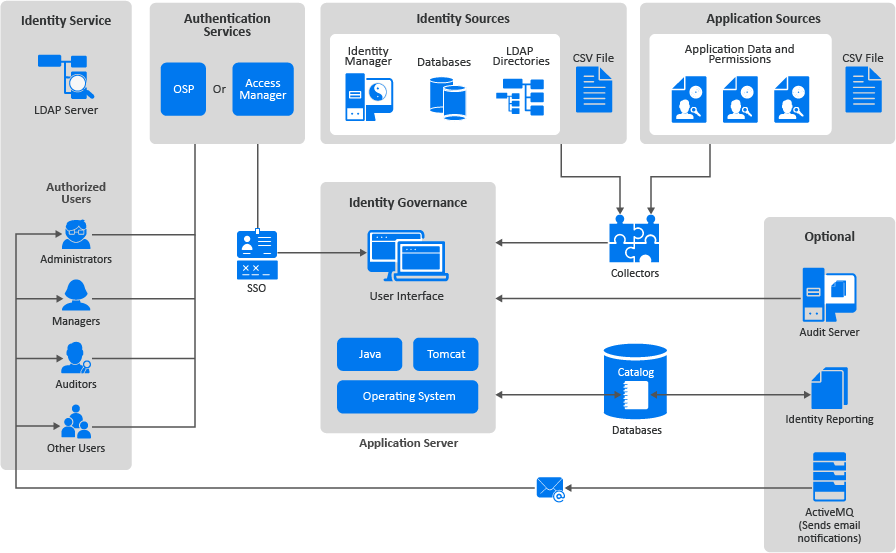
This guide explains the different components that are part of OpenText Identity Governance. The User and Administration Guide contains information about how OpenText Identity Governance works and the features it provides. For more information, see Introduction
in the OpenText Identity Governance User and Administration Guide.
The following information is useful for people who deploys OpenText Identity Governance and configures it to obtain the identity data and application data in the IT environment.
1.1.1 Understanding the Required Components for OpenText Identity Governance
OpenText Identity Governance requires that you install several components and have these components running and configured before you can start the OpenText Identity Governance installation. Before you start installing the components, you should read the following sections:
Understanding How OpenText Identity Governance Uses Java
OpenText Identity Governance uses Java to perform all the data processing in your environment to create reports and reviews and perform other actions. You must have the open Java version from Zulu installed and running on the same server where you install Apache Tomcat and OpenText Identity Governance. Zulu provides the Java Developer Kit (JDK). The Zulu Java Runtime Environment (JRE) comes with the Zulu OpenJDK.
WARNING:OpenText Identity Governance must have a supported Java instance installed and running to function. You cannot assume the Java version installed with the operating system also works with OpenText Identity Governance. The Zulu OpenJDK is the only supported Java version for OpenText Identity Governance.
For more information, see Section 3.4, Installing Zulu OpenJDK.
Understanding the Application Server
OpenText Identity Governance is a web application that requires a web application server to run the user interface. For this release, OpenText Identity Governance supports Apache Tomcat as the web server that runs the OpenText Identity Governance user interface application.
Because the user interface is a web application, people that are inside or outside the firewall can access and use OpenText Identity Governance as long as they are authorized users and have the proper credentials. For more information, see Section 3.5, Installing the Apache Tomcat Application Server.
Understanding the Catalog
OpenText Identity Governance collects account data, permissions, and access information for all users in your IT environment. OpenText Identity Governance stores the collected data in a catalog. OpenText Identity Governance stores the catalog in an external databases and it uses that data to generate reviews and reports to help ensure that you comply with any applicable regulations. OpenText Identity Governance requires that you install a database server or use a database instance in the cloud before you start to install OpenText Identity Governance. The database installation and configuration are not part of the OpenText Identity Governance installation process.
For a production environment, we recommend that you have the databases installed on a dedicated server that runs only the databases. Having any other OpenText Identity Governance components or any OpenText Identity Manager components installed on the database server slows down the performance of OpenText Identity Governance.
OpenText Identity Governance contains multiple databases. There are the main databases that make OpenText Identity Governance work and there is an additional separate database for Identity Reporting. The installer creates and populates the database for you. If your policies do not allow external programs to modify the database server, the installer generates a SQL script file that you can use to create the required databases and populate them correctly for OpenText Identity Governance, Identity Reporting and Workflow Engine to use. For more information about the databases, see Section 5.0, Creating Databases for OpenText Identity Governance and Components.
1.1.2 Understanding Authorized Users for OpenText Identity Governance
OpenText Identity Governance requires that any administrator, manager, auditor, or any other user that accesses and uses OpenText Identity Governance have an account for an identity service and an authentication service to log in and access OpenText Identity Governance.
Understanding the Bootstrap Administrator for OpenText Identity Governance
The bootstrap administrator account is an account that you define during the OpenText Identity Governance installation that can immediately log in and configure OpenText Identity Governance before importing any identity data from the systems in your environment. You can have an LDAP-based or file-based bootstrap administrator account. The file-based bootstrap account is useful if you do not have an authentication server installed that contains your administrator accounts before installing OpenText Identity Governance. For more information, see Section 4.1.1, Using the Bootstrap Administrator.
Understanding the Identity Service
The identity service is an LDAP server that contains the user accounts that access and use the features in OpenText Identity Governance. This service allows OpenText Identity Governance to control which accounts in the IT environment can access the features in OpenText Identity Governance. To grant users access to OpenText Identity Governance and its features, you must add the users to the identity service (LDAP server) and import their account information into OpenText Identity Governance using an identity source. For more information, see Section 3.7, Preparing or Installing an Identity Service.
Understanding the Authentication Services
OpenText Identity Governance uses an authentication service to provide authentication methods for authorized user accounts stored in the identity service. By default, OpenText Identity Governance uses the LDAP account name and password as the authentication method for the authorized users. However, this means that users must remember a separate user name and password to access OpenText Identity Governance.
OpenText Identity Governance provides additional authentication methods through the two supported authentication services: One SSO Provider (OSP) and OpenText Access Manager. Both of these authentication services allow you to create a single sign-on (SSO) experience for your users and they provide advanced authentication options like two-factor authentication or biometric authentication for the authorized users. OSP or OpenText Access Manager can be a shared service providing SSO across OpenText Identity Governance, OpenText Identity Manager, and Identity Reporting services. You must select one of the authentication services for your OpenText Identity Governance deployment. For more information, see Section 4.0, Installing an Authentication Service.
1.1.3 Understanding the Data Sources
The purpose of OpenText Identity Governance is to gather identity data, application accounts, and application permissions information from your IT environment so you can analyze the information and ensure that the correct people have the correct access to the correct applications at the correct time. This ensures that you can comply with the regulations that your industry must follow. OpenText Identity Governance allows you to import identity data from many different data sources and many different applications. You can also use a CSV file that contains this information to populate OpenText Identity Governance.
Understanding Collectors
Collectors are templates that you add to OpenText Identity Governance for each data source to map the identity data and application data to a minimum standard schema that OpenText Identity Governance uses. The standard schema allows OpenText Identity Governance to understand and translate the data to match the definitions in the OpenText Identity Governance schema. OpenText Identity Governance requires that you add the connection-specific information, such as accounts and passwords or API keys and access tokens, in the collector templates to be able to save the templates and collect the data from the sources. For more information, see Understanding Collector Templates for Identity Sources
in the OpenText Identity Governance User and Administration Guide.
Understanding Identity Sources
OpenText Identity Governance imports identities from many identity sources, such as OpenText Identity Manager, databases, LDAP directories, and CSV files. You use the collectors in OpenText Identity Governance to define the same namespace for these identity sources that OpenText Identity Governance uses. This allows OpenText Identity Governance to perform the required analysis to ensure that you comply with your industry regulations. For more information, see Creating Identity Sources
in the OpenText Identity Governance User and Administration Guide.
Understanding the Application Sources
OpenText Identity Governance imports application data, application account information, and application permissions to ensure that the users have the correct access to the correct applications and the data stored in those applications. You use the collectors in OpenText Identity Governance to define the same name space for these application sources as OpenText Identity Governance uses. This allows OpenText Identity Governance to perform the required analysis to ensure that you comply with your industry regulations. For more information, see Creating an Application Source
in the OpenText Identity Governance User and Administration Guide.
1.1.4 Understanding the Optional Components
OpenText Identity Governance allows you to install additional components to increase the capabilities of OpenText Identity Governance. These components are not installed and enabled by default. You must install the component separately from the OpenText Identity Governance installation and then configure these components to work with your OpenText Identity Governance deployment.
Understanding Auditing
OpenText Identity Governance generates common event format (CEF) events that you can forward to an audit server to analyze the events and to create reports. OpenText Identity Governance events contain an authentication tracking identifier to correlate audit events from multiple systems. OpenText Identity Governance also generates audit events for OpenText Identity Governance, Identity Reporting, OSP, and Workflow Engine.
If you have the audit server details when you install OpenText Identity Governance, you can configure them during the installation. If your audit server uses TLS, you can retrieve the certificate during installation. You can also add or change your audit server details after you install OpenText Identity Governance. For more information, see Section 12.4, Configuring Auditing after the Installation.
OpenText Identity Governance supports the following audit servers:
-
ArcSight Enterprise Security Manager Suite
-
NetIQ Sentinel
-
NetIQ Sentinel Log Manager
-
Splunk
For more information about supported versions, see Section 2.4.6, Audit Server System Requirements.
Understanding How to Send Email Notifications
OpenText Identity Governance can send email notifications to people who must take action in OpenText Identity Governance or it can send email notifications to administrators if something is wrong with the system. OpenText Identity Governance requires that you install ActiveMQ to be able to send these notifications. After you install ActiveMQ, you must configure OpenText Identity Governance to send email notifications through the ActiveMQ server. For more information, see Section 12.5, Enabling Email Notifications after the Installation.
Understanding Identity Reporting
Identity Reporting generates reports that show critical business information about various aspects of your Identity Reporting and OpenText Identity Manager configuration, including information collected from the identity services and managed systems such as Active Directory or SAP. Identity Reporting provides a set of predefined report definitions that you can use to generate reports. It also gives you the option to import custom reports.
Identity Reporting generates a snapshot of the catalog and the state of permissions or reviews. You can use the reports to comply with applicable regulations for your business. You can also create custom reports if the predefined reports do not meet your needs. The user interface for Identity Reporting makes it easy to schedule reports to run at off-peak times for optimized performance. For more information, see Section 7.0, Installing Identity Reporting.
Understanding Workflow Engine
The Workflow Engine is responsible for managing and executing steps in an administrator-defined workflow. It also keeps track of the different states of a workflow and persists them in a database. The Workflow Engine provides additional functionality to OpenText Identity Governance such as starting a workflow process, logging, generating reminders, escalation notifications, and retrying failed processes. Additionally, the Workflow Engine sends email messages to notify users of changes in the state of the workflow during workflow execution. For more information, see Section 8.0, Installing Workflow Engine.