
This chapter provides an overview of Micro Focus Database Connectors and how you can use its interfaces to bridge the worlds of COBOL and Structured Query Language (SQL).
Welcome to the Database Connectors™ family of products! This guide describes how the Micro Focus COBOL programming language uses Database Connectors interfaces to access information stored in Oracle®, Microsoft® SQL Server (MSSQL), and DB2® relational database management systems (RDBMSs). It explains how to describe data in your COBOL programs and how to handle differences in the field names and data types that are passed between COBOL and the database engine.
Note: Unless otherwise indicated, the references to "Windows" in this manual denote the following 32-bit versions of the Windows operating systems: Windows Vista, Windows XP, Windows NT 4.0 or later, Windows 2000, Windows 2003, and the following 64-bit versions of the Windows operating systems: Windows Server 2003 and 2008 x64, Vista x64. In those instances where it is necessary to make a distinction among the individual versions of those operating systems, we refer to them by their specific version numbers (such as "Windows 2000" and "Windows NT 4.0").
Database Connectors supports the following RDBMSs:
As a result of our testing and according to general information received from the makers of the RDBMSs regarding upward compatibility of their product, we believe the following to be accurate.
| RDBMS | Tested with RDBMS version | Probable compatibility, based on vendor
information
(Client/Server may be used for connecting to other versions) |
|---|---|---|
| Microsoft SQL Server | NT, 2000, and 2005 | Versions greater than 6.5 |
| Oracle | 9i for Windows, 10g for Windows | Versions greater than 9i |
| DB2 | 8.1, 8.2, and 9 | No others |
The essence of Database Connectors is that standard COBOL I/O statements are used to access databases. Database Connectors handles the translation between standard COBOL and the language that the RDBMS understands.
There are special instructions and status messages that apply to each individual RDBMS. These are included in the appendices of this manual: each RDBMS has an appendix dedicated to its own specific information.
The standard file system supplied with reUZE Developer is the Micro Focus EXTFH File Handler.
At your option, files can be replaced by (or used in conjunction with) database management systems such as Oracle, Microsoft SQL Server, and DB2. This is possible through the Micro Focus ACUFH file handler, which can accommodate a wide variety of protocols.
All file systems communicate with the ACUFH file handler via interface routines. The interfaces to various RDBMSs are available from Micro Focus as add-on modules. The user is free to add any combination of traditional indexed file interfaces and RDBMS interfaces that will meet a site's particular needs. The run-time system communicates with relational databases via the special family of add-on interfaces called Database Connectors.
Database Connectors uses XFDs created by the Compiler. These files map COBOL records into database fields and map the database fields back into records.

The following sections describe Database Connectors and explain how it interfaces to database systems by referencing XFDs. For detailed information about XFDs, see the section "XFD Files" in the chapter XFDs.
Relational databases differ from indexed file systems in several significant ways. These are the logical associations between database concepts and COBOL indexed file concepts:
| Indexed File Concept | Database Concept |
|---|---|
| Directory | Database |
| File | Table |
| Record | Row |
| Field | Column |
Or, put another way:
For example, for Oracle, a COBOL record that looks like this:
01  terms-record.
    03  terms-code        pic 999.
    03  terms-rate        pic s9v999.
    03  terms-days        pic 9(2).
    03  terms-descript    pic x(15).
would be represented in the database as a table with a format similar to this:
| Name | Null | Type |
|---|---|---|
| TERMS_CODE | NOT NULL | NUMBER (3) |
| TERMS_RATE | – | NUMBER (4, 3) |
| TERMS_DAYS | – | NUMBER (2) |
| TERMS_DESCRIPT | – | CHAR (15) |
Database Connectors implements a direct, transparent interface between COBOL and RDBMSs.
Previously, accessing a relational database from a COBOL program involved writing SQL code and embedding that code in your program. You had to know SQL, and you had to write SQL statements appropriate for the specific database you wanted to access. Because your queries were tailored to suit one database management system, you had to recode your COBOL application if you wanted to access a different RDBMS, or an indexed file system, or even to migrate a file from one system to another.
As an alternative, some interface products now translate COBOL I/O statements into direct reads and writes on the database files, without going through the driver, or engine, supplied by the database manufacturer. This means that the COBOL programmer must provide for enforcement of database rules that the engine already knows about and is designed to handle. Bypassing the database engine also means that new constraints or changes in the database structure will require reprogramming of the COBOL application.
Database Connectors implements a more suitable approach by dynamically generating industry standard SQL from COBOL I/O statements. As the run-time system is executing your COBOL application, Database Connectors is running behind the scenes to match up the requirements and rules of both COBOL and the RDBMS to accomplish the task set by your application. This means that Database Connectors uses the full power designed into the database engine. The engine enforces database rules and constraints; any violations are returned to the COBOL program as I/O error conditions.
Database Connectors provide a transparent, efficient interface between your program and the relational database. The interface is categorized as transparent because the communication between your COBOL program and the database is smooth, with no special query coding on your part and no interruptions in the execution of your program. You need not change your COBOL code if you later want to access a different database or to access an alternate indexed file system.
The information exchange operations between the database and the COBOL program are invisible to the end user. For example, if your program specifies a READ, a database query is automatically generated by the interface. Then the data that is read from the database is translated into a COBOL record. This exchange occurs in fractions of a second, and the application proceeds without interruption.
Because relational databases handle I/O at the column (field) level, and COBOL handles I/O at the record level, some mapping is necessary to associate records with their fields. One function of Database Connectors is to map COBOL records into database fields, and to map the database fields back into records. Database Connectors does this by consulting XFDs generated by the Compiler. The detailed structure of XFDs is discussed in the section "XFD Files" in the chapter XFDs.
Database Connectors builds its own database queries dynamically whenever an input or output request is received. You just compile your program, and Database Connectors does the rest.
Database Connectors ensures that all changes to your database are immediately available to your COBOL program. Also, it ensures that all data updates introduced by your COBOL program are immediately reflected in the database.
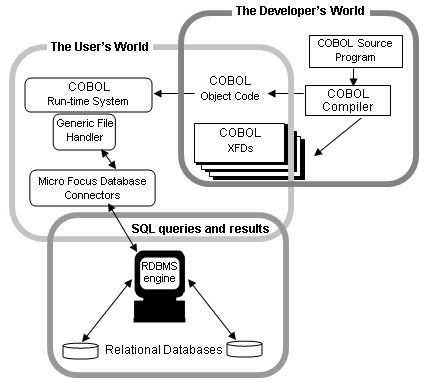
After your XFDs have been generated, you can switch to a different RDBMS simply by setting DEFAULT_HOST to point to the new RDBMS. No recompiling is necessary.
Because Database Connectors accesses the database through its native engine, the full relational integrity of the database is maintained. The COBOL program need not be concerned about such things as enforcing relationships between keys and foreign keys on tables or constraints on field relationships and contents.
If you have specified that a file is to reside on a RDBMS by setting either DEFAULT_HOST or filename_HOST, an OPEN OUTPUT "filename" statement in your COBOL program will automatically generate a CREATE TABLE filename function on the specified host database. Appropriate permissions will be granted based on your login and password and on access parameters you have set. ( For details, see the "Contents" pane to find the appendix specific to your RDBMS.) If a table will eventually be large, you may wish to have your systems database administrator create the table and indexes for you. Databases offer many methods for creating tables that may improve performance for large tables, such as spreading the table across multiple hard drives or storing the data and the indexes on different drives.
Note: Database Connectors uses a specific naming convention for indexes it creates. Indexes created with Database Connectors use the i<TABLENAME>_<key value> convention. If you are using indexes created outside of the Database Connectors application, you must ensure that the index names match the Connectors naming convention.
Changes to the way a database functions should be carefully considered and tested before being fully implemented. If a database violation occurs, the engine detects it, and Database Connectors returns an I/O error condition to the COBOL program. The program can, if desired, call a standard COBOL library routine for an extended error description.
It is possible that there are library routines that do not work with or do not make sense to use with some of the Database Connectors interfaces. To find out if that is the case with your Database Connectors interface, look in the Common Questions and Answers section of the appendix specific to your interface.
Copyright © 2009 Micro Focus (IP) Ltd. All rights reserved.
 How to...