A.2 Example of Establishing Secure Communication for a Web Server
When you install a web server, the communication is not secure by default. Or if the communication is secure, it is usually using a self-signed certificate. The following example shows how the web server obtains a server certificate signed by a well-known certificate authority (CA) to use in establishing secure communications with any client.
Figure A-2 Obtaining a Signed Server Certificate from a Well-known Certificate Authority
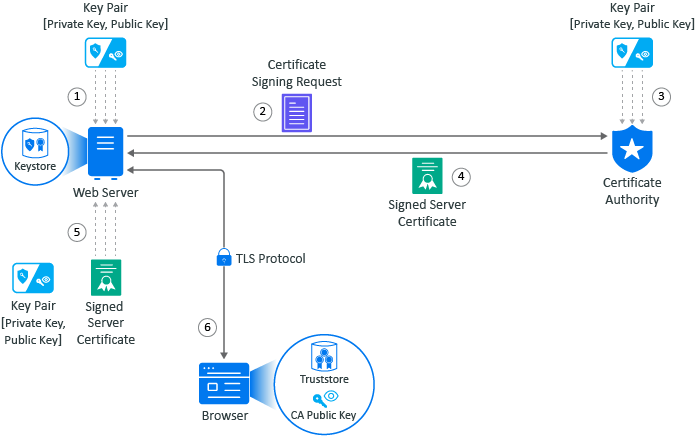
The example is of Adam the administrator requesting a signed server certificate from the well-known CA and using the certificate to establish secure communications with a client that is a web application.
-
Adam generates a key pair on the web server using keytool. Adam use the key pair to create a certificate signing request (CSR) using keytool. The CSR contains the fully qualified DNS name of the server, the key pair, and other such information to help identity the web server.
-
Adam sends the CSR that contains the web server’s information to a well-known CA such as DigCert.
-
The CA uses the CSR to generate a server certificate for the web server. The CA uses it private key to sign the certificate. The server certificate contains the key pair and the web server’s information included in the CSR. The CA signs your certificate with its private key.
-
The CA sends the signed web server certificate back to Adam.
-
Adam imports the signed web server certificate into the web server and the web server’s certificate and private key are stored in the KeyStore on the web server.
-
When a browser access the web server, the web server sends a certificate signed by the private key of the CA to the browser. The browser has a copy of the CA’s public key in its TrustStore and uses the public key to decrypt the signature of the CA. Now, the browser knows to trust any communication coming from this web server. For more information, see Example of a Secure Handshake for the Client.