7.1 Understanding OAuth 2.0
OAuth 2.0 is an authorization framework that enables a third-party application to obtain limited access to an HTTP service, either on behalf of a resource owner by orchestrating an approval interaction between the resource owner and the HTTP service, or by allowing the third-party application to obtain access on its behalf. It provides a framework that allows users to grant websites or services access to their information from other websites or services but without giving them the passwords.
Single Sign-on supports OpenID Connect. OpenID Connect is a simple identity layer on top of the OAuth protocol. It enables Clients to verify the identity of the end user based on the authentication performed by an authorization server, as well as to obtain basic profile information about the end user in an interoperable and REST-like manner.
The following information is intended for customers who want to create OAuth services for their environments. The information was taken from the OAuth 2.0 RFC. If you only configuring Single Sign-on to function with an existing OAuth service, proceed to Create an OAuth Application.
7.1.1 OAuth Components
OAuth 2.0 is an open standard for ownership consent and access delegation to create a federation connection with Single Sign-on and a protected resource. It provides a framework that allows users to grant websites or services access to their information from other websites or services but without giving them the passwords.
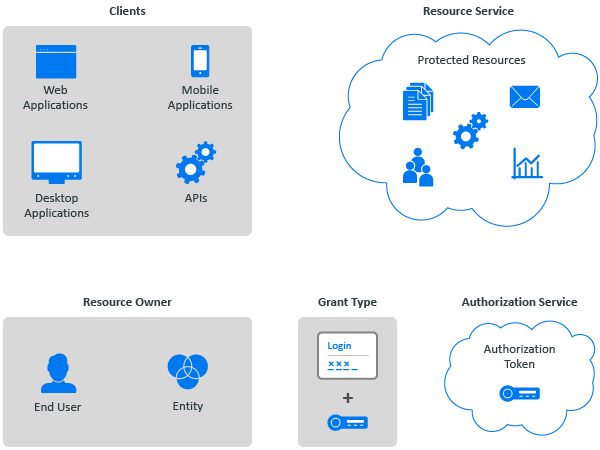
OAuth consists of different components that participate in the framework to create the federation connection. Figure 7-1 depicts these different components.
Figure 7-1 OAuth 2.0 Components
- Resource Owner
-
An entity capable of granting access to a protected resource. When a resource owner is a person, the person is an end-user of the protected resource.
- Resource Service
-
A service hosting the protected resources, capable of accepting and responding to protected resource requests using authorization tokens.
- Client
-
An OAuth client is an application making protected resource requests on behalf of the resource owner and with its authorization. An OAuth client can execute on a server, a desktop, or a mobile.
- Authorization Service
-
An authorization service issues authorization tokens to the client after successfully authenticating the resource owner and obtaining authorization.
- Authorization Grant
-
An OAuth authorization grant is a credential representing the resource owner's authorization (to access its protected resources) used by the OAuth client to obtain an authorization token.
When you configure an application in Single Sign-on using OAuth, the application is the protected resource and Single Sign-on provides the authorization service for the protected resource.
7.1.2 OAuth Authorization Grant
An OAuth authorization grant is a credential representing the resource owner's authorization (to access its protected resources) used by the OAuth client to obtain an authorization token. OAuth supports four grant types: authorization code, implicit, resource owner password credentials, and client credentials. OAuth also contains an extensibility mechanism for defining additional types.
Authorization Code Grant (Web Server)
You use the authorization code grant with client applications hosted on a secure server or by a secure service use the Authorization Code Grant. Client applications use this grant to obtain both Access tokens and Refresh tokens. This grant ensures that both types of tokens remain with the client web application (the web server side) and the authorization service does not send these to the browser. Only the authorization code is visible to the browser.
The client application redirects the resource owner to the authorization service through the web browser. The resource owner authenticates at the authorization service. The authorization service obtains the resource owner’s consent and then redirects the web browser with the authorization code to the client application.
This flow is suitable for client applications that can interact with the resource owner’s user-agent and can receive incoming requests from the authorization service.
Figure 7-2 OAuth Authorization Code Grant Flow

Implicit Grant
You use the implicit flow grant with:
-
Single-page applications, where the user navigates between different screens of the website without loading different web pages in the browser, such as Google Mail.
-
Applications that run on the user’s device, such as mobile apps.
-
Web applications that do not require high security. Applications that require high-security use the authorization code flow.
A client application can implement this flow in a browser using a scripting language such as JavaScript or Flash, from a mobile device, or a desktop application. After a user grants the requested authorization, the authorization service returns an access token to the application. An intermediate authorization code is not required. As the authorization service sends the access token to the web browser, this flow offers less security than the authorization code.
Figure 7-3 OAuth Resource Own Implicit Grant

Resource Owner Credential Grant
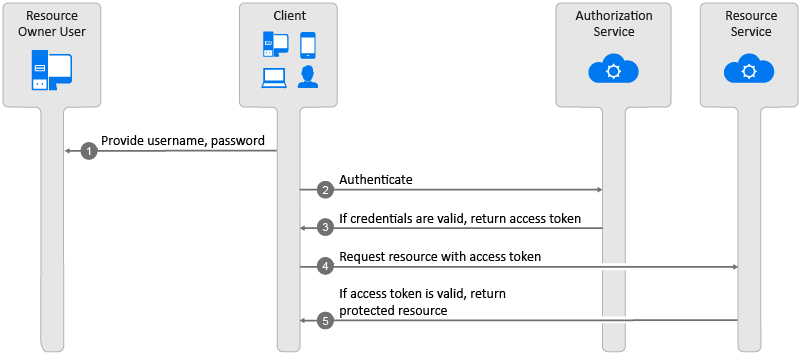
You use the resource owner credential grant flow for highly-trusted applications, applications owned by the service, and client applications that have a trust relationship with resource owners. In this flow, the client application sends the user's credentials along with its credentials to the authorization service. The authorization service provides an access token and a refresh token to the client application. The user does not need to log in to approve the request.
Figure 7-4 OAuth Resource Owner Credential Grant Flow
Client Credential Grant
You use the client credential grant is useful for headless clients and batch processing of scripts. The applications access their resources from the resource service. This grant type only requires the client application’s credentials. The resource owner's credentials are not required.
Figure 7-5 OAuth Client Credential Grant Flow

7.1.3 Example of Single Sign-on with OAuth
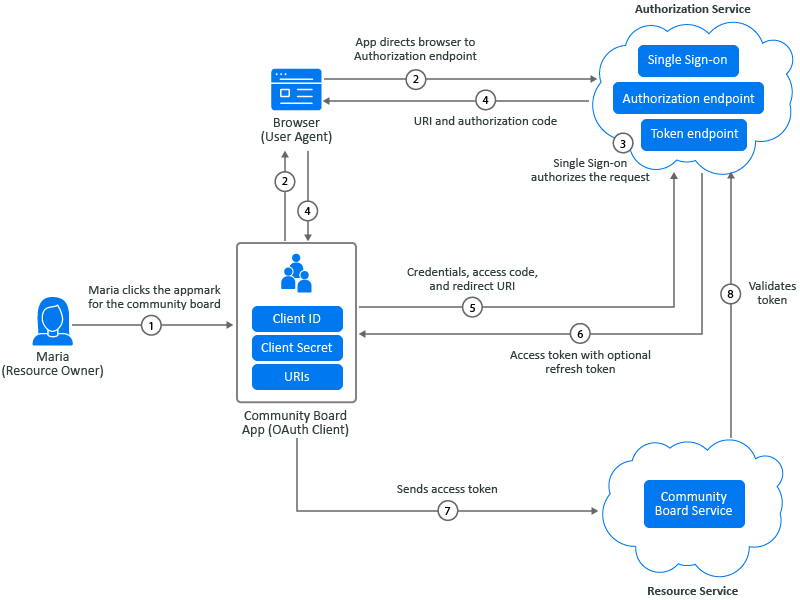
The following example is using the authorization code grant. During the authorization code process, an authorization service acts as an intermediary between the OAuth client and the resource. Instead of requesting authorization directly from the resource owner, the OAuth client directs the resource owner to an authorization service, which in turn directs the resource owner back to the client with the authorization code. Figure 7-6 depicts that Maria Belefonte wants to access and use her organization’s online community board.
Figure 7-6 OAuth Authorizations to a Community Board
-
Maria Belafonte, the resource owner, selects the appmark for the web app of the community board. The browser acts as Maria’s agent during the authorization process.
-
The app initiates the process by directing the request for authorization through the browser to the authorization endpoint. The app is an OAuth client that contains the client ID, client secret, and any URIs added to the configuration. The authorization endpoint is Single Sign-on.
-
Single Sign-on authenticates Maria through the browser, and it either grants or denies Maria’s access request.
-
The app uses the redirection URI provided earlier to redirect the browser to the community board app. The redirection URI includes an authorization code and any local state previously provided by the OAuth client.
-
The app requests an access token from Single Sign-on through the token endpoint. The app authenticates with its client credentials and includes the authorization code received in the previous step. The app also includes the redirection URI used to obtain the authorization code for verification.
-
Single Sign-on validates the client credentials and the authorization code. It also ensures that the redirection URI received matches the URI used to redirect the app in Step 4. If valid, Single Sign-on responds with an access token.
-
The app sends the access token to the community board service to get access.
-
The community board service sends the token to Single Sign-on for validation. On successful validation, Maria accesses the community board service.