Message Routing in Message Broker Clouds
When a subscriber first connects to an MPX-enabled server configuration, it uses a connection profile to determine which Message Broker to use. If the subscriber opens another view on the same server configuration, it reuses the same Message Broker connection. If the subscriber opens a view on a different server configuration, it will again use the same Message Broker connection if the default or selected MPX profile for that server specifies the same Message Broker. However, if the default or selected MPX profile for the new server configuration specifies a different Message Broker, the subscriber will open a new connection to it. This means that a subscriber could have multiple Message Broker connections. Each message broadcast by an MPX-enabled server configuration is automatically forwarded to every Message Broker that has a connected subscriber interested in that message.
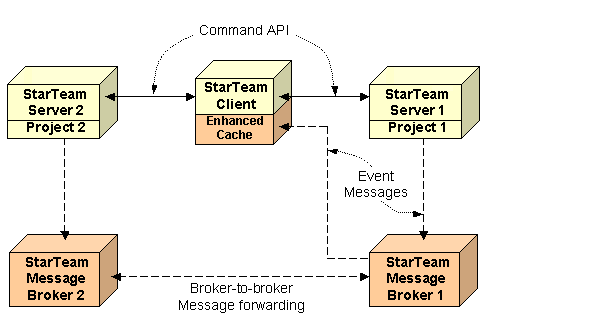
For example, in the following figure, the client has two open projects that are located on two different MPX-enabled server configurations. When a user opens Project 1 on StarTeam Server 1, the StarTeam Cross-Platform Client chooses a connection profile for Message Broker 1.
When the user opens Project 2 on StarTeam Server 2, assume that the client has selected an MPX profile that also specifies Message Broker 1. The client sends a subscribe message to Message Broker 1 registering its interest in messages regarding Project 2. Thereafter, StarTeam Server 2 sends all messages pertaining to Project 2 to Message Broker 2, which forwards them to Message Broker 1, and finally to the client. Even if the user closes Project 1 and, therefore, its connection to StarTeam Server 1, it continues to receive messages through Message Broker 1 during the client session.