Using Profiles with Multiple Connections
In the following figure, a sample StarTeam Server is shown with two MPX-enabled server configurations (Config1 and Config2). Each configuration has its own MPXEventTransmitter.xml file. There are two Message Brokers: one is the default for Config1 and the other is the default for Config2. Both XML files could define a profile for each Message Broker, one as the client and server default, and the other as an optional profile.
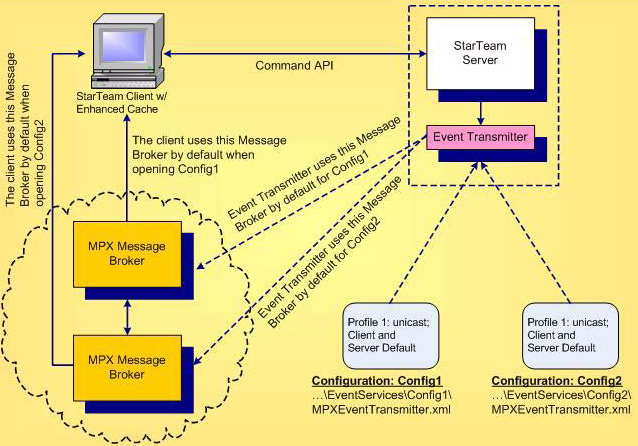
When an Event Transmitter for a specific configuration is successfully initialized, one profile is designated as the default client profile. StarTeam clients can open projects in MPX mode using that default profile or by choosing an alternate connection profile:
- When a client first logs onto a server configuration, it queries the server to determine if it is operating in MPX mode. If the server configuration is operating in MPX mode, it returns the list of connection profiles defined in its Event Transmitter XML file.
- If the user has locally chosen a specific connection profile to use for the configuration, the details of the chosen profile are loaded. Otherwise, the details of the client default profile are loaded.
- The client uses the chosen connection profile to connect to the corresponding Message Broker. If a connection cannot be established, the client displays an error message, and continues accessing the configuration as if it were not MPX-enabled.
- When a Message Broker connection is established and a new project is opened on a different, MPX-enabled server configuration, the client opens a new connection to the Message Broker specified in the default or selected profile for that server.