Replicate
Replicate duplicates changes from one view to another. Use a replicate merge to propagate a change when the target view is not an immediate parent or child of the source view.
Rules for Replicate
When performing a Replicate merge type, follow these general rules:
- The source and target views need to belong to the same project. They should have some common lineage, such as parent/child, siblings, uncle/niece, and so on.
- The Replicate operation can use any configuration of the source view (tip, label, timestamp, or promotion state), called the Replicate point.
- The target view must be an updatable, branching (variant) view, and the tip configuration must be used.
- Items newly-shared to or re-pinned to in the target view use the Rebase/Replicate point.
Replicate Example Scenario
This example shows a typical scenario where the parent view was branched twice for different product releases, creating 2.0 and 3.0 branches. During product maintenance, changes are made in the 2.0 branch that are applicable to the 3.0 branch, but not to the main branch. A Replicate is performed to duplicate the changes from 2.0 to 3.0.
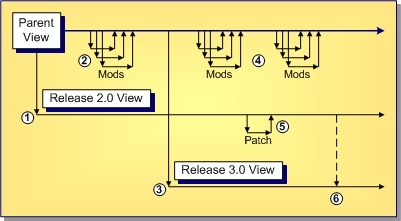
- A "release" (child, branch-all variant) view is created to support the 2.0 release.
- Changes are made in the main view in preparation for the next release.
- A "release" view is created to support the 3.0 release.
- More changes are made for future releases.
- A bug is fixed in 2.0 that is applicable to 3.0, but not other releases.
- A Replicate is performed to duplicate the patch from the 2.0 view to the 3.0 view.
In this example, a bug fix must be propagated from one release view to another, but the release views are old with respect to the tip revision of the parent view and not applicable to it. Consequently, it makes sense to merge the fix “sideways”, directly from the source view to a sibling target view.