Change Request Automatic Workflow
This topic describes the default automatic workflow of a change request in
StarTeam. If your
StarTeam Web Client administrator has customized the workflow for your organization, it may vary significantly from what is discussed here.
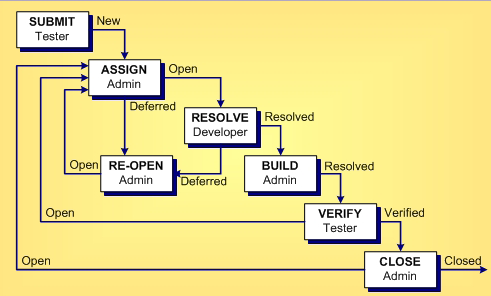
The following diagram shows the default change request workflow. The boxes represent the steps taken from the time that the change request is submitted until the time it is closed. Each box indicates an action and the team member most likely to be responsible for performing this action. The arrows show the status of the change request at the time of each step.
The following table shows the dynamic default values of a change request based on its status.
| Default Workflow Step | Change Request Status | Dynamic Default Property Values |
|---|---|---|
| Submit/Assign |
|
|
| Submit/Assign |
|
|
| Assign/Resolve |
|
|
| Resolve/Build |
|
|
| Verify |
|
|
| Close |
|
|
| Reopen |
|
|
 New
New
 Open
Open

 Cannot Reproduce
 As Designed
 Is Duplicate
 Deferred
 Fixed
Fixed
 Documented
 Verified Cannot Reproduce
 Verified As Designed
 Verified Is Duplicate
 Verified Fixed
 Verified Documented
 Closed Cannot Reproduce
 Closed As Designed
 Closed Is Duplicate
 Closed Fixed
 Closed Documented