APS enforces the following size and programming limitations.
|
Item |
Max |
|---|---|
|
24 |
|
Item |
Max |
|---|---|
|
50 |
|
|
Nested macros |
139 |
|
Macro call arguments |
1000 |
|
Nested INCLUDEs |
10 |
|
|
|
|
Subscripts |
300 |
|
12 |
|
System limits |
|
|
8 |
|
Item |
Max |
|---|---|
|
50 |
|
|
Record name occurrences |
20 |
|
Field qualification occurrences |
70 |
|
Scrolling for repeated blocks |
1 |
|
Field mapping for repeated blocks |
2 |
|
Subschema limits |
|
|
130 |
|
Item |
Max |
|---|---|
|
Application Painter |
|
|
30 |
|
|
|
|
|
500 |
|
400 |
|
Item |
Max |
|---|---|
|
|
|
|
200 |
|
Number of reports for FD |
15 |
|
Number SOURCE/SUM/ VALUE statements per program |
300 |
|
Item |
Max |
|---|---|
|
600 |
|
|
Characters in paragraph name |
24 |
|
Indentation levels per nested IF structure |
14 |
|
Paragraph arguments per program |
400 |
|
|
|
|
255 |
|
Symbol table entries (such as, paragraph names, file names, record names, verbs,section names, keywords, arguments, indexes, flags) |
1801 |
Data communication call (see Data Communication Calls)
Transfer control and optionally send Commarea data from a CICS program at one logical level to a CICS APS or non-APS application subprogram; or, transfer control to an IMS or ISPF Dialog subprogram.
Format 1, link to an APS program:
[TP-]LINK programname [errorpara]
... [DLIUIB pcbname [pcbname] ...]
... [userparm [userparm]...]
... [COMMAREA(dataarea) LENGTH(value)]|[NOCA]
Format 2, linking to a non-APS program:
[TP-]LINK programname(NONAPS)[errorpara]
... [COMMAREA(dataarea) LENGTH(value)]|[NOCA]
Format 1, CALL format:
[TP-]LINK programname [errorpara]
... [userparm [userparm]...]
... [COMMAREA]
[TP-]LINK subprogram [errorpara] [argument1 ... argument36]
Format 1, CALL format:
[TP-]LINK programname [errorpara]
... [userparm [userparm]...]
... [COMMAREA]
Format 2, SELECT format:
[TP-]LINK programname
... [errorpara]
... [options]
[TP-]LINK programname [errorpara]
... [COMMAREA(dataarea) LENGTH(value)]|[NOCA]
Additionally, code the following before your NTRY statement:
%
&TP-PROGRAM-INVOCATION = "NONAPS"
-KYWD-  12-*----20---*----30---*----40---*----50---*----60
        % &DLG-COMMAREA-IN-LINKAGE = 'YES'
Link to PGM001. No PSB is active and no arguments pass.
LINK PGM001
Link to the program stored in WS-PROGNAME. No PSB is active and no arguments pass.
LINK /WS-PROGNAME
Move the value PGM003 to WS-PROGNAME and link to that program.
LINK PGM003/WS-PROGNAME
Link to PGM004; execute an error routine for an abnormal condition. There is no active PSB and no arguments pass.
LINK PGM004 ERROR-PARA
Link to PGM005. Schedule a PSB and use a PCB named ABC-PCB for the linked-to program. Omit the positional parameter errorpara .
LINK PGM005 * DLIUIB ABC-PCB
Link to PGM006 and pass a Linkage data area SCR6-RECORD so that PGM006 can move data directly to screen fields.
LINK PGM006 * SCR6-RECORD
Link to PROG001, a non-APS program, passing TP-USERAREA only.
LINK PROG001(NONAPS)
Link to PROG002, a non-APS program, passing the data area WS-COMMAREA.
LINK PROG002(NONAPS) * COMMAREA(WS-COMMAREA) LENGTH(100)
Link to PROG003, a non-APS program, without passing a COMMAREA.
LINK PROG003(NONAPS) * NOCA
The following examples show the CALL statements generated in the program after linking to subprograms.
Coding     LINK SUBPGM * ARG1 ARG2 ARG3
Yields CALL 'SUBPGM' USING TP-COMMAREA ARG1 ARG2 ARG3

Coding LINK SUBPGM * *NOSPA ARG1 ARG2 ARG3
Yields CALL 'SUBPGM' USING ARG1 ARG2 ARG3

Coding LINK SUBPGM * ARG1 TP-USERAREA ARG2 ARG3
Yields CALL 'SUBPGM' USING ARG1 TP-USERAREA ARG2 ARG3
Invoke PGM001 as a new program function. The SELECT service option NEWPOOL creates a new shared variable pool. The SELECT option is in effect.
LINK PGM001 * NEWPOOL
Invoke PGM001 as a new program function. The SELECT service option PARM passes data to PGM001 via LINKAGE SECTION. To pass variable data, VDEFINE a dialog variable. The SELECT option is in effect.
DLG-VDEFINE 01  WS-EMPL-NBR  PIC X(05) AS EMPNBR
MOVE EMPL-NBR TO WS-EMPL-NBR
LINK PGM001 * PARM('&EMPNBR')
DLG-VDELETE EMPNBR
Link to the program in WS-PROGNAME. The CALL option is in effect.
MOVE 'PGM001' TO WS-PROGRAM
LINK /WS-PROGNAME
Link to PGM006 and pass Linkage data area SCR6-RECORD so that PGM006 can move data directly to screen fields. The CALL option is in effect.
LINK PGM006 * SCR6-RECORD
Program Painter and Specification Editor keyword (see Keywords)
Create or include data structures in the Linkage Section.
-KYWD-  12-*----20---*----30---*----40---*----50---*----60
 LK
 kywd   associated data structure
|
kywd |
Associated data structure keywords are: 01, DS, REC, See SQL, ++, or 01. |
Code Working-Storage and Linkage data structures using section keywords.
-KYWD-  12-*----20---*----30---*----40---*----50---*----60
 IO     INPUT-FILE ASSIGN TO UT-S-INPUT
 FD     INPUT-FILE
        LABEL RECORDS ARE STANDARD
        BLOCK CONTAINS 0 RECORDS
 01     INPUT-REC         PIC X(80).
 WS
 REC    WS-INPUT-REC.
            WS-IN-PART-NO       N8
            WS-IN-DESC          X50
            WS-IN-BASE-PRICE    N6V2
 ++     PANWSREC
 LK
 REC    LK-INPUT-REC
            LK-IN-PART-NO       N8
            LK-IN-DESC          X50
            LK-IN-BASE-PRICE    N6V2
 01     LK-OUT-REC.
DS05 LK-OUT-REC APS-generated report (see Application Reports)
The Macro/Program Cross Reference Report lists the macros used in one or more applications, along with all of the programs that invoke the macros, and the macro libraries that the programs reside in. Use the report to find all the programs and applications that use a given macro.
The cross-referenced macros appear alphabetically within an application on the report. If you report on all applications, the applications display alphabetically in the report. Specific macro libraries are listed as follows.
After each application, summary statistics provide the:
Produce the Macro/Program Cross Reference Report from the Documentation Facility.
REPORT CODE: MC01   APS APPLICATION PAINTER    PAGE  1
               MACRO/PROGRAM CROSS  REFERENCE    01/17/92   08:26
        MKTAPS.MKT2

 SELECTION CRITERIA: TDDEMO
 APPLICATION: TDDEMO


*********************************************************************************
                            MACROLIB.          PROGRAM / STUB TYPE   NO.OF TIMES
NAME OF MACRO / MACROLIB:   IND.               USING MACRO IND       MACRO CALLED
---------------------------------------------------------------------------------
CLEAR                                          TDCM                         1
                                               TDOM                         1
                                               TDPM                         1

DB-ERASE                                       TDCM                         1
                                               TDOM                         1
   TDPM  1
.
.
.
PX-CA-COMPUTE-LEN                              TDOM                         1

.
.
.
TP-ATTR                                        TDOM                         13
                                               TDOT                         1
TP-PERFORM                                     TDCM                         36
                                               TDCS                         27
                                               TDME                         3
                                               TDOJ                         27
                                               TDOM                         80
                                               TDOT                         16
                                               TDOU                         9
                                               TDPF                         7
                                               TDPL                         27
                                               TDPM                         36
.
.
.
XCTL                                           TDCM                         1
                                               TDCS                         1
                                               TDME                         7
                                               TDOJ                         1
                                               TDOM                         1
                                               TDOT                         1
                                               TDOU                         1
                                               TDPF                         1
                                               TDPL                         1
                                               TDPM                         1
TOTAL MACROS & LIBRARIES REPORTED 14
NO. OF PGMS. WITH MACRO CALL IN CODE 10
NO. OF COMMON MACROLIBS IN APPLN. 0
TOTAL NO. OF PROGRAMS IN APPLN. 10 IMS DC target
Screen Painter feature
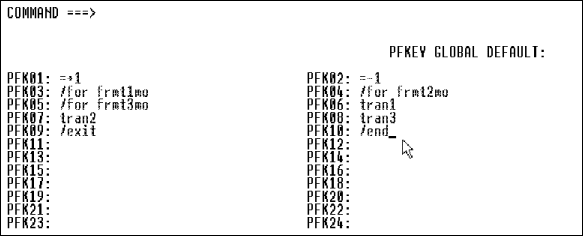
Assign trancodes, operator logical paging, other IMS commands, and nulls or spaces to the MFS PF key fields.
To define MFS function key values, follow these steps.
IMS DC target
Screen Painter feature
Construct trancodes of up to eight parts by concatenating screen fields, literals, and PF keys.
To create a trancode, follow these steps.
| Field |
Description and Values |
||||
|---|---|---|---|---|---|
|
Field Name |
Enter name of field or *pf. If you enter *pf, specify PF key values on the MFS Function Keys screen. If you specify a field, APS ignores all field attributes, including an initial value entered in the Value field. You must enter the initial value in the Default Literal field. |
||||
|
Default Literal |
Enter any literal. If you supply a literal on the same line as a field name or *PFKEY, APS transmits the literal in the MID when no value is entered for the field or when the PF key is not invoked. |
||||
|
Fill |
Enter the MID fill character for the associated field name or *PFKEY.
|
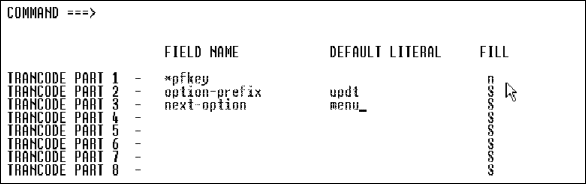
Define a trancode definition, consisting of a function key (values specified in the MFS Function Keys example on Example:), and the fields OPTION-PREFIX and NEXT-OPTION. If the end user enters no values in these two fields, the literal UPDTMENU transmits in the MID.
IMS DC target
Screen Painter feature
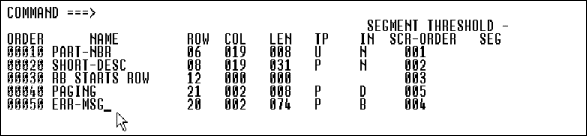
Change the MID/MOD order in which the I/O fields from your screen appear in the generated Working-Storage. Do so to meet any site standards that require transmittal of screen data in a particular order.
To change the order in which your I/O fields appear in the generated Working-Storage, follow these steps.
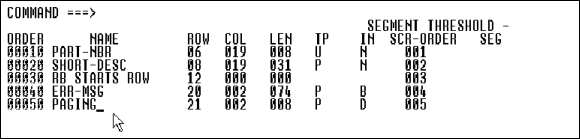
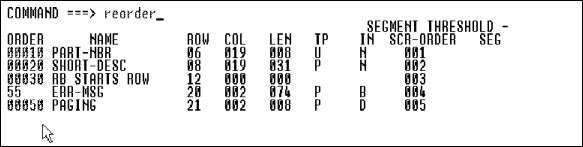
Reorder the fields in the first screen. The second screen sequences ERR-MSG after PAGING in the Working-Storage Section. The third screen shows the result.
Program Painter and Specification Editor keyword (see Keywords)
Batch environments
Specify the report mock-up name in your report program.
-KYWD- 12-*----20---*----30---*----40---*----50---*----60
 MOCK  mockupname
Mockupname is the name entered in the Reports field associated with your program in the Application Painter and painted in the Report Painter.
-KYWD- 12-*----20---*----30---*----40---*----50---*----60
 RED   STOCK-REPORT
       CONTROLS ARE FINAL WS-LOCATION-CODE
       PAGE LIMIT IS 50
       FIRST DETAIL 10
       LAST DETAIL 40
       FOOTING 47.
 MOCK  STCKPRT
 01    TYPE IS REPORT HEADING NEXT GROUP
           NEXT PAGE LINE 20.
       MOCKUP LINES 1 THRU 6
SOURCE WS-DATE Report Writer statement (see Report Writer Structures and the APS User's Guide chapter Create Reports with Report Writer.)
Batch environments
In your report program, specify the line numbers in the report mock-up that correspond to the detail lines, headers, and footers.
MOCKUP|M LINE|LINES linenumber1 [THRU linenumberN]
Specify that lines 1 through 8 in the report mock-up contain the heading text.
-KYWD- 12-*----20---*----30---*----40---*----50---*----60
 01    TYPE IS REPORT HEADING LINE 20 NEXT GROUP
           NEXT PAGE.
MOCKUP LINES 1 THRU 8 APS-generated report (see Application Reports)
The Mock-Up Report contains a representation of a report mock-up as painted in the Report Painter. When produced from the Report Generator, the report includes line numbers. This report documents a key aspect of an application for end users to review or for developers to use when maintaining or enhancing the application.
The Report Options screen displays. Specify y(es) to print line numbers or n(o) if you do not want to print them.
REPORT CODE: REPT                     APS ENTITY REPORT FACILITY                    PAGE    1
                                              CLSAPS.CLS2                      01/18/92 15:01
REPORT CRITERIA: 2
           ALL MEMBERS OF LIBRARY TYPE : RP
*********************************************************************************************
           LIBRARY      ENTITY
           TYPE         NAME                      STATUS                     REMARKS
---------------------------------------------------------------------------------------------

           RP           COSTRPT                   REPORTED
           RP           MERPT                     REPORTED

REPORT CODE: RP01                        APS APPLICATION PAINTER                  PAGE     1
                                       APPLICATION DEFINITION REPORT          01/18/92 15:01
                                                CLSAPS.CLS2

SELECTION CRITERIA: COSTRPT
*******************************************************************************************
REPORT: COSTRPT                                                            CREATED: 07/27/90
AUTHOR: CLSONE                                                             UPDATED: 07/27/90
*************************************************************************************************

             USER MANUFACTURING COMPANY
         EXPENDITURES REPORT AS OF XXXXXXXX

                                  NO                                   CUMULATIVE
MONTH      DAY      DEPT          PURCHASES    ITEM         COST       COST
XXXXXXXXX  EXPENDITURES
XXXXXXXXX    XX     XXX           2Z9           X           ZZ9.99
TOTAL COSTS FOR W/E                 XXXXXXXXX   XX        Z,ZZ9.88     ZZ,ZZ9.99
 TOTAL COSTS FOR XXXXXXXXX  ZZ,ZZ9.99
TOTAL EXPENDITURES FOR YEAR-TO-DATE  ZZZ,ZZ9.99

PAGE ZZZ9
END OF REPORT

REPORT CODE:RP01                  APS APPLICATION PAINTER                       PAGE     1
                              APPLICATION DEFINITION REPORT               01/18/92   15:01
                                      CLSAPS.CLS2

        SELECTION CRITERIA: MERPT
*******************************************************************************************
        REPORT: MERPT                                                    CREATED: 08/24/90
        AUTHOR: CLSTRA                                                   UPDATED: 08/24/90
*************************************************************************************************
                               USER MANUFACTURING COMPANY
                          EXPENDITURES REPORT AS OF XXXXXXXX

                                     NO                                 CUMULATIVE
MONTH        DAY          DEPT       PURCHASES     ITEM      COST       COST
XXXXXXXX     EXPENDITURES
XXXXXXXX     XX           XXX        2Z9           X       ZZ9.99
TOTAL COSTS FOR W/E XXXXXXXX XX                          Z,ZZ9.99       ZZ,ZZ9.99
TOTAL COSTS FOR XXXXXXXX  ZZ,ZZ9.99
TOTAL EXPENDITURES FOR YEAR-TO-DATE ZZZ,ZZ9.99

PAGE ZZZ9
END OF REPORT Under normal screen processing, the MDT (Modified Data Tag) attribute must be turned on for each field when you use Field Edits with an updateable program. This causes the end user workstation or terminal to always send all field modified or unmodified data to the program.
Transmission of data is more efficient if MDT is turned off, but then only the data modified by the end user is returned to the program, and the unmodified data is lost, which is of course, undesirable. To turn off the MDT tag and not lose unmodified data, follow these steps.
$TP-MDTOFF-READQ-TS-ERROR
$TP-MDTOFF-WRITEQ-TS-ERROR
$TP-MDTOFF-DELETEQ-TS-ERROR
As shipped, these macros generate a CICS-SEND-TEXT call to display appropriate error messages, and a TERM to terminate the program. You can change these macros to conform to your shop standards.
Data communication call (see Data Communication Calls)
IMS DC and ISPF Prototyping targets
Send a data or a message to the specified program trancode or subprogram.
[TP-]MSG-SW trancode|programname|dataname [errorpara]
... [screenname|recordname]
... [keyword[+keyword]...]
[TP-]MSG-SW trancode|programname|dataname [errorpara]
... [screenname]
Send messages to another program; perform error routine when error occurs.
MSG-SW trancode PROCESS-ERRORS
Send messages and pass a screen record. Note that the asterisk (*) replaces the positional parameter errorpara.
MSG-SW trancode * SCRA
Send messages and pass a COBOL record.
MSG-SW trancode * WS-CUSTOMER RECORD
Program Painter and Specification Editor keyword (see Keywords)
Generate a program template that fully defines all parts of your program except for the procedural code that you supply.
NTRY generates a program template that defines:
In CICS programs, NTRY also generates code to:
In ISPF Dialog programs, NTRY also generates code to display screens.
In IMS programs, NTRY also generates code to:
NTRY|ENTR screenname(mapsetname)]
... [errorpara]
... [RETRY|NORETRY]
Format 1:
NTRY|ENTR
Format 2:
NTRY|ENTR screenname
... [errorpara]
... [RETRY|NORETRY]
Format 3:
NTRY|ENTR recordname
... [errorpara]
... [RETRY|NORETRY]
... *RECORD
NTRY|ENTR screenname
... [errorpara]
... [RETRY|NORETRY]
... [CANCEL|RETURN]
... [dataareas]
NTRY|ENTR screenname
... [RETRY|NORETRY]
... [CANCEL|RETURN]
... [dataareas]
|
CANCEL |
Default. Generate CONTROL ERRORS CANCEL (return control to ISPF when dialog error of return code 12 or higher). |
|
dataareas |
Generate the PROCEDURE DIVISION USING statement. List user-defined data areas only, not records defined by TP-COMMAREA, TP-LINKAGE, and SCRNLIST, which automatically generate other data areas. APS generates data areas in the following order. Data areas listed with NTRY.
|
|
errorpara |
User-defined error routine to perform when an abnormal condition occurs. Errorpara is positional; if omitted, code an asterisk (*) in its place. |
|
mapsetname |
Mapset containing the screen(s) the program receives; must be a literal (maximum 7 characters). See also Comments: for CICS below. |
|
NORETRY |
Accept invalid data in screen fields with assigned edits. See also Comments: below. |
|
*RECORD |
Code when using recordname instead of screenname as input. |
|
recordname |
User-defined I/O area in Working-Storage, long enough for any input message that can be received. The area receives the data returned from the GU to the program control block. For a conversational program, the program reads the ASPA with a GU, and the input message with a GN. It does not expect a multisegment input message. PF keys are not generated; you must code them. |
|
RETRY |
Default. Accept only valid data in screen fields with assigned edits; otherwise, return screen to the terminal user for correction. See also "Comments" below. |
|
RETURN |
Generate CONTROL ERRORS RETURN to return control to program when dialog error occurs. See also Comments: below. |
|
screenname |
Screen name; value must be literal (maximum 8 characters). |
Code an NTRY, PROC, or OPT statement for each program.
It is possible, however, to accept screens with data that does not pass editing. When NORETRY is coded, the application logic executes regardless. A set of runtime flags allow application logic to determine the success or failure of editing.
|
APS-EDITS-PASSED |
88-level flag set to true when data for all edited fields is valid. Code IF APS-EDITS-PASSED to test whether the edit is OK. |
|
screenname-fieldname-FLAG |
Indicator flag set to spaces when data for a specified field valid. Code IF screenname-fieldname-FLAG = SPACES to test whether the data is valid. |
|
screenname-fieldname-INPT |
APS-generated data field; contains data exactly as entered if the field failed to pass editing. |
|
APS-MSG-IO-ERROR |
Applies to IMS DC only. 88-level flag set to true when a program sends a user-defined I/O error message. Code IF APS-MSG-IO-ERROR to test if message sent. |
|
APS-MSG-EDIT-ERROR |
88-level flag set to true when a program sends a user-defined edit error message. Code IF APS-MSG-EDIT-ERROR to test if the message is sent. |
| Screen Name Length |
Generated
Mapset Name |
|---|---|
|
4 characters |
screennameSET |
|
5 characters |
screenname$ |
|
6 characters |
screenname$ |
|
7 characters |
Last character of screenname changes to $ |
|
8 characters |
Truncates eighth character of screenname; seventh character changes to $ |
| User Macro Name |
Where
Included |
|---|---|
|
TP-ENTRY-EXIT-1 |
Bottom of APS-HOUSEKEEPING-PARA |
|
TP-ENTRY-EXIT-2 |
After APS-HOUSEKEEPING-PARA |
It is possible, however, to accept screens with data that does not pass editing. When NORETRY is coded, the application logic executes regardless. A set of runtime flags allow application logic to determine the success or failure of editing.
|
APS-EDITS-PASSED |
88-level flag set to true when data for all edited fields is valid. Code IF APS-EDITS-PASSED to test whether the edit is OK. |
|
screenname-fieldname-FLAG |
Indicator flag set to spaces when data for a specified field valid. Code IF screenname-fieldname-FLAG = SPACES to test whether the data is valid. |
|
screenname-fieldname-INPT |
APS-generated data field; contains data exactly as entered if the field failed to pass editing. |
|
APS-MSG-IO-ERROR |
Applies to IMS DC only. 88-level flag set to true when a program sends a user-defined I/O error message. Code IF APS-MSG-IO-ERROR to test if message sent. |
|
APS-MSG-EDIT-ERROR |
88-level flag set to true when a program sends a user-defined edit error message. Code IF APS-MSG-EDIT-ERROR to test whether if message sent. |
The APS/IMS DC Generator creates programs consistent with this practice. Termination DC calls (SEND, MSG-SW, TERM) do not terminate a program, but instead return control to NTRY-generated logic to receive a new input message.
Because a program may process multiple messages in a single execution, you program should perform any Working-Storage initialization in the Procedure Division, rather than in Working-Storage using the VALUE clause. You can still use the VALUE clause to initialize Working-Storage constants that are never changed during execution.
| User Macro Name |
Where
Included |
|---|---|
|
TP-ENTRY-EXIT-1 |
Bottom of APS-HOUSEKEEPING-PARA |
|
TP-ENTRY-EXIT-2 |
After APS-HOUSEKEEPING-PARA |
|
TP-ENTRY-EXIT-2S |
After screen message is sent |
|
TP-ENTRY-EXIT-3 |
At end of $TP-ENTRY macro |
It is possible, however, to accept screens with data that does not pass editing. When NORETRY is coded, the application logic executes regardless. A set of runtime flags allow application logic to determine the success or failure of editing.
|
APS-EDITS-PASSED |
88-level flag set to true when data for all edited fields is valid. Code IF APS-EDITS-PASSED to test whether the edit is OK. |
|
screenname-fieldname-FLAG |
Indicator flag set to spaces when data for a specified field valid. Code IF screenname-fieldname-FLAG = SPACES to test whether the data is valid. |
|
screenname-fieldname-INPT |
APS-generated data field; contains data exactly as entered if the field failed to pass editing. |
|
APS-MSG-IO-ERROR |
Applies to IMS DC only. 88-level flag set to true when a program sends a user-defined I/O error message. Code IF APS-MSG-IO-ERROR to test if message sent. |
|
APS-MSG-EDIT-ERROR |
88-level flag set to true when a program sends a user-defined edit error message. Code IF APS-MSG-EDIT-ERROR to test whether if message sent. |
Generate code to receive screen SCRA when the program is screen-invoked. Specify that the program can receive a screen that contains invalid data. Omit the error paragraph.
-KYWD-  12--*--20---*----30----*---40---*----50---*----60
 NTRY   SCRA * NORETRY
Receive multiple screens and include an error routine. Note that when you use SCRNLIST, you do not specify any screens in the NTRY statement.
-KYWD-  12--*--20---*----30----*---40---*----50---*----60
 SYM1   SCRNLIST C1ORDR C2ORDR C3ORDR
 NTRY   * PROCESS-ERRORS
Generate code to receive screen CUSTORDR in mapset CUSTOR$ for a screen-invoked program. Perform MAP-ERROR-PARA when an exceptional condition occurs on the RECEIVE MAP.
-KYWD-  12--*--20---*----30----*---40---*----50---*----60
 NTRY   CUSTODR(CUSTOR$) MAP-ERROR-PARA
Receive a message into a COBOL record I/O area.
-KYWD-  12--*--20---*----30----*---40---*----50---*----60
 NTRY   WS-CUSTOMER * *RECORD
Generate code to display screen SCRA. Perform PROCESS-ISPF-ERRORS when return codes from services are greater than 12. Generate CONTROL ERRORS RETURN code so the program can control all error processing.
-KYWD-  12--*--20---*----30----*---40---*----50---*----60
 NTRY   SCRA  PROCESS-ISPF-ERRORS  RETURN
Generate code to display screen SCRA. Perform PROCESS-ISPF-ERRORS when return codes from services are greater than 12. Generate CONTROL ERRORS RETURN code so the program can control all error processing.
-KYWD-  12--*--20---*----30----*---40---*----50---*----60
 NTRY   SCRA  PROCESS-ISPF-ERRORS  RETURN
SQL target
Use a null indicator variable to indicate whether the associated host variable has been assigned a null value.
APS/SQL generates a null indicator variable in Working-Storage, defined as follows.
01  IND-cursorname|IND-recordname
    05  IND-column
Data Structure Painter construct (see Data Structures)
Code OCCURS clauses in your data structures.
dataname(OCCURSclause) [TIMES]
[... DO|ODO dataname]
[... IX|IB|IXB|IXBY dataname]
[... ASCENDING KEY IS dataname]
[... DESCENDING KEY IS dataname]
 ... PICformat
Shorthand syntax for the dimensions of a table in an OCCURS clause.
|
OCCURS Format |
Generated
Code |
|---|---|
|
(number) |
OCCURS number |
|
(number) TIMES |
OCCURS number TIMES |
|
(number1-number2) |
OCCURS number1 TO number2 |
|
(number1 TO number2) |
OCCURS number1 TO number2 |
|
(&variable) |
OCCURS &variable |
|
(&variable1 TO &variable2) |
OCCURS &variable1 TO &variable2 |
|
DO|ODO |
Generates DEPENDING ON |
|
... IX|IXB|IXBY|IB |
Generates INDEXED BY |
Always code an INDEXED BY clause on a continuation line.
Data Structure Painter format:
-LINE- ------- Data Structure Painter --------
000001    EXDS-TABLE
000002        EXDS-TABLE-3  (1-99)
000003        ... ODO EXDS-TABLE-3-SIZE
000004        ... IXB EXDS-INDEX
000005        ... X20
Generated COBOL code:
01  EXDS-TABLE.
    05  EXDS-TABLE-3 OCCURS 1 TO 99
                     DEPENDING ON
                     EXDS-TABLE-3-SIZE
                     INDEXED BY EXDS-INDEX
                     PIC X(20).
Data Structure Painter format:
-LINE- ------- Data Structure Painter --------
000001      TYPE-DESC-RATE-CONSTANTS X90
000002      TYPE-DESC-RATE-TABLE-REDEF R
000003          TYPE-DESC-RATE-TABLE (30)
000004          ... ASCENDING KEY IS TYPE-CODE
000005          ... IXB DATA-INDEX
000006              TYPE-CODE X
000007              DESC-CODE X
000008              RATE-CODE X
Generated COBOL code:
01  TYPE-DESC-RATE-CONSTANTS    PIC X(90).
01  TYPE-DESC-RATE-TABLE-REDEF  REDEFINES
                TYPE-DESC-RATE-CONSTANTS.
    05  TYPE-DESC-RATE-TABLE    OCCURS 30
                ASCENDING KEY IS TYPE-CODE
                INDEXED BY DATA-INDEX.
        10  TYPE-CODE           PIC X.
        10  DESC-CODE           PIC X.
        10  RATE-CODE           PIC X.
Data Structure Painter format:
-LINE- ------- Data Structure Painter --------
000001    LOAN-RATE-TABLE
000002        LOAN-RATE-ROW OCCURS 10 TIMES
000003        ... ASCENDING KEY IS TYPE-CODE
000004        ... IXB DATA-INDEX
000005            TYPE-CODE  PIC X(05)
Generated COBOL code:
01  LOAN-RATE-TABLE.
    05  LOAN-RATE-ROW       OCCURS 10 TIMES
                    ASCENDING KEY IS TYPE-CODE
                    INDEXED BY DATA-INDEX.
10 TYPE-CODE PIC X(05). Program Painter and Specification Editor keyword (see Keywords)
Programs created in Program Painter
Suppress the mainline program section generated by the NTRY or PROC keyword, in order to supply your own screen and program invocation logic. Use OPT only in programs with screens.
-KYWD-  12-*----20---*----30---*----40---*----50---*----60
 NTRY|
 PROC
 OPT    PROG
Report Writer statement (see Report Writer Structures and the APS User's Guide chapter Create Reports with Report Writer)
Batch environments
Print one line on top of the other without advancing the line printer. Use this feature to create bold text or to underscore text.
OVERPRINT|O WHEN 'characterstring' AT COLUMN integer
|
characterstring |
Line or text to be overprinted; must be identical to characterstring in mock-up; delimit with single or double quotation marks. |
|
integer |
Starting column number of characterstring on the mock-up. |
In the mock-up, the two lines of text that print on one line of the page must be consecutive. On the first line enter a text string. On the second line enter the text that prints over the first line, and to the right of this text enter a unique characterstring to identify the line. When the report prints, blanks replace characterstring in the mock-up.
Underscore text within a page heading. Below are lines 7 and 8 of a mock-up. The identifying character string, NO ADVANCING, begins in column 70 of the second line.
XXXXXXX
_______                                                                  NO ADVANCING
The OVERPRINT clause:
-KYWD- 12-*----20---*----30---*----40---*----50---*----60
 01    TYPE IS PAGE HEADING.
       MOCKUP LINES 7 THRU 9
       OVERPRINT WHEN 'NO ADVANCING' AT COLUMN 70
The printed result:
XXXXXXX
Print text within the report heading of a mock-up twice, to appear as bold type. The identifying character string begins in column 70.
WIDGETS
WIDGETS
DITTO
The OVERPRINT statement:
-KYWD- 12-*----20---*----30---*----40---*----50---*----60
 01    TYPE IS REPORT HEADING LINE 20 NEXT GROUP NEXT PAGE.
       MOCKUP LINES 1 THRU 6
       OVERPRINT WHEN 'DITTO' AT COLUMN 70
The printed result:
WIDGETS
Report Writer clause (see Report Writer Structures and the APS User's Guide chapter Create Reports with Report Writer)
Batch environments
Define the page length and the vertical subdivisions of a printed page.
PAGE LIMIT IS|ARE number [LINE|LINES]
    [FIRST DETAIL linenumber]
    [LAST DETAIL linenumber]
    [FOOTING linenumber] [.]
|
number LINE|LINES |
Number of lines on each report page. Number cannot exceed 3 digits and must be greater than or equal to the FOOTING linenumber. |
|
FIRST DETAIL linenumber |
First detail line. Print control break heading and report body detail lines beginning on linenumber. Print REPORT and PAGE HEADING groups before linenumber. |
|
LAST DETAIL linenumber |
Line number of the last report body detail line. Print CONTROL FOOTING, PAGE FOOTING, and REPORT FOOTING lines after this number. Linenumber must be greater than FIRST DETAIL linenumber. |
|
FOOTING linenumber |
Last line number of the last control footing report group. Print PAGE FOOTING and REPORT FOOTING lines after this number. Linenumber must be greater than or equal to LAST DETAIL linenumber. |
-KYWD- 12-*----20---*----30---*----40---*----50---*----60
 RED   STOCK-REPORT
       CONTROLS ARE FINAL WS-LOCATION-CODE
       PAGE LIMIT IS 50
       FIRST DETAIL 10
       LAST DETAIL 40
FOOTING 47. ISPF Dialog target
Screen Painter feature
Generate native panel definition statements.
To generate native panel definition statements, follow these steps.
| Field |
Description and Values |
|---|---|
|
Command Field |
Enter screen field name for the panel command field that allows end users to enter ISPF commands and prevents truncation errors when they use PF keys. Default is the first unprotected I/O field on the screen. This option generates the native )BODY CMD(variable) statement. |
|
Long Message Short Message |
Enter sysmsg, if specified on Screen Generation Parameters screen, or a screen field name for the panel long and short message fields. These fields allow the program to move literal messages to the screen. These options generate the native )BODY LMSG(variable) statement for the long message and the )BODY SMSG(variable) statement for the short message. |
|
Help Panel |
Enter the name of the panel to display, if the end user requests help. This option generates the HELP = panelname statement. |
|
Pfkey Option |
P Program controls PF key processing. APS saves the end user's original PF key values and replaces them with literals not recognized by ISPF, so that you can control the PF key usage. When the program terminates, the original PF key values are restored. See PF Key Values. I Default. ISPF controls PF key processing. |
Program Painter and Specification Editor keyword (see Keywords)
Indicate a paragraph in your program code. A paragraph is a Procedure Division routine that you write and perform specifically for one program. Use paragraphs to perform the following, depending on which APS tool you use.
|
Use paragraphs in... |
To
perform... |
|---|---|
|
Online Express |
Custom actions for events; Custom routines at window events |
|
Specification Editor |
Custom routines in the Procedure Division |
|
Program Painter |
Custom routines in the Procedure Division |
Format 1:
-KYWD-  12-*----20---*----30---*----40---*----50---*----60
 PARA   paragraphname [SECTION.]
        paragraphcode
Format 2:
-KYWD-  12-*----20---*----30---*----40---*----50---*----60--
             .
             .
             .
        PERFORM paragraphname [(arguments)]
             .
             .
             .
 PARA   paragraphname [(+|-arguments)]
        statement
             .
             .
             .
        PERFORM subparagraphname [(arguments)]
 PARA   subparagraphname [(+|-arguments)]
        statement
             .
             .
             .
 WS
 01     group-level-data-item
        05  elementary-data-item
             .
             .
             .
Rules for coding paragraphs in Online Express:
Rules for coding paragraphs in the Specification Editor and Program Painter:
Anywhere in the program, use APS Data Division keywords to define any data items that the paragraphs reference.
S-COBOL structure (see S-COBOL Structures)
Depart from the normal program execution sequence to execute a particular paragraph or section and then return control to the statement immediately following the PERFORM statement.
Format 1, perform a paragraph:
PERFORM paragraphname
Format 2, perform a paragraph and pass arguments:
PERFORM paragraphname (actualargument1[[,]
... actualargument2[,] ... actualargumentN])
                      .
                      .
PARA  paragraphname ([+|-]formalargument1[[,]
... [+|-]formalargument2[,] ... [+|-]formalargumentN])
|
+|- |
A plus (+) or minus (-) sign preceding a formalargument passes values between actual arguments and formal arguments, as follows.
|
|
actualargument |
Values you send to or receive from a formalargument in the paragraph; can be literals, identifiers, arithmetic expressions, variables, or index names. |
|
formalargument |
Values you receive from or send to an actualargument in the PERFORM statement. |
|
paragraphname |
Name of paragraph to perform. |
PERFORM PARA-1( 'ABC', ABC-FLD, RESULT)
          .
          .
          .
    PARA-1( +ARG1, +ARG2, -'Y')
Generates:
    MOVE 'ABC' TO ARG-1
    MOVE ABC-FLD TO ARG2
    PERFORM PARA-1 THRU .......
    MOVE 'Y' TO RESULT
Perform GET-SALARY (line 5010); pass the literal 20 to HOURS-WORKED and the value of HOURLY-RATE to PAY-RATE before calculating TOT-PAY (line 5020). After the GET-SALARY paragraph executes, pass the value of PAY-RATE to HOURLY-RATE and the value of TOT-PAY to WEEKLY-PAY.
-LINE- -KYWD- 12-*----20---*----30---*----40---*----50---*--
000100  NTRY
   .
   .
   .
003010            IF CLASS = 'HALF-TIME'
003020                PERFORM GET-SALARY( 20,
003021                ... HOURLY-RATE, WEEKLY-PAY)
003030            ELSE
003040                PERFORM GET-SALARY( 40,
003041                ... HOURLY-RATE, WEEKLY-PAY)
003050            WEEKLY-PAY = WEEKLY-PAY * TAX
003060            COMPUTE MEDICAL-DEDUC =
003061            ... HOURLY-RATE * 1.50
   .
   .
   .
005010  PARA   GET-SALARY( +HOURS-WORKED,
005011        ... PAY-RATE,-TOT-PAY)
005020            TOT-PAY = HOURS-WORKED * PAY-RATE
   .
   .
   .
Data communications feature (see also Data Communication Calls)
CICS, IMS DC, and ISPF Dialog targets
Use the PF key 88-levels generated by APS.
PFKEY-FIELD PIC X(01).
    88  ENTER-KEY VALUE '''. (single quotation mark)
    88  CLEAR-KEY VALUE '_'.
    88  PEN VALUE '='.
    88  OPID VALUE 'W'.
    88  MSRE VALUE 'X'.
    88  STRF VALUE 'H'.
    88  TRIG VALUE '"'. (double quotation mark)
    88  PA1 VALUE '%'.
    88  PA2 VALUE '>'.
    88  PA3 VALUE ','.
    88  PF0 VALUE '''. (single quotation mark)
    88  PF00 VALUE '''. (single quotation mark)
    88  PF1 VALUE '1'.
    88  PF2 VALUE '2'.
    88  PF3 VALUE '3'.
    88  PF4 VALUE '4'.
    88  PF5 VALUE '5'.
    88  PF6 VALUE '6'.
    88  PF7 VALUE '7'.
    88  PF8 VALUE '8'.
    88  PF9 VALUE '9'.
    88  PF1 VALUE ':'.
    88  PF11 VALUE '#'.
    88  PF12 VALUE '@'.
    88  PF13 VALUE 'A'.
    88  PF14 VALUE 'B'.
    88  PF15 VALUE 'C'.
    88  PF16 VALUE 'D'.
    88  PF17 VALUE 'E'.
    88  PF18 VALUE 'F'.
    88  PF19 VALUE 'G'.
    88  PF20 VALUE 'H'.
    88  PF21 VALUE 'I'.
    88  PF22 VALUE '['.
    88  PF23 VALUE '.'.
    88  PF24 VALUE '<'.
APS assigns character values for the 24 PF keys and the ENTER key to APS-painted screens. NTRY generates logic to place this portion of the input message in a field with 88-level condition names to facilitate program testing for PF and ENTER keys.
TP-PF-KEY            PIC X(132).
    88  PF0            VALUE ' '.
    88  PF00           VALUE ' '.
    88  PF1            VALUE '1'.
    88  PF01           VALUE '1'.
    88  PF2            VALUE '2'.
    88  PF02           VALUE '2'.
    88  PF3            VALUE '3'.
    88  PF03           VALUE '3'.
    88  PF4            VALUE '4'.
    88  PF04           VALUE '4'.
    88  PF5            VALUE '5'.
    88  PF05           VALUE '5'.
    88  PF6            VALUE '6'.
    88  PF06           VALUE '6'.
    88  PF7            VALUE '7'.
    88  PF07           VALUE '7'.
    88  PF8            VALUE '8'.
    88  PF08           VALUE '8'.
    88  PF9            VALUE '9'.
    88  PF09           VALUE '9'.
    88  PF10           VALUE 'A'.
    88  PF11           VALUE 'B'.
    88  PF12           VALUE 'C'.
    88  PF13           VALUE 'D'.
    88  PF14           VALUE 'E'.
    88  PF15           VALUE 'F'.
    88  PF16           VALUE 'G'.
    88  PF17           VALUE 'H'.
    88  PF18           VALUE 'I'.
    88  PF19           VALUE 'J'.
    88  PF20           VALUE 'K'.
    88  PF21           VALUE 'L'.
    88  PF22           VALUE 'M'.
    88  PF23           VALUE 'N'.
    88  PF24           VALUE 'O'.
    88  ENTER-KEY      VALUE ' '.
    88  NO-KEY-USED    VALUE LOW-VALUES.
During screen painting, if you paint PF key values or use a PF key to supply all or part of the trancode value, you cannot use the above facility for PF key testing.
TP-PF-KEY            PIC X(04).
    88  ENTER-KEY      VALUE '    '.
    88  PF1            VALUE 'PF01'.
    88  PF01           VALUE 'PF01'.
    88  PF2            VALUE 'PF02'.
    88  PF02           VALUE 'PF02'.
    88  PF3            VALUE 'PF03'.
    88  PF03           VALUE 'PF03'.
    88  PF4            VALUE 'PF04'.
    88  PF04           VALUE 'PF04'.
    88  PF5            VALUE 'PF05'.
    88  PF05           VALUE 'PF05'.
    88  PF6            VALUE 'PF06'.
    88  PF06           VALUE 'PF06'.
    88  PF7            VALUE 'PF07'.
    88  PF07           VALUE 'PF07'.
    88  PF8            VALUE 'PF08'.
    88  PF08           VALUE 'PF08'.
    88  PF9            VALUE 'PF09'.
    88  PF09           VALUE 'PF09'.
    88  PF10           VALUE 'PF10'.
    88  PF11           VALUE 'PF11'.
    88  PF12           VALUE 'PF12'.
    88  PF13           VALUE 'PF13'.
    88  PF14           VALUE 'PF14'.
    88  PF15           VALUE 'PF15'.
    88  PF16           VALUE 'PF16'.
    88  PF17           VALUE 'PF17'.
    88  PF18           VALUE 'PF18'.
    88  PF19           VALUE 'PF19'.
    88  PF20           VALUE 'PF20'.
    88  PF21           VALUE 'PF21'.
    88  PF22           VALUE 'PF22'.
    88  PF23           VALUE 'PF23'.
    88  PF24           VALUE 'PF24'.
To let your program control PF key values, specify P(rogram controlled) in the PFKEY Option field on the ISPF Panel Options screen. See Panel Options, ISPF Dialog.
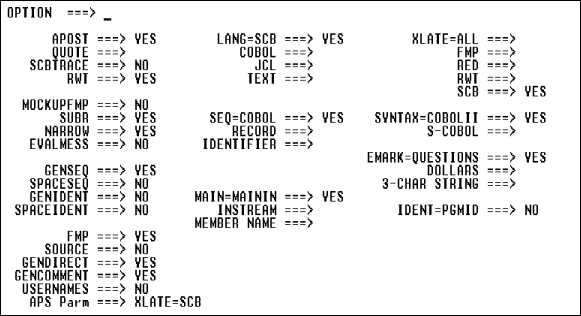
Application generation
Define variations and special features for program precompilation.
| Option |
Description and Values |
||||||||
|---|---|---|---|---|---|---|---|---|---|
|
Apost |
Override Quote.
|
||||||||
|
Quote |
Override Apost.
|
||||||||
|
SCBtrace |
|
||||||||
|
RWT |
Note: For very large Report Writer programs, enter rwt=bigrwt in the APS Parm field on the Generator Options screen. |
||||||||
|
Lang |
Indicate which type of source to process and which columns to process.
|
||||||||
|
XLATE |
Specify which processing step(s) that APS performs. You can stop processing at any of the steps listed below to help isolate the step at which errors occur. The steps are listed in the order in which APS executes them. All options except ALL are mutually exclusive.
|
||||||||
|
MockupFMP |
|
||||||||
|
SUBR |
|
||||||||
|
Narrow |
|
||||||||
|
Evalmess |
|
||||||||
|
Seq |
Specifiy the type of sequence numbers that APS generates. See also, Genident, Spaceident, Ident.
|
||||||||
|
Syntax |
Specify which compiler to use.
|
||||||||
|
Emark |
Generate a three-character string marking error and warning messages in the message report.
|
||||||||
|
Genseq |
Override Spaceseq.
|
||||||||
|
Spaceseq |
Override Genseq.
|
||||||||
|
Genident |
See also, Spaceident, Ident, Seq.
|
||||||||
|
Spaceident |
See also, Genident, Ident, Seq.
|
||||||||
|
Main |
Specify location of the main input source.
|
||||||||
|
Ident |
See also, Genident, Spaceident, Seq.
|
||||||||
|
FMP |
|
||||||||
|
Source |
|
||||||||
|
Gendirect |
|
||||||||
|
Gencomment |
|
||||||||
|
Usernames |
Note: To generate any other prefix, enter the following in the APS Parm field on this screen. usernames=prefix |
||||||||
|
APS Parm |
Display all Precompiler options whose default values you override. These values also display in the APS Parm field on the Generator Options screen. APS saves the values you change on the APS Parm field on the Precompiler Option screen. APS does not save values that you change in the APS Parm field on the Generator Options screen. |
GENIDENT   ===> YES
SEQ=RECORD ===> YES
The generated lines are:
| Input |
S-COBOL |
|---|---|
|
00000100 |
00000002 |
|
00000200 |
00000004 |
|
00000300 |
00000006 |
Generate sequence numbers in columns 73-80, with 00 in columns 73-74.
GENIDENT       ===> YES
SEQ=IDENTIFIER ===> YES
The generated lines are:
| Input |
S-COBOL |
|---|---|
|
00000001 |
00000001 |
|
00000002 |
00000002 |
|
00000003 |
00000003 |
XLATE=RED ===> YES
Process S-COBOL, and report mock-ups but do not process the APS macros or user-defined Customization Facility macros.
XLATE=RED ===> YES
FMP       ===> NO
Process only the APS macros and user-defined Customization Facility macros, columns 1-80. You must supply your own JCL to support this override.
XLATE=FMP ===> YES
LANG=TEXT ===> YES
MAIN=MEMBER NAME ===> XYZ
USERNAMES ===> YES
Generate the prefix xyz- for all APS-generated paragraphs, rather than the default prefix G--.
APS Parm ===> USERNAMES=XYZ-
QUOTE  ===> YES
NARROW ===> NO
Program Painter and Specification Editor keyword (see Keywords)
Non-IMS batch programs
Generate the batch program template, including a PROCEDURE DIVISION USING clause that enables a called program to receive data from the calling program.
-KYWD-  12-*----20---*----30---*----40---*----50---*----60
 PROC   [variablename1 variablename2 ... variablenameN]
Program Painter code:
-KYWD-  12-*----20---*----30---*----40---*----50---*----60
 PROC   REC-2 REC-2 REC-3
Generated COBOL code:
PROCEDURE DIVISION USING REC-2 REC-2 REC-3
Data communication feature (see also Data Communication Calls)
IMS DC target
APS generates an IO PCB with the following format in the Linkage Section.
LINKAGE SECTION.
01  IO-PCB.
    05  IO-PCB-LTERM        PIC X(8).
    05  FILLER              PIC X(2).
    05  IO-PCB-STATUS       PIC X(2).
    05  IO-PCB-INPUT-PREF.
        10  IO-PCB-DATE     PIC S9(7) COMP-3.
        10  IO-PCB-TIME     PIC S9(7) COMP-3.
        10  IO-PCB-MSG-SEQ  PIC S9(7) COMP.
    05  IO-PCB-MOD-NAME     PIC X(8).
    05  IO-PCB-USER-ID      PIC X(8).
In an APS IMS/SQL program, code a PSB with the same name as your DB2 subschema. The PSB must specify an IO PCB (by setting CMPAT=YES in the PSBGEN). If your program uses MSG-SW, the PSB must also specify an alternate IO PCB.
APS-generated report (see Application Reports)
The Program DB/DC Report includes documentation summaries on the subschemas, PSBs, and screens used by a program. The Program DB/DC Report has a separate section for database views, record I/O areas, and screen I/O areas.
The Database Views section provides the following information.
The Record I/O Areas section provides information on the COBOL I/O areas for the database and file records. Records are listed alphabetically by record name.
The Screen I/O Areas section provides information on COBOL I/O areas for up to 20 screens arranged alphabetically.
Produce the Program DB/DC Report from the Documentation Facility.
REPORT CODE: PG02        APS PROGRAMMER SUBSYSTEM       01/17/92      14:29
                           PROGRAM DB/DC REPORT

***************************************************************************
PROGRAM: TDOM  PSB/SUBSCHEMA: TDDB2
SCREENS: TDOM
***************************************************************************

TABLES/VIEWS: (DB2 RECORDS)
---------------------------
TABLE: TDCUST-REC
TABLE: TDODET-REC
TABLE: TDORDR-REC
TABLE: TDPART-REC


RECORD IO AREAS
---------------

RECORD: TDCUST-REC
 ****************************************************************
 *                 DCLGEN TABLE  : MKTAEA.TDCUST USER: CLSTR1   *
 *                    LIBRARY: CLSAPS.CLS2.COPYLIB              *
 *                    MEMBER : TDCUST  DATE: 90/11/27           *
 *                    ACTION(REPLACE)  TIME 13:11:44            *
 *                                     DB2 SYSTEM: DB2B         *
 ********************************************************************

  EXEC SQL DECLARE MKTAEA.TDCUST TABLE
   (CM_CUSTOMER_NO CHAR(6) NOT NULL,
   CM_CUSTOMER_NAME CHAR(20) ,
   CM_CUSTOMER_ADDR CHAR(20) ,
   CM_CUSTOMER_CITY CHAR(20) ,
   CM_CUSTOMER_ZIP CHAR(9) )
  END-EXEC.

 ******************************************************************
 * COBOL DECLARATION FOR TABLE MKTAEA.TDCUST                      *
 ******************************************************************
 01  TDCUST-REC.
  10  CM-CUSTOMER-NO PIC X(6).
  10  CM-CUSTOMER-NAME PIC X(20).
  10  CM-CUSTOMER-ADDR PIC X(20).
  10  CM-CUSTOMER-CITY PIC X(20).
  10  CM-CUSTOMER-ZIP PIC X(9).


******************************************************************
* THE NUMBER OF COLUMNS DESCRIBED BY THE DECLARATION IS 5        *
**********************************************************************
SCREEN IO AREAS
---------------

SCREEN: TDOM                                           FORMAT (:/D/M )
                                                            RULEDLINE:
                                                INITIAL CURSOR (X):: :
                                                           COLOR: :: :
                                             UNDERSCORE (U/:):: : :: :
                                             BLINKING (B/:): :: : :: :
                                      REVERSE VIDEO (R/:): : :: : :: :
                                      INTENSITY (B/:/D): : : :: : :: :
                                        PROTECT (P/U): : : : :: : :: :
     01  TDOM-RECORD.                              : : : : : :: : :: :
     05  TDOM-FUNCTION          PIC X(1).          U B : : : :: X :: :
     05  TDOM-ORDER-NO          PIC X(6).          U B : : : :: : :: :
     05  TDOM-SAVEKEY-1         PIC X(8).          P D : : : :: : :: :
     05  TDOM-CUSTOMER-NO       PIC X(6).          U B : : : :: : :: :
     05  TDOM-CUSTOMER-NAME     PIC X(20).         U B : : : :: : :: :
     05  TDOM-CUST-ENTRY-DATE   PIC X(8).          U B : : : :: : :: :
     05  TDOM-ORDER-DEL-DUE-D   PIC X(8).          U B : : : :: : :: :
     05  TDOM-ORDER-DEL-INSTR   PIC X(20).         U B : : : :: : :: :
     05  TDOM-TABLE-1.                             : : : : : :: : :: :
               10  FILLER       OCCURS 5.          : : : : : :: : :: :
               15  TDOM-ROW-FUNCTION
                                 PIC X(1).
               15  TDOM-PART-NO PIC X(8).
               15  TDOM-LINE-NO PIC X(4).
               15  TDOM-PART-SHORT-DESC
                                PIC X(14).
               15  TDOM-QTY-ORDERED
                                PIC X(8).
               15  TDOM-QTY-BASE-PRICE
                                PIC X(10).
               15  TDOM-TAX-CATEGORY
                                PIC X(1).
               15  TDOM-SAVEKEY-2 PIC X(15).
05 TDOM-MESSAGE PIC X(79). P B : : : :: : :: : APS-generated report (see Application Reports)
The Program Definition Report produces a listing of the program code you create in the Program Painter. Use this report when you need to review program listings to troubleshoot problems, or when you need to document completed programs in your applications.
Produce the Program Definition Report from the Report Generator, Painter Menu, or Application Painter.
REPORT CODE: PG01                APS APPLICATION PAINTER                   PAGE     1
                                PROGRAM DEFINITION REPORT              01/18/92 15:10
                                       CLSAPS.CLS2
SELECTION CRITERIA:
 TDCM
*************************************************************************************
PROGRAM: TDCM                                                       CREATED: 03/19/90
TITLE :
UPDATED : 12/19/90
*************************************************************************************************
START    KYWD    STATEMENT                                                    LINE NO
COL      ----    --------------------------------------------------------------------

 8       SYM1    % INCLUDE APSMACS (APXMACS)                                  00010007
 8       NTRY    TDCM * NORETRY                                               00020007
12       /************************************************************        00030007
12       /************************************************************        00040007
12       /***                                                                 00050007
12       /*** MAINLINE LOGIC                                                  00060007
12       /***                                                                 00070007
12       /************************************************************        00080007
12       /************************************************************        00090007
12       TP-PERFORM PX-INIT-HOUSEKEEPING                                      00100007
12       /************************************************************        00110007
12       /* CONTROL POINT: - POST-SCREEN-READ                                 00120007
12       /************************************************************        00130007
12       IF SC-ED-ALL-OK                                                      00140007
16 MOVE SPACE TO TDCM-MESSAGE 00150007 CICS and IMS DB targets
When you assign a PSB to a program by naming the PSB in the Application Painter, CICS schedules only one PSB at a time. NTRY schedules the PSB. This PSB is active until the program
To ensure that your PSB remains active when you link or transfer to another program, pass the associated PCBs in the LINK or XCTL call, as shown below.
LINK programname [errorpara]
... [DLIUIB pcbname [pcbname ...]]
... [userparm [userparm]...]

XCTL programname [errorpara]
... [DLIUIB pcbname [pcbname ...]]
The invoking program must pass the PCBs in the order that they are coded in the Linkage Section of the invoked program.
When a program invokes a LINK to a subprogram, and passes a scheduled PSB, it expects the PSB to remain scheduled when control returns from the subprogram. To return without terminating the PSB, use TERM because it does not terminate a PSB passed from a higher-level program. To terminate a PSB, use the CIC-TERM-PSB call.
Pass part of a scheduled PSB and two Linkage Section data areas.
LINK PROGRMB * DLIUIB
... ORDERDB-PCB
... ITEMDB-PCB
... USER-LINK-1
... USER-LINK-2
The PSB remains scheduled at the start of the next program.
Application generation
Identify application project and group location and where you want APS to generate the project and group DDIFILE dataset.
| Field |
Description |
|---|---|
|
Project |
The name of the project. For example, MYPROJ. Must be 1-8 alphanumeric characters; the first character must be alphabetic. |
|
Group |
The name of the group. For example, mygrp. Must be 1-8 alphanumeric characters; the first character must be alphabetic. |
|
DDIFILE |
The location of the project and group DDIFILE data set; do not specify the name DDIFILE. Default: The project and group path specified above. For example, myproj.group. |
|
Data Element Library Prefix |
Optional. The location of the Data Element Facility APSDE data set; do not specify the name APSDE. For example, APSPG.PROJECT1.GROUP1. |
Copyright © 2002 Micro Focus International Limited. All rights reserved.
This document and the proprietary marks and names
used herein are protected by international law.