Program Painter and Specification Editor keyword (see Keywords)
Generate a PANVALET ++INCLUDE statement.
-KYWD-  12-*----20---*----30---*----40---*----50---*----60
 ++     PANVALETmembername
The preceding section keyword determines the placement of a data structure in the generated program. Associated section keywords are:
|
FD |
File Section (see FD) |
|
SD |
Sort File Description (see SD) |
|
WS |
Working-Storage Section (see WS) |
|
LK |
Linkage Section (see LK) |
-KYWD-  12-*----20---*----30---*----40---*----50---*----60
 WS
 REC    WS-INPUT-REC
          WS-IN-PART-NO       N8
          WS-IN-DESC          X50
          WS-IN-BASE-PRICE    N6V2
 01     WS-OUT-REC.
 DS05   WSOUTREC
++ PANWSREC Program Painter and Specification Editor keyword (see Keywords)
Use the 01 keyword to:
Format 1, define input or output files:
-KYWD-  12-*----20---*----30---*----40---*----50---*----60
 IO     filename ASSIGN [TO] ...
        ORGANIZATION IS ...
 01     input|outputrecordname         PIC clause
Format 2, define a data structure:
-KYWD-  12-*----20---*----30---*----40---*----50---*----60
 01     COBOLdatastructure
        [05  COBOLdatastructure]
Format 3, copy a data structure:
-KYWD-  12-*----20---*----30---*----40---*----50---*----60
 01     COBOLcopystatement
Format 4, define Report Writer line types:
-KYWD-  12-*----20---*----30---*----40---*----50---*----60
 01    [dataname] TYPE [IS] reportgroup
       [NEXT GROUP [IS] number|PLUS number|NEXT PAGE][.]
       [LINE [NUMBER IS] number|PLUS number|NEXT PAGE]
       MOCKUP|M LINE|LINES linenumber1 [THRU linenumberN]
       [OVERPRINT] WHEN "characterstring" AT COLUMN column]
       [SOURCE] [IS] dataname [options]]
       [VALUE] [IS] literal]
       [REFERENCE [IS] dataname PIC[TURE] [IS] picclause
           [options]]
        [SUM|+ [IS] dataname [dataname] ...
            [UPON detailgroup [detailgroup] ...]
            [RESET [ON] [FINAL] dataname]
            [options]]
-KYWD-  12-*----20---*----30---*----40---*----50---*----60
 01     COPY copybookname

 01     dataname COPY copybookname

 01     dataname
            COPY copybookname

 01     dataname COPY copybookname
            REPLACING fieldname1 BY fieldname2
|
FD |
File Section (see FD) |
|
SD |
Sort File Description (see SD) |
|
WS |
Working-Storage Section (see WS) |
|
LK |
Linkage Section (see LK) |
Data Structure Painter construct (see Data Structures)
Code 66-level RENAMES clauses in your data structures.
66 anytext
anytext |
Valid COBOL Syntax: for 66-levels. |
A 66-level variable needs the same or deeper indentation than the data name it refers to.
Data Structure Painter format:
-LINE- ------- DATA STRUCTURE PAINTER --------
000001   WORK-RECORD
000002      WORK-RECORD-GRP1
000003          WORK-FIELD-1   XX
000004          WORK-FIELD-2   XXX
000005          WORK-FIELD-3   PIC X(04)
000006      WORK-RECORD-GRP2
000007          WORK-FIELD-4   PIC X(02)
000008          WORK-FIELD-5   PIC X(06)
000009      WORK-RECORD-GRP3
000010          WORK-FIELD-6   PIC X(08)
000011          WORK-FIELD-7   PIC X(02)
000012   66  RECORD-1-REN RENAMES WORK-FIELD-1
000013   ... THRU WORK-FIELD-6
Generated COBOL code:
01  WORK-RECORD.
    05  WORK-RECORD-GRP1.
        10  WORK-FIELD-1        PIC XX.
        10  WORK-FIELD-2        PIC XXX.
        10  WORK-FIELD-3        PIC X(04).
    05  WORK-RECORD-GRP2.
        10  WORK-FIELD-4        PIC X(02).
        10  WORK-FIELD-5        PIC X(06).
    05  WORK-RECORD-GRP3.
        10  WORK-FIELD-6        PIC X(08).
        10  WORK-FIELD-7        PIC X(02).
    66  RECORD-1-REN RENAMES WORK-FIELD-1
THRU WORK-FIELD-6. Data Structure Painter construct (see Data Structures)
Code 88-level clauses in your data structures.
88   dataname VALUE 'value1' [THRU 'value2']
...                'value3' [THRU 'value4']
...                'value5' [THRU 'value6']
   .
   .
   .
...                'valueN' [THRU 'valueN']
|
value |
88-level value; do not enclose numeric values in single quotation marks. |
-LINE- ------- DATA STRUCTURE PAINTER --------
000001      WRK1-FIELD-1 X5
000002        88 OPEN-VAL
000003        ... V 'OPEN' 'BEGIN'
000004        ...  'START'
000005        88 OPEN-FLAG
000006        ... VALUE 'ON'
000007        ... 'YES'
Generated COBOL code:
01  WRK1-FIELD-1          PIC X(5).
    88  OPEN-VAL          VALUE 'OPEN' 'BEGIN'
                          'START'.
    88  OPEN-FLAG         VALUE 'ON'
                          'YES'.
-LINE- ------- DATA STRUCTURE PAINTER --------
000009      WRK1-FIELD-2 X(04)
000010        88 SUB-LVL1
000011        ... V 'ABCD' 'EFGH'
000012        ... 'FFFF' THRU 'MMMM'
000013        ... 'PPPP' THRU 'ZZZZ'
000014        88 SUB-LVL2
000015        ... V LOW-VALUES
Generated COBOL code:
01  WRK1-FIELD-2           PIC X(04).
    88  SUB-LVL1           VALUE 'ABCD' 'EFGH'
                           'FFFF' THRU 'MMMM'
                           'PPPP' THRU 'ZZZZ'.
    88  SUB-LVL2           VALUE LOW-VALUES.
-LINE- ------- DATA STRUCTURE PAINTER --------
000016      WRK1-FIELD-3 H
000017        88 SUB-LVL3
000018        ... V -1000 +1000
000019        ... -900 THRU -700
000020        ... +500 THRU +800
Generated COBOL code:
01  WRK1-FIELD-3           PIC S9(4) COMP.
    88 SUB-LVL3            VALUE -1000 +1000
                                 -900 THRU -700
                                 +500 THRU +800.
APS-generated report (see Application Reports)
The Application Definition Report displays each component of an application in a separate report section.
This report consists of the following collection of reports.
REPORT CODE: REPT              APS ENTITY REPORT FACILITY                             PAGE  1
                                       CLSAPS.CLS2                             01/21/92 09:28
REPORT CRITERIA:
       ALL ASSOCIATED ENTITIES OF THE APPLICATION :  TDDEMO
*********************************************************************************************
LIBRARY    ENTITY
TYPE          NAME           STATUS          Comments:
---------------------------------------------------------------------------------------------

       AP       TDDEMO        REPORTED
       PG       TDCM          REPORTED
       PG       TDCS          REPORTED
       PG       TDME          REPORTED
       PG       TDOJ          REPORTED
       PG       TDOM          REPORTED
       PG       TDOT          REPORTED
       PG       TDOU          REPORTED
       SC       TDCM          REPORTED
       SC       TDCS          REPORTED
 .
 .
 .

REPORT CODE: AP01        APS APPLICATION PAINTER                                       PAGE 1
                         APPLICATION DEFINITION REPORT                         01/21/92 09:28
                       CLSAPS.CLS2
SELECTION CRITERIA:
   TDDEMO
*********************************************************************************************
APPLICATION: TDDEMO                                           CREATED: 02/15/90
TITLE      :                                                  UPDATED: 08/30/90
AUTHOR     : CLSTR1                                           DC TARGET:   CICS
                                                                 DB TARGET:   VSAM
*********************************************************************************************

-LINE-   PROGRAMS   SCREENS  IO   REPORTS    DATA STR TY  SBSC/PSB USERMACS LOC
---------------------------------------------------------------------------------------------
000001   TDME       TDME     IO
000002   TDCM       TDCM     IO                           TDDB2
000003   TDPL       TDPL     IO                           TDDB2
000004   TDOM       TDOM     IO                           TDDB2
000005   TDOT       TDOT     IO                           TDDB2
000006   TDOJ       TDOJ     IO                           TDDB2
000007   TDOU       TDOU     IO                           TDDB2
 .
 .
. Screen Painter feature (see Field Edits)
Specify additional edits or tests for input or output data.
To assign an edit routine, follow these steps.
| Option |
Description |
|---|---|
|
Type |
Indicate whether this application edit is a paragraph, subprogram, or APS macro. Default is P(aragraph). |
|
Name |
Enter a descriptive name for the application edit; maximum 32 characters. |
|
Arguments |
To pass a screen field or error flag, prefix the name with the screen name and a hyphen. If the field is located in a list box or combination box, APS suffixes the name with (APS-ROW-SUB). |
|
|
Enter the following arguments separated by commas and enclose literals in single quotation marks. |
|
Paragraph |
Data names or literals that pass to the paragraph through a PERFORM with arguments statement in the generated program. |
|
Subprogram |
Data names that appear on the CALL USING statement in the generated program. |
|
APS macros |
Customization Facility macro terms, literals, and numeric literals. Do not enclose arguments with double quotation marks. |
|
Execute Before/After APS Edits |
Specify when the program executes this application edit--before or after the normal APS field edit routine. Default is b(efore). See also "Comments:" below. |
|
Paragraph COPYLIB or APS Macro USERMACS Member |
Specify an associated COPYLIB member or a paragraph or the associated USERMACS member name for an APS macro. |
|
Working-Storage COPYLIB Member |
Specify a Working-Storage COPYLIB member to be included in the program Working-Storage section. |
Alternately, for screen fields, you can select a predefined edit from the Application Edit List, which is a centralized collection of routines maintained by your APS Administrator. To do so:
|
APS-EDITS-PASSED |
Flag that APS sets to T(rue) if there are no input errors and F(alse) if there are input errors |
|
APS-EDIT-ERRORS-CTR |
Data field containing the number of screen fields in error |
|
screenname-fieldname-FLAG |
Flag that APS sets to T(rue) if an error occurs and F(alse) if not |
The following is sample generated code for a screen record with input and output edits.
01  EMPLOYEE-RECORD.
    05  EMPLOYEE-SALARY-GRP.
        10  EMPLOYEE-SALARY-INPT.
            15  FILLER                      PIC X(03).
            15  EMPLOYEE-SALARY             PIC S9(O5)V99.
        10  EMPLOYEE-SALARY-OUTP REDEFINES
                                      EMPLOYEE-SALARY-INPT.
            15  EMPLOYEE-SALARY-EDIT        PIC $$$,$$9.99.
The following three examples show the generated code when you code an application edit routine as a paragraph, subprogram, and macro. Each routine:
In the first example illustrated below, the edit routine uses the VALIDATE-CUSTOMER-NO paragraph, which resides in the CUSTPARA copylib, as shown below.
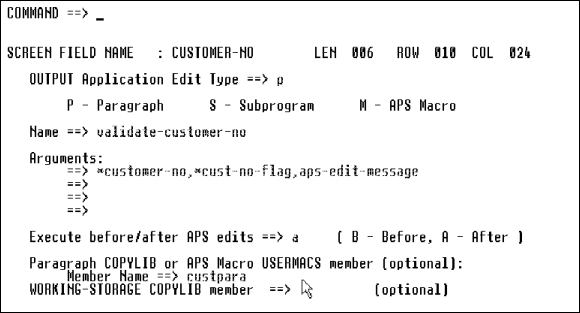
The VALIDATE-CUSTOMER-NO paragraph receives the SCRN-CUSTOMER-NO data, verifies it exists, and returns a T(rue) value to SCRN-CUST-NO-FLAG if the part number is not found. Then, APS checks the SCRN-CUST-NO-FLAG to determine whether an error was found. If so, the APS-EDIT-MESSAGE text displays on the screen.
PERFORM VALIDATE-CUSTOMER-NO( SCRN-CUSTOMER-NO,
... SCRN-CUST-NO-FLAG, APS-EDIT-MESSAGE)
   .
   .
   .
VALIDATE-CUSTOMER-NO(+WS-CUSTOMER-NO,-WS-ERROR-FLAG,
... WS-MESSAGE)
    DB-OBTAIN REF CUST-RECORD
    ... WHERE CUSTOMER-NO-KEY = WS-CUSTOMER-NO
    IF NTF-ON-REC
           MOVE 'T' TO WS-ERROR-FLAG
           MOVE 'CUSTOMER NUMBER NOT FOUND ON FILE'
           ... TO WS-MESSAGE
           MOVE ' ' TO WS-ERROR-FLAG
    ELSE
           MOVE 'T' TO WS-ERROR-FLAG
           MOVE 'ABNORMAL RETURN ON PART NBR VALIDATION'
           .... TO WS-MESSAGE
In the second example, the edit routine uses the CUSTVER subprogram. The subprogram accepts the arguments into the Linkage Section.
CALL 'CUSTVER' USING
... SCRN-CUSTOMER-NO,
... SCRN-CUST-NO-FLAG,
... APS-EDIT-MESSAGE
In the third example, the edit routine uses the $VALIDATE-CUSTOMER-NO macro, which resides in USERMACS CUSTMAC. The $VALIDATE-CUSTOMER-NO macro receives the SCRN-CUSTOMER-NO as an argument, verifies it exists, and returns a T(rue) value to SCRN-CUST-NO-FLAG if the part number is not found. Then, APS checks the SCRN-CUST-NO-FLAG to determine whether an error was found. If so, the APS-EDIT-MESSAGE text displays on the screen.
$VALIDATE-CUSTOMER-NO("SCRN-CUSTOMER-NO",
% ... "SCRN-CUST-NO-FLAG",
% ... "APS-EDIT-MESSAGE")
   .
   .
% DEFINE $VALIDATE-CUSTOMER-NO( &CUSTOMER-NO, &ERROR-FLAG,
% ... &MESSAGE )
    $DB-OBTAIN("REF CUST-RECORD",
    % ... <%&CQ WHERE CUSTOMER-NO-KEY = &CUSTOMER-NO&CQ>)
    IF NTF-ON-REC
        MOVE 'T' TO &ERROR-FLAG
        MOVE 'PART NUMBER NOT FOUND ON FILE' TO &MESSAGE
    ELSE-IF OK-ON-REC
        MOVE ' ' TO &ERROR-FLAG
    ELSE
        MOVE 'T' TO &ERROR-FLAG
        MOVE 'ABNORMAL RETURN ON CUSTOMER NUMBER VALIDATION'
...TO &MESSAGE Create an application definition by listing all its components in a matrix that indicates their relationsip to each other. Specify requirements on the Application Painter screen, as follows:
|
Field |
Description and Values |
||||||||
|---|---|---|---|---|---|---|---|---|---|
|
Data communications target. Valid targets are CICS, DLG (ISPF Dialog), IMS, ISPF, MVS (batch). Specify the target as follows: |
|||||||||
|
|
If application contains... |
Specify this DC target... |
|||||||
|
|
Only online programs |
Your online DC target. |
|||||||
|
|
Only batch programs |
MVS. In addition, leave each program Screens field blank. |
|||||||
|
|
Both online and batch programs |
Your online DC target. To identify the batch programs, enter *batch in the Screens field next to each batch program name. |
|||||||
|
|
|
|
For a list of valid DB/DC combinations for generating executable programs, see DB/DC Target Combinations. |
||||||
|
Database target. Valid values are DLI (or IMS), IDMS, VSAM. To specify a SQL target, leave the DB field blank or let default to VSAM. Then go to the Generator Options screen and specify the SQL target. If your application accesses multiple database targets, specify the DB target as follows. |
|||||||||
|
|
If application accesses . . . |
Specify this DB target . . . |
|||||||
|
|
Two DB targets, including VSAM |
The non-VSAM target--APS always gives you access to the VSAM target. |
|||||||
|
|
Two or more DB targets, excluding VSAM |
Any DB targets. When you generate the programs, first generate just the programs of your specified DB target. Then change the DB target to the next target and generate just the programs of that next target. For example, if your application accesses both SQL and IMS subschemas, generate your SQL programs separately from your IMS programs. |
|||||||
|
|
For a list of valid DB/DC combinations for generating executable programs to run on various operating systems, see See DB/DC Target Combinations. |
||||||||
|
Specify the size of the screen for your application by selecting one of the following application screen sizes from the Screen Size field. |
|||||||||
|
|
Application Screen Size |
Dimension |
Development Screen Size |
||||||
|
|
MOD2 |
24 x 80 |
MOD2, MOD3, MOD4, or MOD5 |
||||||
|
|
MOD3 |
32 x 80 |
MOD3 or MOD4 |
||||||
|
|
MOD4 |
43 x 80 |
MOD4 |
||||||
|
|
MOD5 |
27 x 132 |
MOD5 |
||||||
|
Program |
Enter program names; maximum eight characters. The first character must be alphabetic; others can be alphabetic, numeric, or the special characters #, $, or @. The names all and dummy are invalid. |
||||||||
|
Screen |
Associated screen name; eight-character maximum, except for IMS DC and ISPF Prototyping, which have a seven-character maximum. The first character must be alphabetic, others can be alphanumeric. For batch programs, enter *batch in the Screens field, on the same row as the program name. For online programs, enter the program associated screen name, on the same row as the program name. |
||||||||
|
IO |
Specify whether the screen is input-only (i), output-only (o), or input/output (io). For batch programs, leave the IO field blank. |
||||||||
|
Report |
Batch program report mock-up name; eight character maximum. The first character must be alphabetic or the special characters #, $, or @; others can be any of these or numeric. |
||||||||
|
Data St |
Name of any data structure file that the program will reference; eight character maximum. The first character must be alphabetic; others can be alphanumeric. If the program references multiple data structure files, enter their names on subsequent rows. To make the data structures global, or available to all programs of the application, enter their names on rows above all programs. |
||||||||
|
Type of data structure file, indicating the program location where you plan to include it, as follows. |
|||||||||
|
|
|
||||||||
|
Subschema or PSB name; eight character maximum. The first character must be alphabetic; others can be alphanumeric. To make the subschema or PSB global, or available to all programs of the application, enter its name on a row above all programs. |
|||||||||
|
Name of user-defined macro library file that the program will reference; eight characters maximum. The first character must be alphabetic; others can be alphanumeric. If the program references multiple macro library files, enter their names on subsequent rows. To make the files global, or available to all programs of the application, enter their names on rows above all programs. The files must reside in your project.group USERMACS PDS. |
|||||||||
|
Location of the macro library file, indicating the program location where you plan to invoke its macros, as follows: |
|||||||||
|
|
T |
Default; top of program, before Identification Division |
|||||||
|
|
B |
Bottom of program |
|||||||
|
|
WT |
Top of Working-Storage Section |
|||||||
|
WS |
Working-Storage Section, after any data structures you include in the Data Str field |
||||||||
|
|
WB |
Bottom of Working-Storage Section |
|||||||
|
|
LT |
Top of Linkage Section |
|||||||
|
|
LK |
Linkage Section, after any data structures you include in the Data Str field |
|||||||
|
|
LB |
Bottom of Linkage Section |
|||||||
|
|
IO |
Top of Input-Output Section |
|||||||
|
|
FD |
Top of File Section |
|||||||
|
|
RP |
Top of Report Section |
|||||||
|
|
CA |
Top of Commarea |
|||||||
On the Application Painter, the selection fields next to programs, screens, reports, and data structures accept the following APS-defined selection codes.
|
This code... |
Represents... |
|---|---|
|
ox |
Select Online Express program |
|
s, e |
Select or Edit |
|
b |
Browse |
|
g |
Generate |
|
r |
Report |
|
bd |
BIND |
You can create selection codes to do additional things by writing a member processing exit subroutine. For example, you could create a member processing exit that contains logic to archive an entity to tape when the user-defined selection code T is entered. You can also create member processing exits to modify or disable the APS-defined selection codes.
To write an Application Painter member processing exit, follow these steps:
When you enter one or more selection codes on the Application Painter, the Painter first validates that the selection codes were entered correctly. Then, if no errors are found, the Painter processes the selection codes.
You can code logic in an exit program for any of three Application Painter processing points - during validation, before processing, and after processing. APS provides the following two structures in the exit macro and the exit program template respectively, to determine which function is requested.
P-FUNC-CD        X(1)
    88  P-FUNC-CD-VALIDATE     V 'V'
    88  P-FUNC-CD-PRE-PROCESS  V 'B'
    88  P-FUNC-CD-POST-PROCESS V 'A'
               .
               .
               .
EVALUATE P-FUNC-CD
WHEN 'V'
    PERFORM VALIDATE-FUNC
WHEN 'B'
    PERFORM CUSTOM-PREPROCESS
WHEN 'A'
    PERFORM CUSTOM-POSTPROCESS
APS also provides the following variables in the exit macro. To define your own selection code(s) to the exit program, reference these variables in your program.
% &APS-UE-SEL-BROWSE             = 'B'
% &APS-UE-SEL-BIND               = 'BD'
% &APS-UE-SEL-EDIT               = 'E'
% &APS-UE-SEL-GEN                = 'G'
% &APS-UE-SEL-ONLINE-EXPRESS     = 'OX'
% &APS-UE-SEL-REPORT             = 'R'
% &APS-UE-SEL-SELECT             = 'S'
The Painter validates each selection code entered. It also calls the exit program's validation paragraph once per selection code. In the paragraph, you can use the following return codes.
|
Return Code |
Meaning |
|---|---|
|
&APS-UE-RC-OK |
All validations for the selection code are successful; the exit program should handle this selection and bypass APS processing. |
|
&APS-UE-RC-UNKNOWN-SEL-CD |
The selection code is not user-defined; APS should handle it. |
|
&APS-UE-RC-CONTINUE |
The selection code is a standard APS selection code. Both the exit program and APS should process this selection code. |
|
&APS-UE-RC-USER-ERROR |
The selection code is in error; APS should stop validation and redisplay the Application Painter screen for user correction. |
For example:
        /* *************************************************
        /* USER LOGIC TO VALIDATE SELECTION CODES
        /* *************************************************
PARA    VALIDATE-FUNC
        /* VALIDATE THE SELECTION CODE...
        IF P-SEL-CD = 'yourcode'
            RETURN-CODE = &UE-RC-OK
        ELSE
RETURN-CODE = &UE-RC-UNKNOWN-SEL-CDIf validation was successful, the Application Painter processes the selection codes in this order:
|
g |
Generate screens, then programs |
|
bd |
Bind |
|
r |
Report |
|
ox |
Online Express |
| s, e, b, and user-defined codes |
Codes processed as they appear on Application Painter, from top to bottom, and right to left |
For each selection code, the Application Painter checks the return code set by the exit program during validation. If the return code is &APS-UE-RC-OK or &APS-UE-RC-CONTINUE, the Application Painter calls the exit program preprocessing paragraph; otherwise standard Application Painter processing occurs.
In the exit program preprocessing paragraph, write your custom preprocessing logic, and then set one of these return codes.
|
Return Code |
Meaning |
|---|---|
|
&APS-UE-RC-OK |
Processing of this selection code is complete. |
|
&APS-UE-RC-CONTINUE |
The exit program preprocess paragraph is successful; continue with standard Application Painter processing. |
|
&APS-UE-RC-POSTPROCESS |
The exit program preprocess paragraph is successful; continue with both standard Application Painter and exit program postprocessing. |
|
&APS-UE-RC-USER-ERROR |
The exit program preprocess paragraph is unsuccessful; continue processing with the next selection code. |
For each selection code, when the exit program preprocess paragraph returns &APS-UE-RC-CONTINUE or &APS-UE-RC-POSTPROCESS, the Application Painter attempts to perform its standard processing. Then, for &APS-UE-RC-POSTPROCESS, the Application Painter calls the exit program postprocess paragraph. The call parameter P-APS-STATUS indicates the success or failure of the standard Application Painter processing.
Use the exit program postprocessing paragraph to execute any action after the standard Application Painter processing. A common action is to free resources allocated by the preprocess paragraph. The postprocessing paragraph should set one of these return codes.
|
Return Code |
Meaning |
|---|---|
|
&APS-UE-RC-OK |
The exit program postprocessing paragraph is successful. |
|
&APS-UE-RC-ERROR |
The exit program postprocessing paragraph failed. |
APS provides a set of reports that help you understand your application and its various components. Use these reports as you develop an application to determine the status of your work and the tasks left to complete. Some reports help you to troubleshoot problems in an application that you are developing, or to determine the impact of a proposed change. Others help you to verify the results of your work. Once you have fully implemented an application, use the APS reports to document it so that developers who later maintain or enhance the application can easily understand it in detail.
You can produce reports on an entire application, on selected components, or on selected members of components. You can produce reports from the Report Generator, Painter Menu, Application Painter, or Documentation Facility, as follows.
|
Report |
Available from |
|
|---|---|---|
|
Application Definition (AP01) lists and describes all components of an application except the scenario prototype. See Application Definition Report (AP01). |
Painter Menu |
|
|
Component List (MS01) catalogs and totals the components for each painter. See Component List (MS01). |
Documentation Facility |
|
|
Data Structure Definition (DS01) lists and describes structures that you create in the Data Structure Painter. See Data Structure Definition (DS01). |
Painter Menu |
|
|
DDIFILE (DB01) describes the contents of the file that contains information about your database, formatted to APS specifications. See DDIFILE Report (DB01). |
Documentation Facility |
|
|
Entity Content (MS02) lists summary information for each application component. See Entity Content Report (MS02). |
Documentation Facility |
|
|
Entity Cross Reference (MD01) cross references and totals application components. See Entity Cross Reference (MD01). |
Documentation Facility |
|
|
Entity Parts List (EN01) catalogs selected parts of one or more application components. See Entity Parts List (EN01). |
Documentation Facility |
|
|
Entity Search Utility (GS01) lets you create reports on application components that meet the selection criteria that you specify. See Entity Search Utility Report (GS01). |
Documentation Facility |
|
|
Entity Use (EN02) lists components that copy, include, or otherwise use the target component. See Entity Use Report (EN02). |
Documentation Facility |
|
|
Field/Screen Cross Reference (SC02) lists application screens along with their I/O and text fields. See Field/Screen Cross Reference (SC02). |
Documentation Facility |
|
|
Macro/Program Cross-Reference (MC01) lists macros and the programs that use them. See Macro/Program Cross Reference (MC01). |
Documentation Facility |
|
|
Mock-Up (RP01) lists and displays report mock-ups as painted in the Report Mock-Up Painter. See Mock-Up Report (RP01). |
Painter Menu |
|
|
Program DB/DC (PG02) lists the screens and the subschemas or PSBs used by a program. See Program DB/DC Report (PG02). |
Documentation Facility |
|
|
Program Definition (PG01) provides a printout of programs created in APS. See Program Definition Report (PG01). |
Painter Menu |
|
|
Scenario Definition (CN01) describes components created in the Scenario Prototype Painter. See Scenario Definition Report (CN01). |
Painter Menu |
|
|
Screen Hardcopy/Field Attribute (SC01) displays the components of a screen as painted in the Screen Painter as well as field attribute and field edit information. See Screen Hardcopy/Field Attribute Report (SC01). |
Painter Menu |
Use the following procedures to produce APS reports from the Report Generator, Painter Menu, Application Painter, and Documentation Facility.
Produce reports from the Report Generator following these steps.
Produce reports from the Painter Menu following these steps.
Produce reports from the Application Painter following these steps.
Produce reports from the Documentation Facility following these steps.
Contains macros used by APS during generation. Place user macros in project.group.USERMACS.
Note: This feature is closely associated with the Control Files feature. See Control Files.
APS library.
|
Rule Name |
Usage |
|---|---|
|
A1CMLIB |
Endevor Configuration Management |
|
A1UXAP01 |
Application Painter User Exit |
|
APAUTOED |
Character based Automatic Edits |
|
APBTCHTP |
Batch Generator |
|
APCICSTP |
CICS Generator |
|
APCMSCAN |
TCP/IP Generator |
|
APDB2DB |
SQL Generator (all SQL database types) |
|
APDLGMAC, APDLGTP |
ISPF Dialog Generator |
|
APFEDCLR, APFEMACS |
Field Edits |
|
APHLPMAC |
Online Help |
|
APIDMSPT |
IDMS Pass Thru Generator |
|
APIDMSTP |
IDMS DC Generator |
|
APIMSDB |
IMS DB Generator |
|
APIMSTP |
IMS/TM Generator |
|
APMSGADB |
Database Generator Errors (all database types) |
|
APMSGBTC |
Batch Generator Messages |
|
APMSGCIC |
CICS Messages |
|
APMSGDB2 |
SQL Generator Messages (all SQL database types) |
|
APMSGDCL |
IMS Database Messages |
|
APMSGDLG |
DLG Messages |
|
APMSGHLP |
User Help Messages |
|
APMSGIDB, APMSGIDC |
IDMS Generator Messages |
|
APMSGIMS |
IMS Generator Messages |
|
APMSGMDC |
Character based TP messages (CICS, IMS) |
|
APMSGVSM |
VSAM Generator Messages |
|
APPCVSM |
VSAM Generator |
|
APPIPMAC |
TCP/IP Generator |
|
APSBASE |
APS Base (all targets) |
|
APSCRGEN |
Character based Screen Generator |
|
APSDBCMD |
Database Generator (all database types) |
|
APSUBSCH |
Subschema Processor |
|
APVBXMAC |
Visual Basic Extension (VBX) Generator |
|
APVSMCIC |
VSAM Generator (CICS only) |
|
APVSMDB |
VSAM Generator (all platforms) |
|
APVSMMVS |
VSAM Generator (batch) |
|
DCLMACS |
IMS DB and VSAM Generator |
|
DDIAMS |
VSAM IDCAMS Generator (mainframe only) |
|
DXPG02 |
PG02 (Program Painter) Report Generator |
|
IDMDBMAC |
IDMS DB Generator |
|
IDMPROTO |
IDMS Messages |
|
IMSDBMAC, IMSPHYS |
IMS DB Generator |
|
SSMXPG02 |
PG02 (Specification Editor) Report Generator |
|
VSMDBMAC |
VSAM Generator |
|
VSMPHYS |
VSAM Generator (all platforms) |
S-COBOL structure (see S-COBOL Structures)
Test the END-OF-FILE or AT END condition for files accessed sequentially, and test the INVALID KEY condition for files accessed randomly.
conditionalverb [AT] END ON      filename
              INVALID [KEY] ON
  statementblock
-KYWD-  12-*----20---*----30---*----40---*----50---*----
 PARA   MAIN-LOGIC
            OPEN INPUT MASTER-FILE
            REPEAT
                READ MASTER-FILE INTO MASTER-REC
                ... INVALID KEY
                    MASTER-REC = HIGH-VALUES
                ELSE-IF MASTER-TYPE = 'A'
                    PERFORM PROCESS-TYPE-A
                ELSE-IF MASTER-TYPE = 'C'
                    PERFORM PROCESS-TYPE-C
                ELSE
                    PERFORM PROCESS-OTHER-TYPES
            UNTIL INVALID KEY ON MASTER-FILE
            CLOSE MASTER-FILE
STOP RUN Data communications call (see Data Communication Calls)
Modify the screen I/O field attributes attributes at run time. To reset all screen field attributes to their original painted values, see CLEAR-ATTRS.
[TP-]ATTR screenname POS fieldname[(subscript)]
[TP-]ATTR screenname
... attribute1[+attribute2...]
... fieldname[(subscript)][+fieldname[(subscript)] ...]
|
attribute |
Specify one or more attributes as follows. |
|||
|
|
BRT |
Bright character images |
||
|
|
NORM |
Normal character images |
||
|
|
DARK |
Suppress character display |
||
|
|
MDTON |
Enable modified data tags (CICS only) |
||
|
|
MDTOFF |
Disable modified data tags (CICS only) |
||
|
|
NUM[LOCK] |
Enable numeric locking (not applicable for DDS) |
||
|
|
NOLOCK|NUMOFF |
Disable numeric locking (not applicable for DDS) |
||
|
|
POS[ITION] |
Position the cursor at the first field in the string (not applicable for DDS) |
||
|
|
PROT |
Specify write-protection |
||
|
|
ASKIP |
Specify write-protection (not applicable for DDS) |
||
|
|
UNPROT|NOPROT |
Cancel write-protection |
||
|
|
COLSEP |
Specify column separator (DDS only) |
||
|
|
DET |
Enable light pen detection |
||
|
|
NODET|DETOFF |
Disable light pen detection |
||
|
|
Color |
Specify one of the following character image colors: |
||
|
|
BLUE | BL |
|||
|
|
Highlighting |
Specify one of the following character highlights: |
||
|
|
BLINK |
Blinking cursor |
||
fieldname [(subscript)] |
Screen field name(s). Code only the field name, not its screen name prefix; code the field subscript if applicable. |
|||
|
screenname |
Screen name; value must be literal (maximum 8 characters). |
|||
ATTR SCRA POS SS-NUM
ATTR SCRA BRT EMPL-NAME
ATTR SCRA PROT+BRT SS-NUM+EMPL-NAME
ATTR SCRA BRT+POS SOC-SEC-NUM(LINE-CTR)
Screen Painter feature
Assign field attributes by modifying the default attribute values for your text and I/O fields. To modify screen field attributes at run time, see ATTR and CLEAR-ATTRS.
Valid attribute values for screen fields on the Field Attribute screens are the following.
|
Attribute |
Description and Values |
|||||||||||||||
|---|---|---|---|---|---|---|---|---|---|---|---|---|---|---|---|---|
|
I/O field name; maximum 16 characters. Text fields do not have names because programs do not reference them. If you are retargeting an APS application to OS400, your field names can be only 10 characters long. Hints:
|
||||||||||||||||
|
Display field only; to change field length, move the cursor to the Xs designating the field and type in your changes. You can space over or delete the Xs representing the field, or extend the field with more Xs. |
||||||||||||||||
|
||||||||||||||||
|
||||||||||||||||
|
Applies to IMS and CICS only. The modified data tag tells the terminal whether to return field data. When this tag is On for a field, the terminal always sends back data; when Off, the terminal returns data only if the user changes the data.
When you use field edits with an update program:
|
||||||||||||||||
|
Initial value for screen field; maximum is field length or 27 characters, whichever is less. |
||||||||||||||||
|
APS edits |
Display field indicating if any field edits were assigned to the screen field. |
|||||||||||||||
|
On Off |
Activate keyboard numeric shift lock Deactivate numeric shift lock (default) |
|||||||||||||||
|
See also Comments. |
||||||||||||||||
|
On Off |
Light pen detectable. Not light pen detectable (default). |
|||||||||||||||
|
No Yes |
Do not position cursor on this field when the program sends the screen. Default for all but the first I/O field. Position cursor on this field. Default for first I/O field. |
|||||||||||||||
|
If you change cursor positioning by setting a new field to Yes, you must change the previous "yes" field to No. By default Online Express positions the cursor on the function field for the non-repeated record block data. To override the default with the field you select here, blank out the Position Cursor on Field field with spaces on the Online Express Program Definition screen. |
||||||||||||||||
|
||||||||||||||||
|
||||||||||||||||
|
IMS only. |
||||||||||||||||
|
No Yes |
Program cannot modify extended attributes at run time (default). Program can modify extended attributes. APS generates the extra attribute bytes required. |
|||||||||||||||
|
See also "Comments" below. |
||||||||||||||||
|
For KANJI use only. Format field characters for a double-byte character set (DBCS) terminal.
|
||||||||||||||||
|
For KANJI use only. Place lines around the field on a DBCS terminal, as follows.
|
||||||||||||||||
| Value |
Under |
Right |
Over |
Left |
|
|---|---|---|---|---|---|
|
00 |
|
|
|
|
Equivalent to spaces |
|
01 |
X |
|
|
|
Equivalent to U |
|
02 |
|
X |
|
|
Equivalent to R |
|
03 |
X |
X |
|
|
|
|
04 |
|
|
X |
|
Equivalent to O |
|
05 |
X |
|
X |
|
|
|
06 |
|
X |
X |
|
|
|
07 |
X |
X |
X |
|
|
|
08 |
|
|
|
X |
Equivalent to L |
|
09 |
X |
|
|
X |
|
|
0A |
|
X |
|
X |
|
|
0B |
X |
X |
|
X |
|
|
0C |
|
|
X |
X |
|
|
0D |
X |
|
X |
X |
|
|
0E |
|
X |
X |
X |
|
|
0F |
X |
X |
X |
X |
Equivalent to B |
SQL DB targets
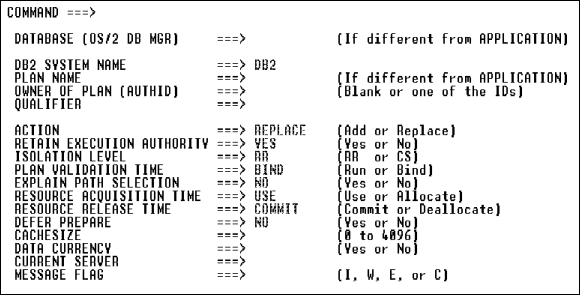
Define bind options for DB2 application and program generation.
| Field |
Description and Values |
||||
|---|---|---|---|---|---|
|
DB2 System Name |
Specify the appropriate name for your site. Default: DB2. |
||||
|
Plan Name |
Specify the plan name you use when you Bind an application. If you leave this field blank, the default depends upon your use of the BIND command in the Application Painter. |
||||
|
Owner of Plan (Authid) |
Leave this field blank or specify a primary or secondary authorization ID of the BIND. |
||||
|
Qualifier |
Leave this field blank or specify the implicit qualifier for the unqualified table names, views, indexes, and aliases contained in the plan. |
||||
|
Action |
Specify the bind action to be executed. Valid values: add or replace. |
||||
|
Retain Execution Authority |
Specify Yes if you specified REPLACE in the BIND ACTION field. Otherwise specify No. |
||||
|
Isolation Level |
Valid values: rr or cs. |
||||
|
Plan Validation Time |
Valid values: run or bind. |
||||
|
Explain Path Selection |
|
||||
|
Resource Acquisition Time |
Valid values: use or allocate. If you enter ALLOCATE, you must enter DEALLOCATE in the Resource Release Time field. |
||||
|
Resource Release Time |
Valid values: commit or deallocate. The value you enter in this field depends on the value you entered in the Resource Acquisition Time field. |
||||
|
Defer Prepare |
|
||||
|
Cache Size |
Specify the size (in bytes) of the authorization cache to be acquired in the EDMPOOL for the plan. Valid values: 0 to 4096. |
||||
|
Data Currency |
|
||||
|
Current Server |
Leave this field blank or specify a connection to a location before the plan runs. |
||||
|
Message Flag |
Specify which messages display. Valid values: I, W, E, C, or blank. |
Copyright © 2002 Micro Focus International Limited. All rights reserved.
This document and the proprietary marks and names
used herein are protected by international law.