Data communication call (see Data Communication Calls)
Terminate programs and transaction operations.
Under ISPF Dialog, perform internal program cleanup, terminate the program via GOBACK statement, and return control to the calling program.
[TP-]TERM
Use TERM after sending output messages (SEND or MSG-SW) with CONTINUE. Do not use TERM prior to sending at least one response; this causes a user terminal in response mode to remain locked, awaiting a response.
Terminate a program when SCRA-FUNCTION = 'E' or PF3 is pressed.
IF  SCRA-FUNCTION = 'E' OR PF3
TERM Report Writer statement (see Report Writer Structures and the Report Writer chapter in your APS User's Guide)
Batch environments
End report processing. TERMINATE:
TERMINATE reportname1 [,reportname2] ...
|
reportname |
Identify the report. Define reportname in a RED statement in the Report Section of the Data Division. |
Data communication call (see Data Communication Calls)
CICS and IMS DC targets
ABEND the program.
TP-BACKOUT [ABORT[(name)]|NOABORT]
TP-BACKOUT [ABORT|NOABORT]
|
ABORT(name) |
Invoke CICS ABEND to terminate task. Name specifies a formatted dump of main storage; can be literal or COBOL data name (maximum 4 characters). |
|
NOABORT |
|
ABORT |
Cancel program and do not reschedule. |
|
NOABORT |
The following three examples execute identically. Each terminates a task abnormally by invoking a CICS ABEND code.
TP-BACKOUT
TP-BACKOUT ABORT
TP-BACKOUT NOABORT
Specify a recovery option and code name to identify a main storage dump related to the task.
TP-BACKOUT ABORT('PGM1') TP-COMMAREA generates a Working-Storage record for passing data between programs. This record contains APS information as well as user data.
There is no need to code a TP-COMMAREA call; APS generates it. The value of &TP-USER-LEN--the default is 80--determines the size of TP-USERAREA, the user portion of TP-COMMAREA. You can accept the APS default of a single Commarea field, TP-USERAREA, or redefine TP-USERAREA as multiple Commarea fields.
The following calls pass a Commarea.
|
Send a screen to the terminal and terminate the program. CICS saves the data stored in the TP-COMMAREA and makes it available to the next program when APS returns the screen to CICS. |
|
|
Link to a subprogram, passing it the TP-COMMAREA address. Define COMMAREA identically in each program. |
|
|
Transfer control to another program, passing a copy of TP-COMMAREA. Define TP-COMMAREA identically in both programs. |
You can redefine TP-USERAREA to fit program requirements.
Optionally, you can code the redefinition in a copybook or rule that you include.
Redefine TP-USERAREA in the Program Painter.
-KYWD-  12-*----20---*----30---*----40---*----50---*----60
 SYM1   % * SET THE LENGTH OF TP-USERAREA TO
        % * 21 BYTES
        % &TP-USER-LEN = 21
 CA     AACA-USERAREA
            CA-DATE                X8
            CA-TIME                X8
            CA-CUST-NUMBER         X5
-KYWD-  12-*----20---*----30---*----40---*----50---*----60
 SYM1   % * SET THE LENGTH OF TP-USERAREA TO
        % * 21 BYTES
        % &TP-USER-LEN = 21
 CA05   AACA-USERAREA
        10  CA-DATE                X8
        10  CA-TIME                X8
        10  CA-CUST-NUMBER         X5
Redefine TP-USERAREA in the Data Structure Painter.
AACA-USERAREA
    CA-DATE                X8
    CA-TIME                X8
    CA-CUST-NUMBER         X5
Each of the above generates:
01  TP-COMMAREA
          .
          .
          .
01  FILLER REDEFINES TP-COMMAREA.
    05  FILLER                PIC X(40).
    05  TP-USERAREA           PIC X(21).
    05  AACA-USERAREA   REDEFINES TP-USERAREA.
        10  CA-DATE           PIC X(08).
        10  CA-TIME           PIC X(08).
10 CA-CUST-NUMBER PIC X(05). TP-COMMAREA coordinates the placement of the APS-generated Commarea structure with a user-provided redefinition of that structure. Use it only with conversational IMS programs--nonconversational IMS programs do not use a Commarea.
In IMS, the Commarea is called a SPA (Scratch Pad Area). Its reserved prefix includes an IMS LLZZ field, the input trancode, and the APS invocation mode flag.
There is no need to code a TP-COMMAREA call; APS generates it. The value of &TP-USER-LEN--the default is 0--determines the size of TP-USERAREA, the user portion of TP-COMMAREA. You can accept the APS default of a single Commarea field, TP-USERAREA, or redefine TP-USERAREA as multiple Commarea fields. You must define the Commarea in Working-Storage.
To redefine TP-USERAREA as a group-level data structure, the length must be the same as the value specified for &TP-USER-LEN. A CA01 keyword generates an 05-level REDEFINES TP-USERAREA statement.
To generate a single-field Commarea in Working-Storage called TP-USERAREA, assign a value to the APS variable &TP-USER-LEN. Code the following on one line.
-KYWD-  12-*----20---*----30---*----40---*----50---*----60
  SYM1   % &TP-USER-LEN = number
-KYWD-  12-*----20---*----30---*----40---*----50---*----60
 SYM1   % &TP-USER-LEN = 100
 CA05   MY-REDEF
        10 CA-FLD-A            PIC X(10).
        10 CA-FLD-B            PIC S9(4) COMP.
        10 CA-FLD-C            PIC X(20).
Generated source:
% &TP-USER-LEN = 100
IDENTIFICATION DIVISION
          .
          .
WORKING-STORAGE SECTION.
$TP-WS-MARKER
$TP-COMMAREA
    05  MY-REDEF REDEFINES TP-USERAREA.
        10 CA-FLD-A            PIC X(10).
        10 CA-FLD-B            PIC S9(4) COMP.
10 CA-FLD-C PIC X(20). TP-COMMAREA generates a Working-Storage record for passing data between programs. This record contains APS information and user data.
There is no need to code a TP-COMMAREA call; APS generates it. The value of &TP-USER-LEN - the default is zero - determines the size of TP-USERAREA, the user portion of TP-COMMAREA. You can accept the APS default of a single Commarea field, TP-USERAREA, or redefine TP-USERAREA as multiple Commarea fields. You must define the Commarea in Working-Storage.
To redefine TP-USERAREA as a group-level data structure, the length must be the same as the value specified for &TP-USER-LEN. A CA01 keyword generates an 05-level REDEFINES TP-USERAREA statement.
To generate a single-field Commarea in Working-Storage called TP-USERAREA, assign a value to the APS variable &TP-USER-LEN. Code the following on one line.
-KYWD-  12-*----20---*----30---*----40---*----50---*----60
 SYM1    % &TP-USER-LEN = number
To receive TP-COMMAREA as a passed data area from a calling program, code this assignment statement before NTRY.
-KYWD-  12-*----20---*----30---*----40---*----50---*----60
        % &DLG-COMMAREA-IN-LINKAGE = "YES"
The results are:
01 DLG-LINKAGE-COMMAREA PIC X(&TP-USER-LEN).
... USING DLG-LINKAGE-COMMAREA
Redefine TP-USERAREA.
-KYWD-  12-*----20---*----30---*----40---*----50---*----60
 SYM1   % &TP-USER-LEN = 49
CA05   PGM-USERAREA
            10  CA-EMPLOYEE-NAME    PIC X(20).
            10  CA-EMPLOYEE-TITLE   PIC X(20).
            10  CA-EMPLOYEE-SSN     PIC X(09).
Generated source:
01 TP-COMMAREA.
   05  TP-USERAREA              PIC (X49).
   05  PGM-USERAREA REDEFINES TP-USERAREA.
       10  CA-EMPLOYEE-NAME     PIC X(20).
       10  CA-EMPLOYEE-TITLE    PIC X(20).
10 CA-EMPLOYEE-SSN PIC X(09). Data communication call (see Data Communication Calls)
CICS, IMS DC, and ISPF Dialog
Handle addressability of Linkage Section data records in a called program.
TP-LINKAGE linkdataname[/copybookname|macrofilename]
... [linkdataname[/copybookname|macrofilename] ...]
|
/copybookname |
Name of copybook that you INCLUDE or COPY prior to this call. See also "Comments" below. |
|
linkdataname |
01-level Linkage Section data area identical to the linkdataname in the associated call. |
|
/macrofilename |
Name of macro file that you INCLUDE or COPY prior to this call. See also "Comments" below. |
Define records LINK-REC-1 and LINK-REC-2. Include definitions from USERMACS macro members LINKR1 and LINKR2.
TP-LINKAGE LINK-REC-1/LINKR1 LINK-REC-2/LINKR2
Define records LINK-REC-1 and LINK-REC-2 and copy their definitions from COPYLIB members LINKR1 and LINKR2.
% &TP-COPY-LINKAGE = 1
TP-LINKAGE LINK-REC-1/LINKR1 LINK-REC-2/LINKR2
Define records LINK-REC-1 and LINK-REC-2, coded in the Linkage Section.
TP-LINKAGE LINK-REC-1 LINK-REC-2
Define records LINK-REC-1 and LINK-REC-2. LINK-REC-1 has been coded in the Linkage Section; LINK-REC-2 is copied from COPYLIB member LINKR2.
% &TP-COPY-LINKAGE = 1
TP-LINKAGE LINK-REC-1 LINK-REC-2/LINKR2
LINK-REC-1       PIC X(100).
Linkage record containing 10,000 bytes.
-KYWD-  12-*----20---*----30---*----40---*----50---*----60
 SYLK   TP-LINKAGE LINK-REC
        ... DUMMY-LINK-REC-BLL1/DUMMY
        ... DUMMY-LINK-REC-BLL2/DUMMY
 LK01   LINK-REC.
        05  LINK-REC-1-4096       PIC X(4096).
        05  LINK-REC-2-8192       PIC X(4096).
        05  LINK-REC-3-10000      PIC X(1808).
 OPT    PROG
 NTRY
        CIC-GETMAIN
        ... SET(LINK-REC)
        ... LENGTH(10000)
        /* PROGRAM HAS ADDRESSABILITY TO
        /* THE FIRST 4,096 BYTES.
        ADD 4096 LINK-REC--P
        ... GIVING DUMMY-LINK-REC-BLL1--P
        ... GIVING DUMMY-LINK-REC-BLL2--P
        /* PROGRAM HAS ADDRESSABILITY TO
        /* ALL 10,000 BYTES.
Define a PARM area for use by TP-LINK and TP-ENTRY. The PROGRAM CONTROL TRANSFER option has been set to SELECT. PGM-PARM-DATA is coded inline. Note: You can place the PGM-PARM-DATA area in Linkage without the use of TP-LINKAGE.
-KYWD-  12-*----20---*----30---*----40---*----50---*----60
 SYLK   TP-LINKAGE PGM-PARM-DATA
 LK01   PGM-PARM-DATA.
            05  PGM-PARM-DATA-LEN   PIC S9(04) COMP.
            05  PGM-PARM-EMPNBR     PIC X(05).
05 FILLER PIC X(95). Data communication call (see Data Communication Calls)
CICS, IMS DC, and ISPF Dialog targets
Move LOW-VALUES to all fields in a specified screen record.
TP-|SC-NULL screenname
|
screenname |
Screen name; value must be literal. |
This call does not alter the field attributes.
Move LOW-VALUES to all fields on screen SCRA.
TP-NULL SCRA
Data communication call (see Data Communication Calls)
Perform a paragraph, with or without passing arguments.
Format 1, perform a paragraph:
TP-PERFORM paragraphname
Format 2, perform a paragraph and pass arguments:
TP-PERFORM paragraphname actualargument1[[,]
... actualargument2[,] ... actualargument8]
          .
          .
          .
paragraphname ([+|-]formalargument1[[,]
... [+|-]formalargument2[,] ... [+|-]formalargument8])
|
+|- |
A plus (+) or minus (-) sign preceding a formalargument passes values between actual arguments and formal arguments, as follows:
|
|
actualargument |
Values you send or receive from a formalargument in the paragraph; can be literals, identifiers, arithmetic expressions, or index names. |
|
formalargument |
Values you receive from or send to an actualargument in the PERFORM statement. |
|
paragraphname |
Name of paragraph to perform. |
S-COBOL structure (see S-COBOL Structures)
Establish flags, set them to true and false, and then test them.
TRUE|FALSE dataname1 [dataname2 [... datanameN]]
The following code in the Procedure Division:
       .
       .
       .
TRUE THERE-ARE-NO-ERRORS
FALSE WITHIN-RANGE
       .
       .
       .
Generates:
WORKING-STORAGE SECTION.
       .
       .
       .
02  THERE-ARE-NO-ERRORS--FLG    PIC X.
 88  THERE-ARE-NO-ERRORS    VALUE 'T'.
02  WITHIN-RANGE--FLG    PIC X.
    88  WITHIN-RANGE    VALUE 'T'.
TRUE THERE-ARE-NO-ERRORS generates
MOVE TRUE TO THERE-ARE-NO-ERRORS--FLG.
Set two undefined flags, THERE-ARE-NO-ERRORS and WITHIN-RANGE to TRUE (line 3030). Define these flags in Working-Storage (88-level condition name flags), because this is the first TRUE or FALSE statement for either flag in this program. If the condition in line 3060 is true, set the THERE-ARE-NO-ERRORS flag to FALSE. If either condition in line 3110 is true, set the WITHIN-RANGE flag to FALSE. As long as the value of the THERE-ARE-NO-ERRORS flag is TRUE, perform the loop. Inside the loop test the other flag, WITHIN-RANGE. If the value is TRUE, execute the subordinate statement block.
-LINE- -KYWD-  12-*----20---*----30---*----40---*----50---*
   .
003030         TRUE THERE-ARE-NO-ERRORS
003031         ... WITHIN-RANGE
   .
003060         IF CODE-IN NOT NUMERIC
003070             FALSE THERE-ARE-NO-ERRORS
   .
003110         IF COUNT > 372 OR COUNT < 50
003120             FALSE WITHIN-RANGE
   .
003150         WHILE THERE-ARE-NO-ERRORS
003160             IF WITHIN-RANGE
S-COBOL flag (see S-COBOL Structures)
TRUE, FALSE, ALWAYS, NEVER are data names whose meanings are reserved and automatically provided by S-COBOL.
Automatically generated in Working-Storage
01  GENERATED-FLAGS.
    02  TRUX        PIC X  VALUE 'T'.
        88  ALWAYS         VALUE 'T'.
        88  NEVER          VALUE 'F'.
    02 FALSX        PIC X  VALUE 'F'.
Because TRUE and FALSE are reserved words on some systems, S-COBOL changes every occurrence of TRUE and FALSE to TRUX and FALSX, and generates the flags accordingly.
Report Writer statement (see Report Writer Structures and the APS User's Guide chapter Create Reports with Report Writer)
Batch environments
Identify a report group, such as a header line, detail line, or footer line.
Format 1, page header:
TYPE [IS] PAGE HEADING|PH

    [LINE [NUMBER IS] number     ]  [.]
                      PLUS number
Format 2, page footer:
TYPE [IS] PAGE FOOTING|PF
    [LINE [NUMBER IS] number]

    [NEXT GROUP [IS] number     ]  [.]
                     PLUS number
Format 3, report header:
TYPE [IS] REPORT HEADING|RH

    [LINE [NUMBER IS] number     ]
                      PLUS number

                     number
    [NEXT GROUP [IS] PLUS number]  [.]
                     NEXT PAGE
Format 4, report footer:
TYPE [IS] REPORT FOOTING|RF

                      number
    [LINE [NUMBER IS] PLUS number]  [.]
                      NEXT PAGE
Format 5, control headers and footers:
TYPE [IS] CONTROL HEADING|CH [FINAL] controldataname
          CONTROL FOOTING|CF
                      number

    [LINE [NUMBER IS] PLUS number]
                      NEXT PAGE
                     number

    [NEXT GROUP [IS] PLUS number]  [.]
                     NEXT PAGE
Format 6, detail lines:
detaildataname TYPE [IS] DE[TAIL]

                      number
    [LINE [NUMBER IS] PLUS number]
                      NEXT PAGE

                     number
    [NEXT GROUP [IS] PLUS number]  [.]
                     NEXT PAGE
01     TYPE IS REPORT HEADING
           NEXT GROUP IS NEXT PAGE.
01     TYPE IS PAGE HEADING.
       SOURCE IS PAGE-COUNTER        PIC ZZZ9
01     PART-DETAIL TYPE IS DETAIL.
       MOCKUP LINES 5 THRU 6
       SOURCE IS PM-PART-NO          PIC XXXXXXXX
       SOURCE IS PD-LONG-DESC        PIC X(50)
       SOURCE IS PM-UNIT-BASE-PRICE  PIC $$$,$$9.99
01     TYPE IS CONTROL FOOTING.
       MOCKUP LINES 7
       SUM PM-UNIT-BASE-PRICE        PIC $$$$,$$9.99
Print a report heading on line 20.
-KYWD- 12-*----20---*----30---*----40---*----50---*----60
 01    TYPE IS REPORT HEADING LINE 20.
Insert blank lines in the report by incrementing the line number by two before printing the footer.
-KYWD- 12-*----20---*----30---*----40---*----50---*----60
 01    TYPE IS REPORT FOOTING LINE PLUS 2.
Print two blank lines between groups. Indentation causes continuation when coding NEXT GROUP PLUS 2.
-KYWD- 12-*----20---*----30---*----40---*----50---*----60
 01    TYPE IS CONTROL FOOTING WS-LOCATION-CODE
          NEXT GROUP PLUS 2.
Increment the page counter after printing a line.
-KYWD- 12-*----20---*----30---*----40---*----50---*----60
 01   TYPE IS REPORT HEADING
NEXT GROUP NEXT PAGE. Database access clause
SQL target
Unite a DB-DECLARE or DB-PROCESS call with one or more DB-OBTAIN calls via the UNION keyword, which collects similar columns from two or more tables into one new table. The DB-OBTAIN calls in a union can select rows from one or many tables; the union results in a single table containing the rows selected by each call.
With DB-DECLARE:
DB-DECLARE cursorname [correlname1.]copylibname-REC
          .
          .
... UNION [ALL]
DB-OBTAIN REC copylibname-REC
          .
          .
          .
... [ORDER
... column1 [ASC|DESC] [...columnN [ASC|DESC]]]
With DB-PROCESS
DB-PROCESS REC [correlname1.]copylibname-REC
          .
          .
          .
... UNION [ALL]
DB-OBTAIN REC copylibname-REC
          .
          .
          .
... [ORDER
... column1 [ASC|DESC] [...columnN [ASC|DESC]]]
See the applicable database call for parameter descriptions.
Unite DB-DECLARE with one DB-OBTAIN; eliminate duplicate rows; sort the combined table in ascending order by PM_PART_NO, then in descending order by PM_UNIT_BASE_PRICE and PM_UNITS. Note that the column literals STMT1 and STMT2 identify which call retrieves each row.
DB-DECLARE D2MAST-CURSOR D2TAB-REC
... DISTINCT
... PM_PART_NO PM_UNIT_BASE_PRICE PM_UNITS 'STMT1'
... WHERE PM_PART_SHORT_DESC = :WS-PART-SHORT-DESC
... AND PM_UNIT_BASE_PRICE BETWEEN 50 AND 150
... UNION
DB-OBTAIN REC D2TAB-REC
... PM_PART_NO PM_UNIT_BASE_PRICE PM_UNITS 'STMT2'
... WHERE PM_PART_SHORT_DESC = :WS-PART-SHORT-DESC
... AND PM_UNIT_BASE_PRICE > 300
... AND PM_UNITS > 1000
... ORDER 1,2 DESC, 3 DESC
Unite DB-PROCESS with one DB-OBTAIN call. Sort the combined table in ascending order by PM_PART_NO, then in descending order by PM_UNIT_BASE_PRICE and PM_UNITS.
DB-PROCESS REC D2TAB-REC
... DB-PROCESS-ID D2UNION-ID
... DISTINCT
... PM_PART_NO PM_UNIT_BASE_PRICE PM_UNITS
... WHERE PM_PART_SHORT_DESC = :WS-PART-SHORT-DESC
... AND PM_UNIT_BASE_PRICE > 50
... AND PM_UNIT_BASE_PRICE < 150
... DB-LOOP-MAX=500
... UNION
DB-OBTAIN REC D2TAB-REC
... PM_PART_NO PM_UNIT_BASE_PRICE PM_UNITS
... WHERE PM_PART_SHORT_DESC = :WS-PART-SHORT-DESC
... AND PM_UNIT_BASE_PRICE > 300
... AND PM_UNITS > 1000
... ORDER 1,2
Because return-fields are not specified for JOB_NAME and PROC_NAME, the host variables of those same names are used. In the case of the literal P, no host variable exists so a return-field must be specified. Specify return-fields only in the DB-DECLARE or DB-PROCESS statements.
DB-PROCESS
... REC A.HTJCLD-REC
... DB-PROCESS-ID SHARED-ID
... JOB_NAME
... PROC_NAME
... REC B.HTJOBR-REC
... 'P'  (WS-HOLD-ACTION)
... WHERE B.RESOURCE = :WS-RESOURCE AND
... B.JOB_NAME = :WS-JOB-NAME
... UNION ALL
DB-OBTAIN REC A.HTJCLD-REC
... DISTINCT JOB_NAME
... PROC_NAME
... REC B.HTJSTEP-REC
... 'A'
... WHERE B.JOB_NAME = :WS-JOB-NAME
... ORDER 01 03 02
S-COBOL structure (see S-COBOL Structures)
Form a loop with a test at the beginning that allows a subordinate statement block to execute repeatedly, either until or while a single or compound condition is satisfied.
Format 1:
REPEAT
        .
        .
        .
UNTIL|WHILE condition1 [AND|OR condition2
... [... AND|OR conditionN]]
    statementblock
Format 2:
REPEAT
    statementblock1
UNTIL condition
      statementblock2
Format 3:
REPEAT
    statementblock1
UNTIL condition
      statementblock2
statementblock3
Find the first X in a string of characters.
-KYWD-  12-*----20---*----30---*----40---*----50---*----60
 PARA   FIND-X
            A-SUB = 1
            UNTIL A-SUB > 100
            ... OR CHAR (A-SUB) = "X"
                A-SUB = A-SUB + 1
            IF A-SUB <= 100
                CHARACTER-COUNT = A-SUB
            ELSE
               .
               .
               .
Use WHILE to achieve the same results.
        WHILE A-SUB <= 100
... AND CHAR (A-SUB) NOT = 'X' Report Writer clause (see Report Writer Structures and the APS User's Guide chapter Create Reports with Report Writer)
Batch environments
Code declarative procedures to modify any heading or footing report group before it prints. You can specify special processing requirements, including calculations in addition to those specified in the SUM clause, and edits to a report line.
USE BEFORE REPORTING identifier
|
identifier |
Designate a HEADING or FOOTING report group. Identifier cannot appear in more than one USE BEFORE REPORTING. |
-KYWD- 12-*----20---*----30---*----40---*----50---*----60
 NTRY  OPEN INPUT
       OPEN OUTPUT
       PERFORM MAIN-PARA
 DPAR  SUPPRESS-CH-REGION SECTION
       USE BEFORE REPORTING CH-REGION
 DPAR  SUPPRESS-CH-REGION-PARA
          IF FIRST-FLG = TRUE
             SUPPRESS PRINTING
User application Help
Create the help source file.
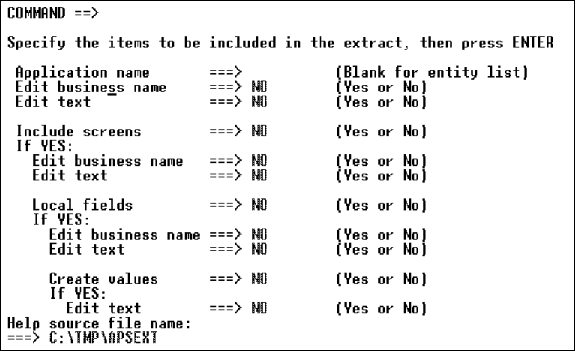
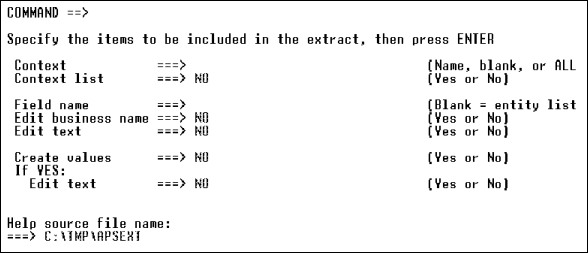
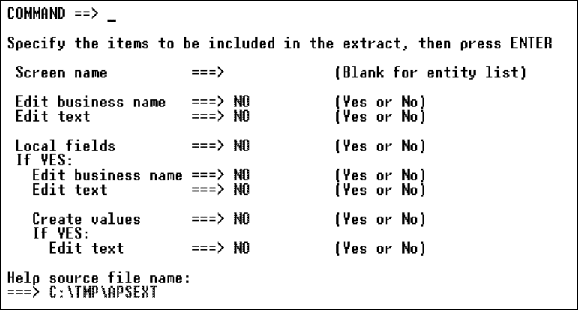
To create the help source file, follow these steps,
| Field |
Screen |
Description |
|---|---|---|
|
Context Name |
Data Elements |
Enter the context name associated with the field to display all the fields with that context. Leave this field blank to display the fields with no context. Enter all to display all the fields with their contexts. |
|
Context List |
Data Elements |
Display a context list. |
|
Application Name |
Applications |
Enter the user application name, or leave this field blank and press Enter to display a selection list. Select a name from the selection list by entering s next to it. |
|
Field Name |
Data Elements |
Type a field name or leave this field blank to display a selection list. |
|
Screen Name |
Screens |
Type a screen name, or leave this field blank to display a selection list. |
|
Edit Business Name |
All |
Select to assign a business name a descriptive name that easily identifies the user application and its components). If you do not assign a business name, it defaults to the user application name. |
|
Edit text |
All |
Select to create help text. |
|
Include Screens |
Applications |
Select to create screen help. |
|
Include Fields |
Applications |
Select to create field help. |
|
Local Fields |
Applications and Screens |
Select to create field help. |
|
Create Values |
All |
Select to create field value help. |
|
Help Source File Name |
All |
Help source file name, TMP.APSEXT. If this file already exists, it is overlaid. Note: Do not use an extension with this filename. |
S-COBOL structure (see S-COBOL Structures)
Direct either the current APS paragraph name or one you designate to name a procedure generated by the APS Precompiler, so that your program follows the conventions, requirements or preferences of a given application or installation.
USERNAME paragraphname
Data Structure Painter construct (see Data Structures)
Code VALUE clauses in your data structures.
dataname PICformat
[...] [VALUE|V] 'valueclause'
Data Structure Painter format:
-LINE- ----- Data Structure Painter ----------
000001  WRK1-FIELD-7 X(120)
000002  ... VALUE 'A LONG LITERAL MAY BE
000003  ...  CONTINUED ON ONE OR
000004  ...  MORE LINES'
000005  WRK1-FIELD-8 X(80)
000006  ... V 'A VALUE CLAUSE THAT SPANS
000007  ...  TWO OR MORE LINES MUST BEGIN
000008  ...  ON ITS OWN LINE'
Generated COBOL code:
01  WRK1-FIELD-7    VALUE 'A LONG LITERAL MAY BE CONT
    'INUED ON ONE OR MORE LINES'
                           PIC X(120).
 01  WRK1-FIELD-8    VALUE 'A VALUE CLAUSE THAT SPANS
   'TWO OR MORE LINES MUST BEGIN ON ITS OWN LINE'
                           PIC X(80).
Data Structure Painter format:
-LINE- ------- Data Structure Painter ---------
000001  WRK1-FIELD-5 x(18) V'18 CHARACTERS LONG'
000002  WRK1-FIELD-6 x(13)
000003  ... V'13 CHARS LONG'
Generated COBOL code:
01  WRK1-FIELD-5 PIC X(18)
                 VALUE '18 CHARACTERS LONG'.
01  WRK1-FIELD-6 VALUE '13 CHARS LONG'
PIC X(13). Report Writer clause (see Report Writer Structures and the APS User's Guide chapter Create Reports with Report Writer)
Batch environments
Designate, as literals, any values that can be interpreted as PIC characters, such as embedded Xs and 9s to a mock-up text field.
APS considers two or more consecutive COBOL PIC characters a COBOL PIC clause and all other strings as literals, with the following exceptions.
To distinguish literals from PIC strings, such as the literal EXXON, which would be interpreted as the literal E, followed by the PIC string XX, and the literal ON, paint the word as a data field in the report mock-up and use the VALUE clause when coding the detail line data item description in your program.
VALUE "characterstring" [PIC picclause]
    [DATA-NAME [IS] fieldname]
|
"character |
Designate a literal as follows.
|
|
DATA-NAME fieldname |
Name a sum accumulator established by a SUM or REFERENCE clause. Do not define fieldname in Working-Storage. At generation, APS inserts fieldname after the level number in the generated report group. DATA-NAME moves the value of the internal SUM accumulator to fieldname. Code DATA-NAME when a SUM UPON clause references DETAIL report group, when the program references a sum accumulator, or when a sum accumulator requires a data name for qualification. |
|
PIC clause |
Specify the format of characterstring. |
Create the report heading QUARTERLY REPORT FOR EXXPERT.
====
QUARTERLY REPORT FOR XXXXXXX
====
-KYWD- 12-*----20---*----30---*----40---*----50---*----60
 01    TYPE IS PAGE HEADING.
       MOCKUP LINE 1
VALUE 'EXXPERT' PIC X(7) Screen Painter feature (see Field Edits)
Ensure that the end user enters only certain values in a screen field by assigning values and value ranges or conversion values to that field.
Note: You can assign values or conversions, but not both.
To assign values to a field, follow these steps.
value
lowvalue TO|THRU highvalue
lowvalue UP
highvalue DOWN
(input1, input2, ..., inputN, I=internalvalue, O=outputvalue)
Follow these rules when you specify values.
For example:
1000 to 30000, 50 down
NORTH, SOUTH, EAST, WEST
25.5 to 35.5, 45.5 to 55.5, 100
-10 to 25, 50.5 up
Follow these rules when you specify conversions.
For example, the entry (ja,jan,i=1,o=January) means that the end user can enter ja or jan; APS converts and stores the ja or jan to 1; and APS displays the output as January.
VSAM batch target
APS locates a variable length record description directly under the associated FD and places the fixed length record descriptions in Working-Storage.
Report Writer clause (see Report Writer Structures and the APS User's Guide chapter Create Reports with Report Writer)
Batch environments
Override the COBOL WRITE statement and execute your own routine.
WRITE ROUTINE [IS] paragraphname
-KYWD- 12-*----20---*----30---*----40---*----50---*----60
 FD    INPUT-FILE
       LABEL RECORDS ARE STANDARD
       BLOCK CONTAINS 0 RECORDS.
 01    PART-STOCK-REC                 PIC X(80).
 FD    REPORT-OUTPUT-FILE
       LABEL RECORDS ARE STANDARD
 01    USER-REPORT-RECORD.
       03  USER-REPORT-APS-PART       PIC X(248).
       03  USER-REPORT-USER-PART      PIC X(7).
   .
 RED   STOCK-REPORT
   .
       WRITE ROUTINE IS USER-DEFINED-PARA
   .
 NTRY
   .
 PARA  USER-DEFINED-PARA
   .
       MOVE STOCK REPORT RECORD TO
...USER-REPORT-APS-PART Program Painter and Specification Editor keyword (see Keywords)
Define or include data structures in the Working-Storage Section.
-KYWD-  12-*----20---*----30---*----40---*----50---*----60
 WS
 kywd   associated data structure
Associated data structure keywords are 01, DS, REC, or ++.
Use Section keywords to code Working-Storage data structures.
-KYWD-  12-*----20---*----30---*----40---*----50---*----60
 IO     INPUT-FILE ASSIGN TO UT-S-INPUT
 IO     OUTPUT-FILE ASSIGN TO UT-S-OUTPUT
 SPNM   C01 IS TOP-OF-PAGE
 FD     INPUT-FILE
        LABEL RECORDS ARE STANDARD
        BLOCK CONTAINS 0 RECORDS
 01     INPUT-REC         PIC X(80).
 DS01   INPUT-REC
 FD     OUTPUT-FILE
        LABEL RECORDS ARE STANDARD
        BLOCK CONTAINS 0 RECORDS
 REC    OUTPUT-REC       X80
 01     OUTPUT-REC-R REDEFINES OUTPUT-REC.
        ... COPY OUTREC.
 WS
 REC     WS-INPUT-REC
            WS-IN-PART-NO       N8
            WS-IN-DESC          X50
            WS-IN-BASE-PRICE    N6V2
 01     WS-OUT-REC
DS05 WSOUTREC Data communication call (see Data Communication Calls)
CICS, ISPF Dialog, and ISPF Prototyping, targets
Transfer control from a program at one logical level to an APS or non-APS application program at the same level, and pass the Commarea.
Transferring to a APS program:
[TP-]XCTL programname [errorpara]
... [LENGTH(value)]
... [DLIUIB pcbname [pcbname ...]]
... [userparm [userparm] ...]
Transferring to a non-APS program:
[TP-]XCTL programname(NONAPS) [errorpara]
... [LENGTH(value)]
[TP-]XCTL programname[(NONAPS)]
... [LENGTH(value)]
% &TP-PROGRAM-INVOCATION = "NONAPS"
XCTL, which calls a subprogram at the next lower level, operates identically to LINK. XCTL invokes LINK, providing no additional functionality and does not pass the COMMAREA; XCTL is provided for upward compatibility.
Transfer control to PGM001. There is no active PSB and no passing of arguments.
XCTL PGM001
Transfer control to the program whose name is stored in WS-PROGNAME. There is no active PSB and no passing of arguments.
XCTL /WS-PROGNAME
Move the value PGM003 to WS-PROGNAME and transfer control to that program. There is no active PSB and no passing of arguments.
XCTL PGM003/WS-PROGNAME
Transfer control to PGM004; execute an error routine for an abnormal condition. There is no active PSB and no passing of arguments.
XCTL PGM004 ERR-PARA
Transfer control to PGM005. A PSB is scheduled and the transferred-to program uses PCB ABC-PCB.
XCTL PGM005 * DLIUIB ABC-PCB
Transfer control to a non-APS program, PROG001.
XCTL PROG001(NONAPS)
Copyright © 2002 Micro Focus International Limited. All rights reserved.
This document and the proprietary marks and names
used herein are protected by international law.