Preparing the Subnet for the NFS Server and Jump Host
This step might be skipped if you already have a subnet prepared for the installation AKS.
In this section, you will prepare subnets for the NFS server and for the jump host. All of the created resources should be placed in the same vnet to prevent performance issues caused by network latency; such resources include resource group, AKS cluster, jumphost, Azure NetApp files, and so on.
Portal
 To prepare the subnet for the NFS server and jump host:
- Open the virtual network used for the installation AKS. In our example, this is called
demo-vnetin resource group srg-demo.
- On the Virtual network page, under Settings, select Subnets.
- Click + Subnet.
- In Name, enter nfs-subnet.
- In Address range, enter an address range based on the IP assigned by Azure. In our example, aks-subnet uses the address range
10.1.1.0/24, so we use10.1.2.0/24.
If you plan to use NetApp as an NFS service, under Subnet delegation, the subnet must be delegated to
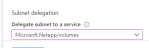
Microsoft.NetApp/volumes.

- Click OK to create the subnet.

- Repeat steps 3 and 4 to create a subnet for the jump host.
- For name, use jumphost-subnet.
- For address range we will use, for example, 10.1.3.0/24.
To prepare the subnet for the NFS server and jump host using the Azure Cloud Shell:
Required permissions:create subnets inside the AKS virtual network
- Create the NFS subnet by running the command:
# az network vnet subnet create \
--address-prefixes <ADDRESS PREFIX> \
--name nfs-subnet \
-g <RESOURCE GROUP> \
--vnet-name <VIRTUAL NETWORK>
where:
<VIRTUAL NETWORK>is the virtual network name where you want to create the subnet. We will use the virtual network created earlier.<RESOURCE GROUP>is the resource group where the virtual network is located.
If you are using NetApp as an NFS service, add the argument
--delegations Microsoft.NetApp/volumes to the above command.For example, the following command would create nfs-subnet in virtual network demo-vnet, from resource group srg-demo with range 10.1.2.0/24 :
# az network vnet subnet create --address-prefixes 10.1.2.0/24 --name nfs-subnet -g srg-demo --vnet-name demo-vnet- Create the jumphost subnet by running a similar command to the one in Step 1, but with a different name and address prefix.
For example, the following command would create the jumphost-subnet, in virtual network demo-vnet from resource group srg-demo with range 10.1.3.0/24
# az network vnet subnet create --address-prefixes 10.1.3.0/24 --name jumphost-subnet -g srg-demo --vnet-name demo-vnetCLI
To prepare the subnet for the NFS server and jump host using the Azure Cloud Shell:
Required permissions:create subnets inside the AKS virtual network
- Create the NFS subnet by running the command:
# az network vnet subnet create \
--address-prefixes <ADDRESS PREFIX> \
--name nfs-subnet \
-g <RESOURCE GROUP> \
--vnet-name <VIRTUAL NETWORK>
where:
<VIRTUAL NETWORK>is the virtual network name where you want to create the subnet. We will use the virtual network created earlier.<RESOURCE GROUP>is the resource group where the virtual network is located.
If you are using NetApp as an NFS service, add the argument
--delegations Microsoft.NetApp/volumes to the above command.For example, the following command would create nfs-subnet in virtual network demo-vnet, from resource group srg-demo with range 10.1.2.0/24 :
# az network vnet subnet create --address-prefixes 10.1.2.0/24 --name nfs-subnet -g srg-demo --vnet-name demo-vnet- Create the jumphost subnet by running a similar command to the one in Step 1, but with a different name and address prefix.
For example, the following command would create the jumphost-subnet, in virtual network demo-vnet from resource group srg-demo with range 10.1.3.0/24
# az network vnet subnet create --address-prefixes 10.1.3.0/24 --name jumphost-subnet -g srg-demo --vnet-name demo-vnet
Next Step: Preparing the Jump Host Virtual Machine