2 Overview and Architecture
It is important to prepare your environment correctly for installation. Content Manager for SharePoint is an integration between Content Manager and Microsoft SharePoint. Both of these products are highly configurable with many optional components.
Preparing for the installation involves ensuring that any necessary configuration of these products has been performed prior to the installation occurring.
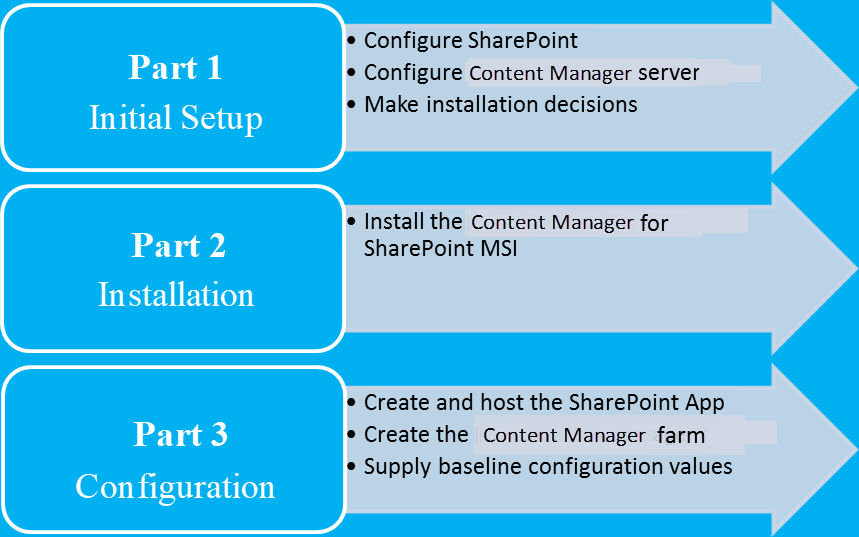
It is important that you follow the steps outlined in this document for each part of the process to ensure a successful implementation.
This section helps you understand and make some installation choices prior to commencing installation.
2.1 Understanding the product architecture
2.1.1 SharePoint apps
SharePoint 2013 introduced a new architecture for integrating/interacting with SharePoint. This architecture is known as the “App model”.
The concept of a SharePoint app is that using only a small footprint on the SharePoint farm, it is able to configure UI components such as ribbon buttons. The actual processing provided by an app is performed on an external server, not on the SharePoint server. This type of SharePoint app is known as a “provider hosted app”.
The SharePoint farm is a collection of servers that have sharepoint installed. There can be only one farm for each server.
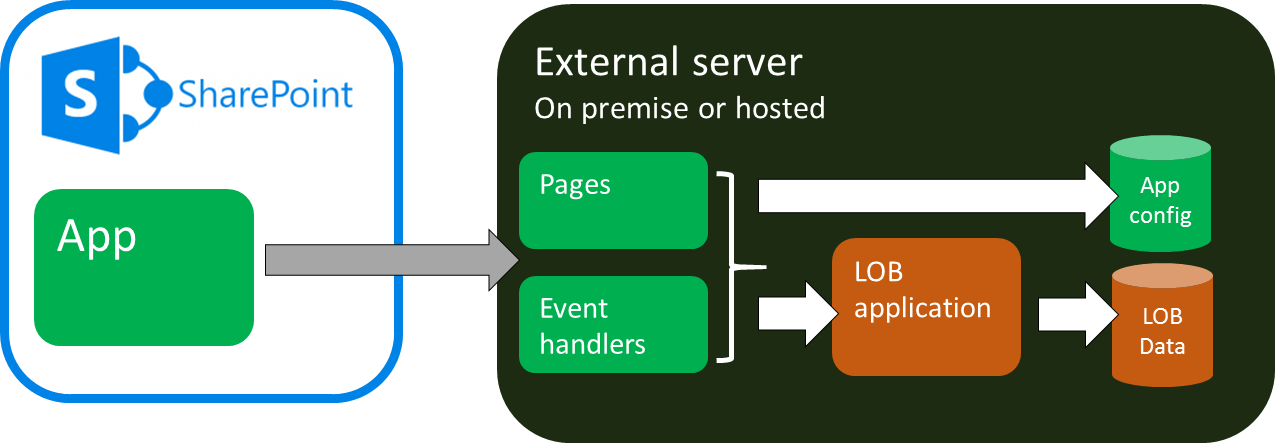
The external server typically provides:
- Any pages used by the app such as configuration pages
- A service for handling events raised by SharePoint that are relevant to the app
- Access to the line of business (LOB) application that the app is using
- Storage of LOB data
- Storage of app configuration data
SharePoint apps are hosted in catalogs to make them available for use on a SharePoint site or site collection. The Microsoft corporate store is the catalog of publicly available apps that are available for purchase and use. SharePoint includes a corporate catalog that allows the hosting of apps that are only available for use in your organization.
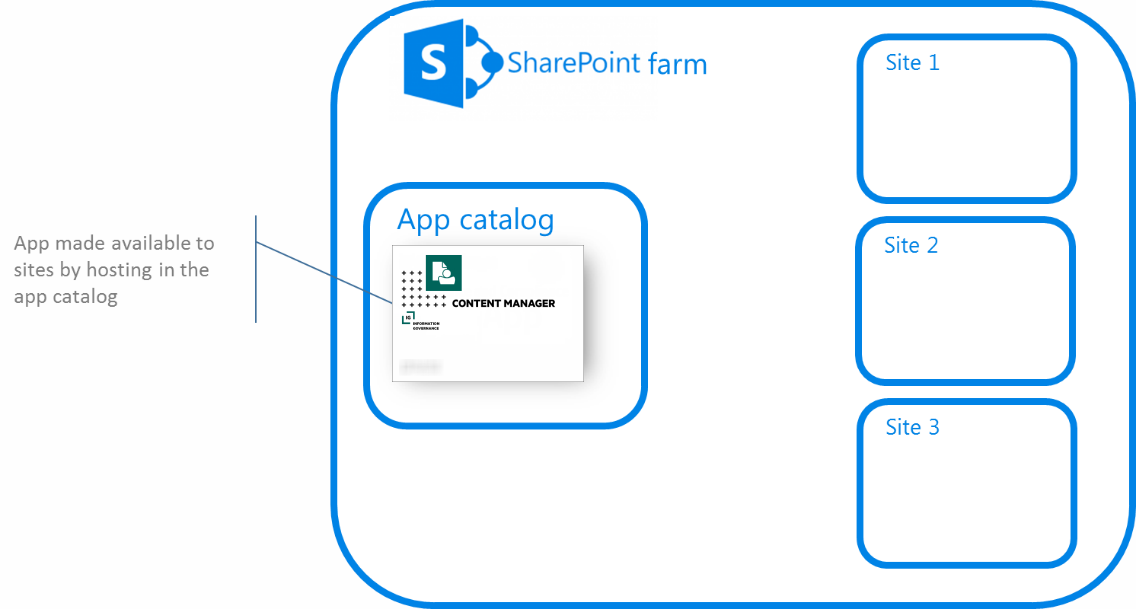
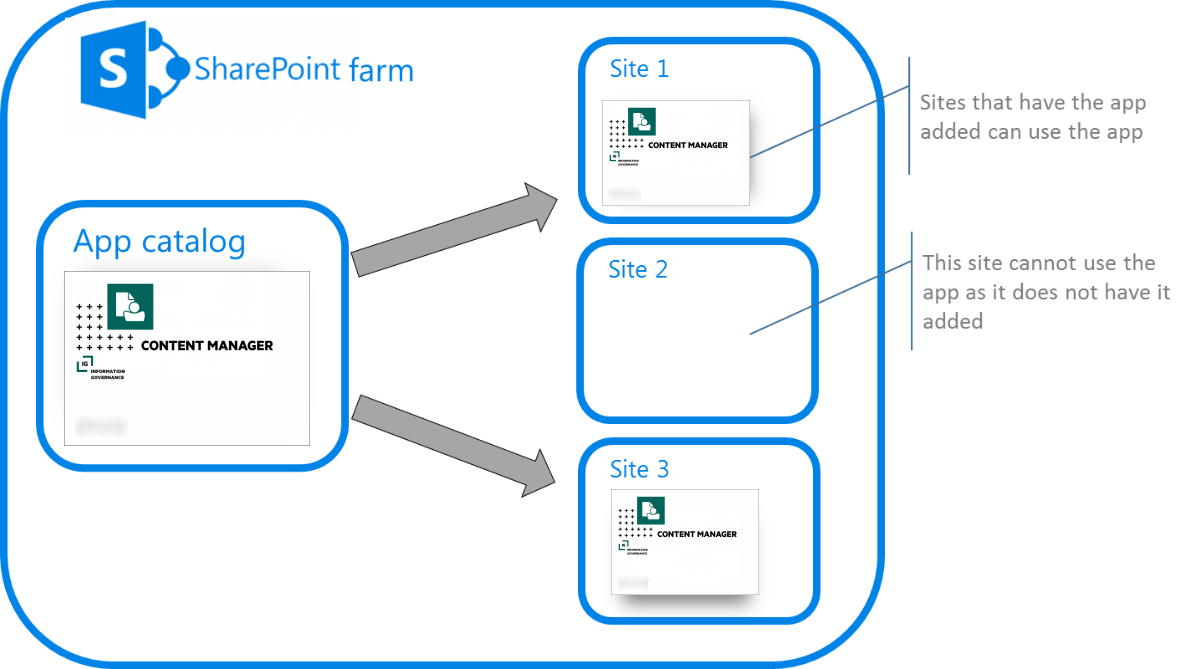
Once an app has been made available in the corporate catalog, it can be added to a site. It is at this point that the app functionality is available for use.
2.1.2 Content Manager Governance and Compliance app
Content Manager for SharePoint includes a SharePoint app. This app uses pages and event handlers that are installed on one or more Content Manager workgroup servers.
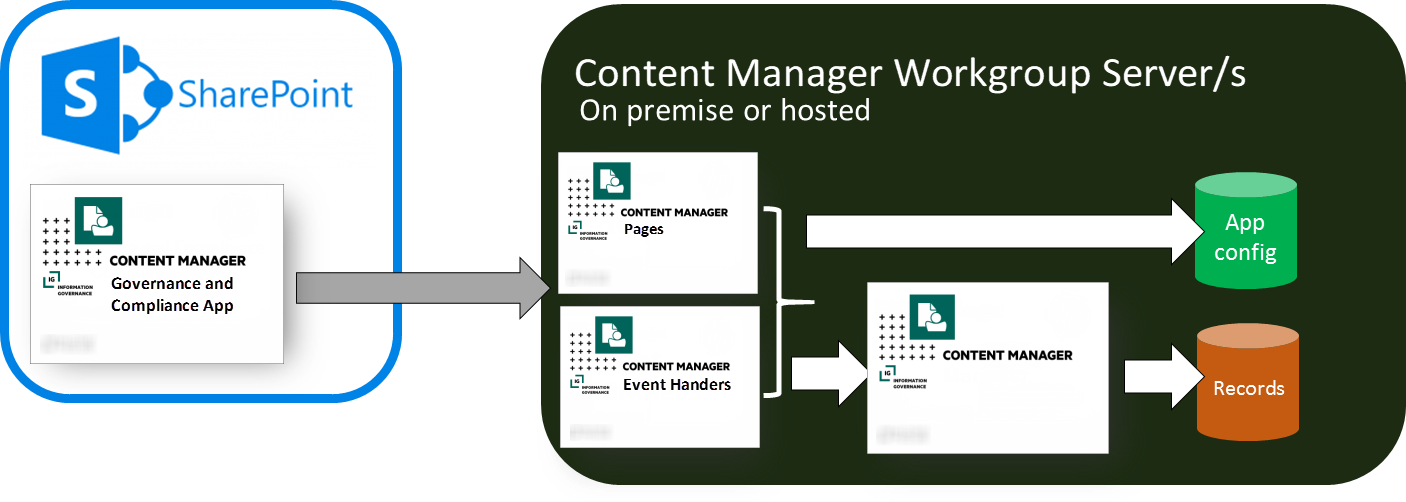
Equating this to the explanation of SharePoint apps, it is Content Manager that is the LOB application with the LOB data being the records it stores.
The app configuration data for the app is stored in a dedicated SQL Server database. Although illustrated as residing on the workgroup server, this database can be hosted on an external SQL Server.
Installation of these components can be summarized as:
- The pages and event handlers are installed on the Content Manager Workgroup Server by a dedicated MSI
- The app is uploaded to the SharePoint app catalog in use by the SharePoint farm
- The app is added to sites and site collections where it is required
Supports SharePoint Site User experience
The Content Manager Governance and Compliance for SharePoint app supports SharePoint Site User experience for Documents and Custom Lists in your site collection. A new template (CMModernUIGovernanceComplianceTemplate.app) is available in the install directory to support SharePoint Site User experience.
If you are integrating Content Manager with SharePoint for the first time, during app configuration using the Wizard or Tool, you have the option to choose the SharePoint Site User experience (Classic or Modern). Based on your selection, respective template will be used to create the app.
If you want your existing integration to work with SharePoint Site User experience then, in the App configuration settings, modify the SharePoint Site User experience option to Modern using the Configuration Tool, configure the app and then publish it. Complete rest of the necessary steps by adding the app to your site collection.
To know whether you are using the right template for the experience you chose, check the app title once you have added it to your site collection. For classic experience, the app title will be Content Manager Governance and Compliance app. For SharePoint Site User experience, the app title will be Content Manager Modern UI Governance and Compliance app.
With the SharePoint Site User experience, Content Manager options will be available on the horizontal navigation bar of your site pages for Documents and Custom Lists. Except for the title of the app, the menu options and its functions are same as the classic experience.
2.1.3 Job processing
Management tasks are performed asynchronously by jobs. When a job is requested it is added to a job queue. The job queue resides in the app configuration database. Workgroup servers in the Content Manager farm retrieve jobs from the job queue and process them when the server has the capacity to complete the job.
The retrieval and execution of jobs from the queue is performed by a Windows service called the “Content Manager SharePoint Service”.
Processing jobs from the queue in this manner provides the following benefits:
- Failover: if a server in the Content Manager farm becomes unavailable, other servers can process the jobs
- Retry: if a job fails, it will be retried
- Restart: should a workgroup server become unavailable after it has commenced processing a job, when the server becomes available again, the job will recommence from the point that it was at when the server went offline.
- Throttling: jobs are processed in a throttled manner to ensure that the server processing does not consume more resources than it has available.
2.2 Implementation Scenarios
The size of your SharePoint farm, the number of users and the types of activities that these users perform will all be determining factors when deciding how to configure the server topology for Content Manager.
2.2.1 Single Architecture
App configuration storage
The app configuration is stored in a SQL Server database. This therefore requires a SQL Server instance to be available. For information on SQL Server supported environment, see Content Manager Specifications and Limitations document.
NOTE: Express editions of these versions of SQL servers are suitable.
The following are the possible scenarios:
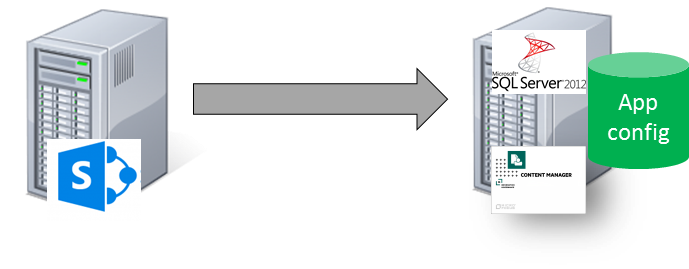
Scenario 1:
This is the simplest scenario where SQL server is hosted on the workgroup server.
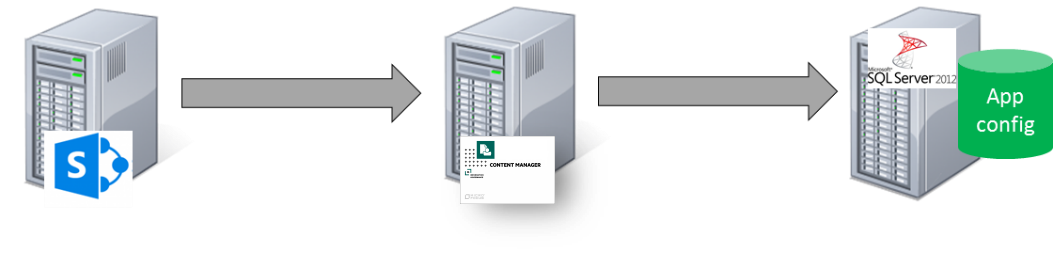
Scenario 2:
In this scenario, the app configuration database can be hosted on a separate dedicated SQL Server box.
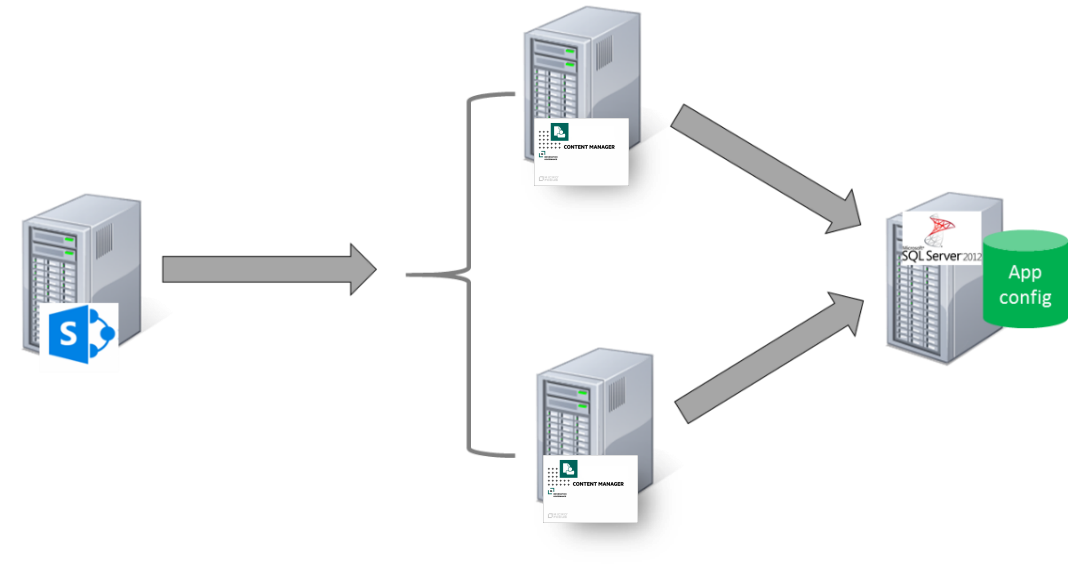
Scenario 3:
In the scenario where multiple workgroup servers are used, only one instance of the app configuration database is required and will be shared by all workgroup servers in the farm.
Workgroup servers
Following are the scenarios for server topology configuration:
Scenario 1:
This scenario involves single Content Manager workgroup server servicing the SharePoint farm.
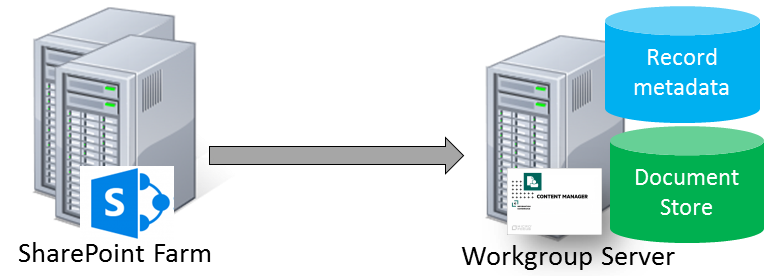
Scenario 2:
In this scenario, depending on the performance of workgroup server and the number and type of management tasks performed for SharePoint, you can have each component on separate server. The workgroup server, database server, and storage server are installed on separate servers.
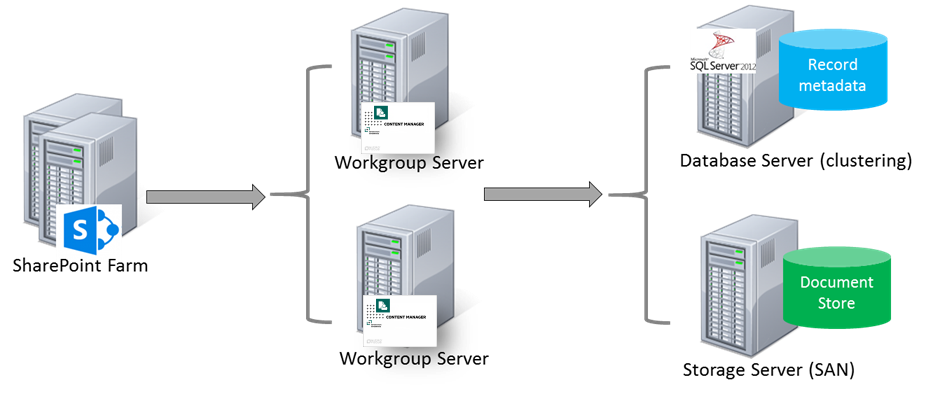
If the workgroup server is unavailable, the information management is not possible for SharePoint content. To overcome this drawback, it is recommended to make available one other Content Manager workgroup server.
NOTE: The collection of workgroup servers in use is referred to in the rest of this document as the Content Manager Farm.
Scenario 3:
Your organization may already have existing workgroup servers if it has an existing implementation of Content Manager. It is possible to use existing workgroup servers in lieu of dedicated servers used only by SharePoint.
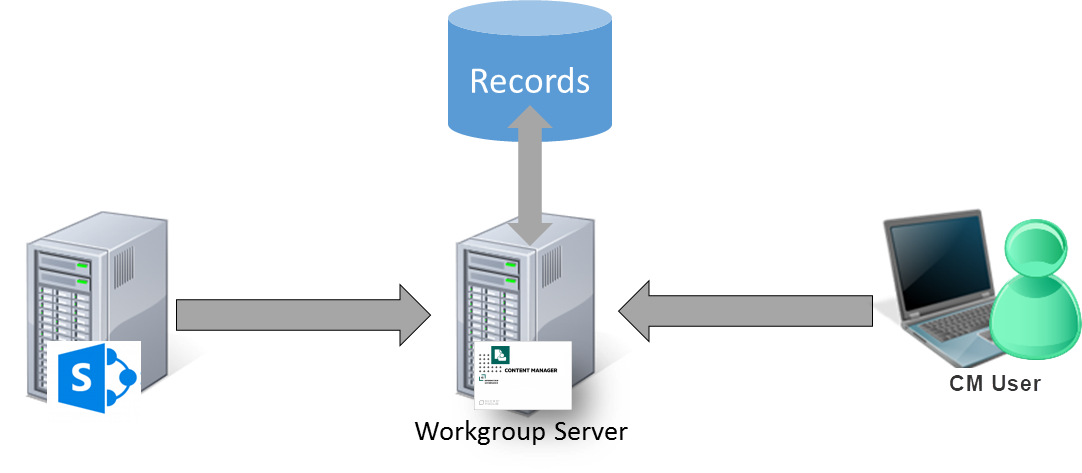
In this scenario, SharePoint is utilizing a workgroup server (or collection of workgroup servers) that is already in use in the organization. Content Manager users can continue to use that workgroup server even though it is also being used for SharePoint management. This may be a suitable configuration in smaller deployments.
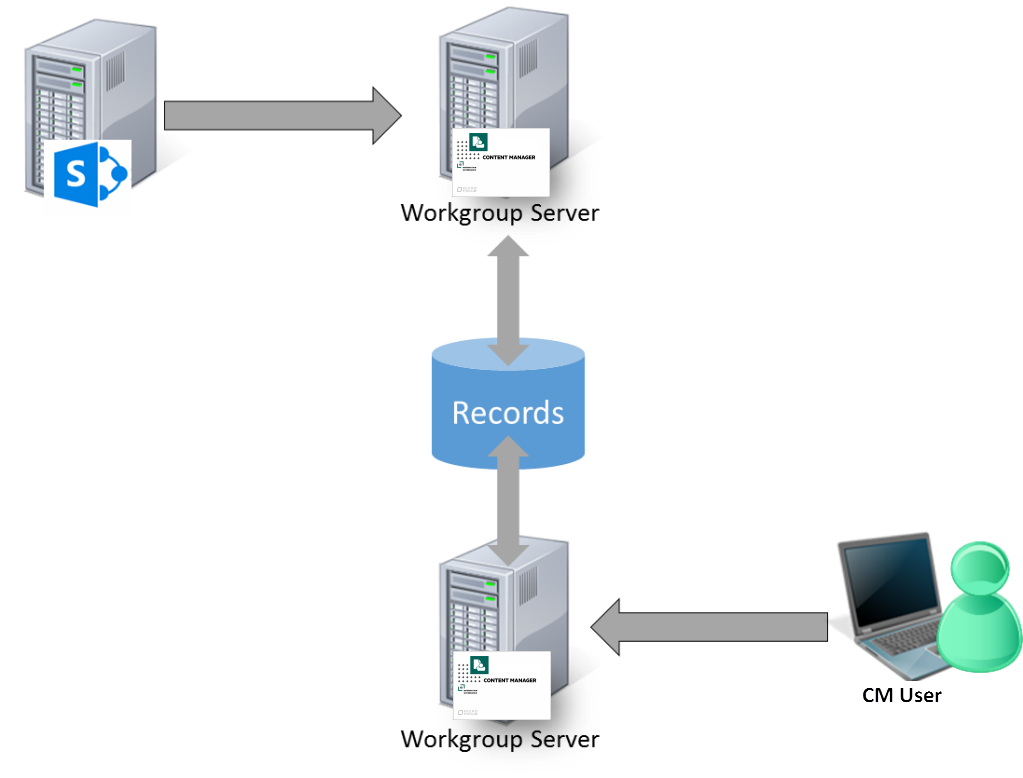
Scenario 4:
In the illustrated scenario, records created from SharePoint content and records created by Content Manager users all reside in the same dataset. The records are simply accessed via different workgroup servers. In this example, the Content Manager user would be able to access records created from SharePoint, and SharePoint users would be able to access records created by the Content Manager user.
Using dedicated workgroup servers in this manner allows distributing much of the load to allow sufficient performance for both SharePoint and for Content Manager users.
NOTE: These illustrations are simplified explanations of workgroup server architecture. Please consult the Content Manager documentation for a more detailed understanding.
Determining the number of workgroup servers
Determining the number of workgroup servers in your Content Manager farm is based on the organization's requirements and performance metrics.
You may define metrics identifying the maximum time that should be taken to process a task or job in the queue. If the metric exceeds, consider improving the performance of the existing workgroup server or adding more workgroup servers to your Content Manager farm.
SharePoint events are handled by the Content Manager servers. For example, when a managed item is modified by a user in SharePoint, the Content Manager server is called synchronously to confirm that the change is permitted and make any necessary updates to the record.
If you encounter noticeable delays when saving updated list items, this indicates that the servers in the Content Manager farm have reached maximum capacity.
See Appendix: Performance planning for guidance around determining hardware requirements. Also see the Understanding the job queue section of the user guide for further details around how jobs are distributed.
2.2.2 Distributed architectures
This section covers common scenarios where an organization may have to geographically distribute system components and/or support multiple different SharePoint farms.
Multiple SharePoint farms - collocated
Multiple SharePoint farms can be supported by Content Manager. There are additional configuration steps required to support scenario. See, Supporting multiple SharePoint farms or multiple configuration databases.
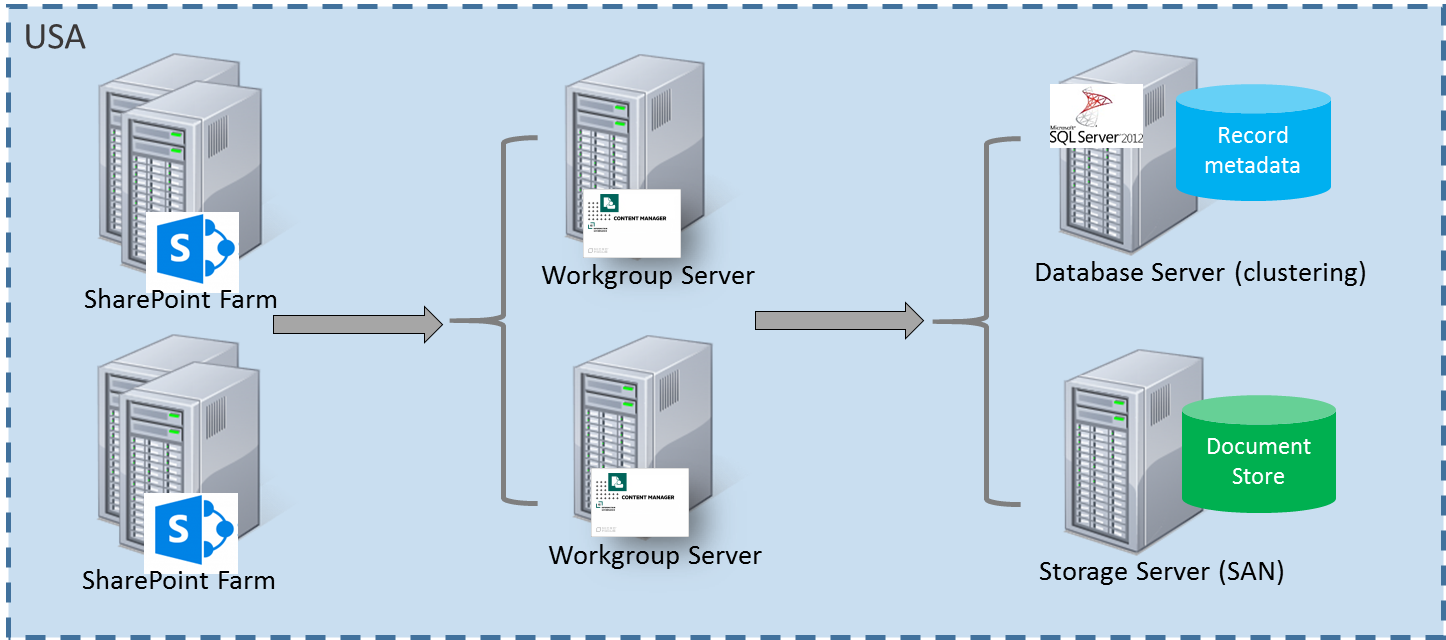
Multiple SharePoint farms – distributed
This scenario involves an organization with multiple SharePoint farms that are geographically distributed. For the examples, the farms are located in Australia and the USA and it is assumed there are network latency issues between the data centers.
Collocated workgroup server farm
An approach to service these farms is to use a single workgroup server farm collocated with one of the SharePoint farms. Both SharePoint farms connect to this workgroup server farm.
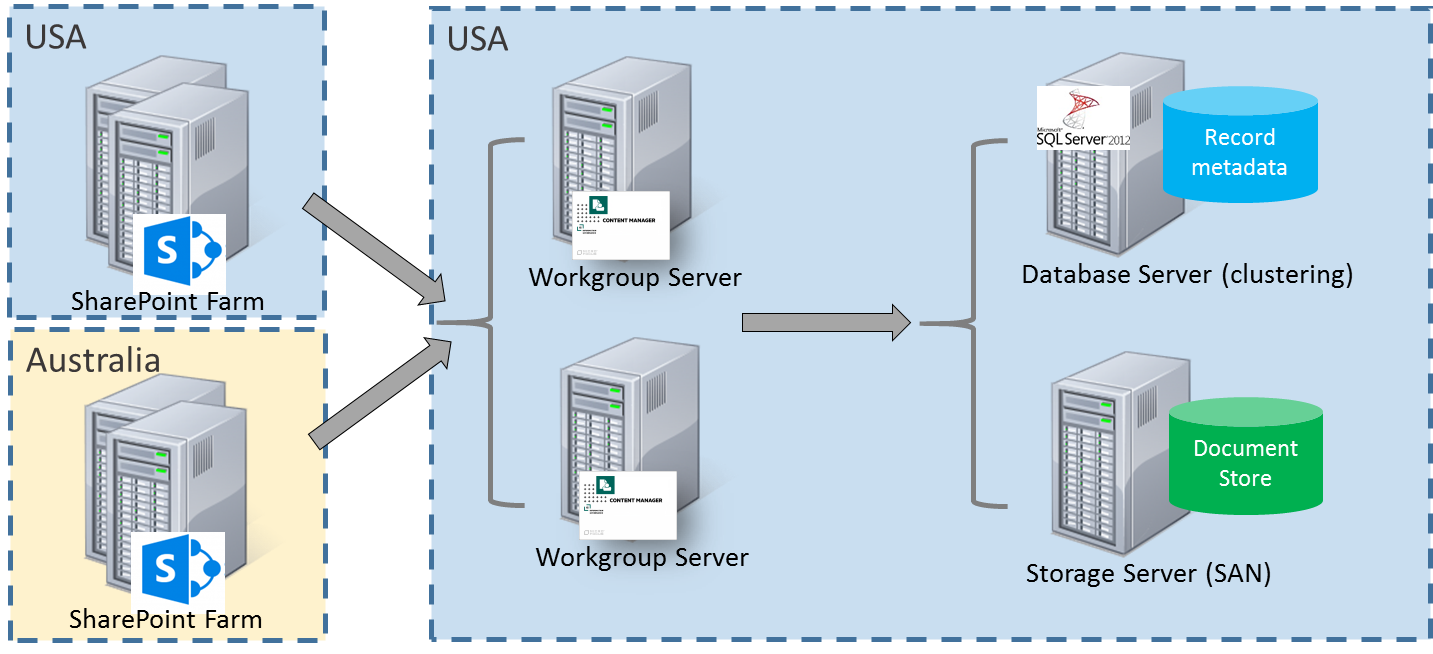
This approach has the following considerations:
- Pros
- Single location for maintenance and efficiency
- Single dataset
- Single document store
- Simpler backup strategy
- Less infrastructure as both countries get redundancy from the same set of infrastructure
- IDOL indexing does not suffer from network latency for Australian content
- Retrieving Australian documents from USA no latency impact
- Cons
- Editing managed list items in Australia would suffer from any Australia to USA latency (noting that we can accommodate up to 59 seconds latency but user’s would probably only accept 4 seconds for a useability perspective).
- Retrieving documents via search would be subject to Aus-US latency
- Jobs running against Australia farm will take longer (but user does not see this)
- Retrieving USA documents from Australia latency impact. Workgroup server caching and pre caching can minimize this impact.
Distributed workgroup server farm
An approach to service distributed SharePoint farms is to distribute the servers in the workgroup server farm across the two geographic locations. Each SharePoint farm connects to the workgroup server/s in its geographic location. Jobs for the region are processed on that regions workgroup server/s.
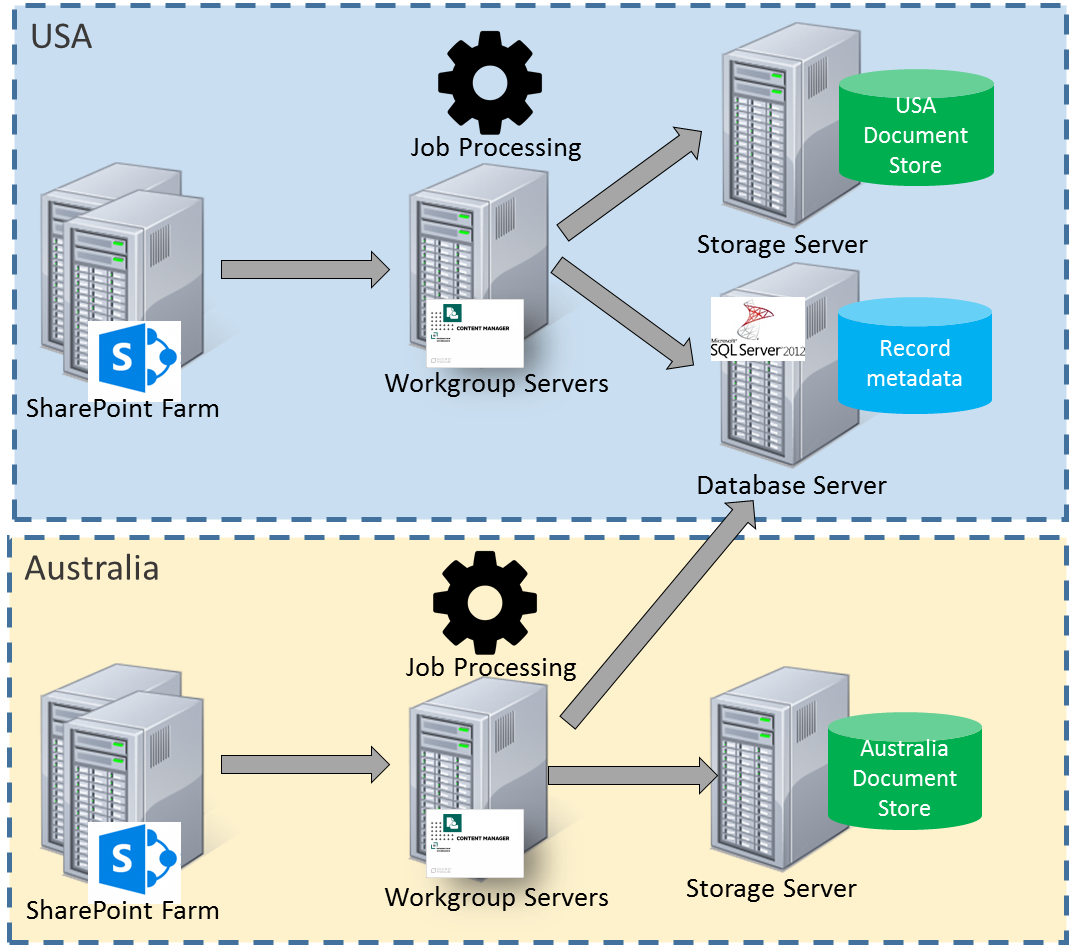
This approach has the following considerations:
- Pros
- Shared database infrastructure – lower maintenance
- Both regions share the database redundancy capabilities
- Document retrieval through search fast
- Can configure each region to only process their own jobs
- Cons
- More infrastructure to provide workgroup server redundancy in each region
- Multiple document stores
- If IDOL indexing in USA will suffer latency for Australian documents
- Retrieving Australian documents from USA (and vice versa) latency impact. Happens through search or during relocation.
- Editing managed list items in Australia could suffer from any latency to database server.
- Job processing on Australian server impacted by latency to database server.
Distributed workgroup server farm with central job processing
An approach to service distributed SharePoint farms is to distribute the servers in the workgroup server farm across the two geographic locations. Each SharePoint farm connects to the workgroup server/s in its geographic location. In this scenario, all jobs for all regions are processed by one of the workgroup server farms.
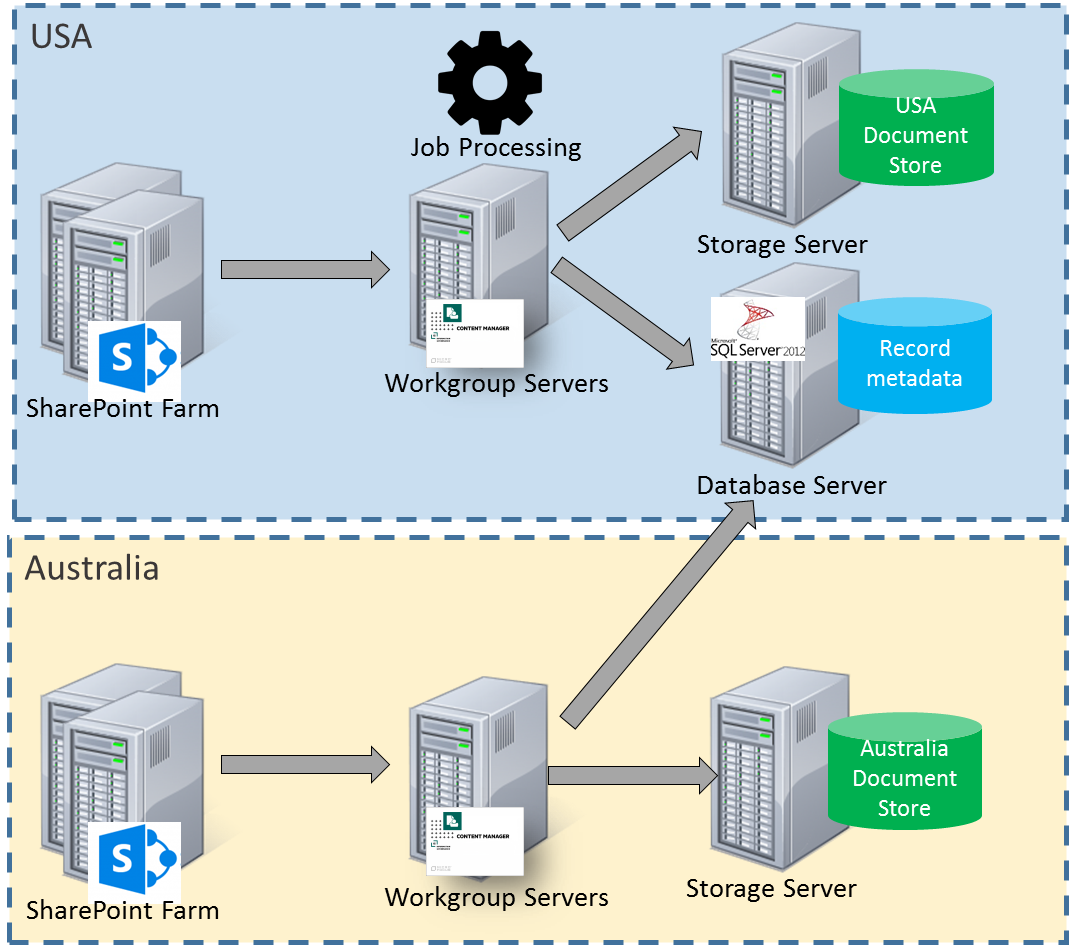
This approach has the following considerations:
- Pros
- Can scale out in a central place rather than distributed as jobs are processed in a central place
- Jobs are processed close to Content Manager so Content Manager interactions have no latency
- Cons
- Workgroup servers in Australia are underutilized
- Jobs for Australian content suffer latency reaching the Australian SharePoint farm
Separation of Content Manager
Another approach to management of geographically separated SharePoint farms is to have an entirely separate Content Manager infrastructure for each SharePoint farm.
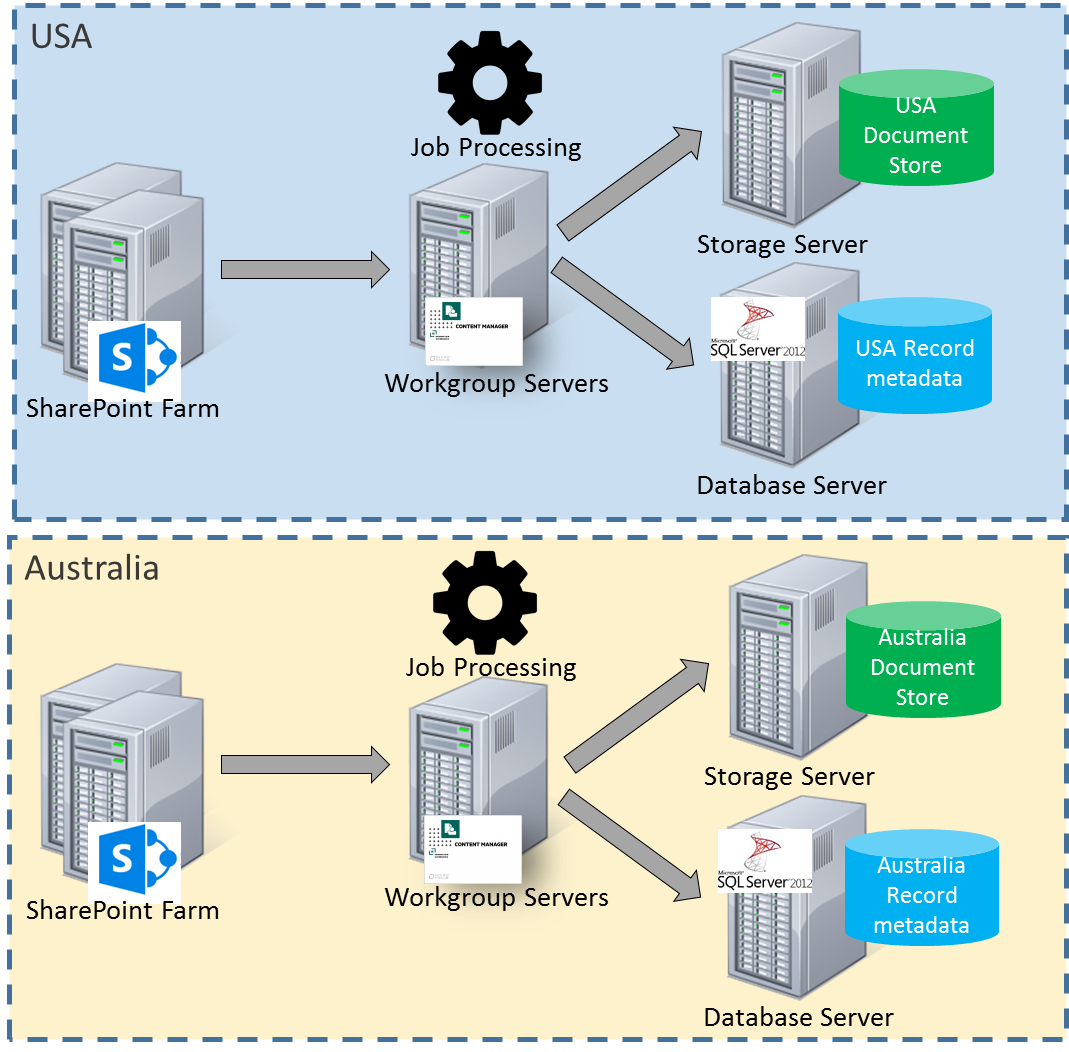
This approach has the following considerations:
- Pros
- No latency
- Can configure search across both datasets
- Cons
- Siloed information
- Maintenance of two separate infrastructures
- May result in underutilized servers