How Reporting Center works
Reporting Center includes a number of components that work together to retrieve data from source databases and produce effective reports. You can customize and configure these reports in the Reporting Center Console and then deploy the reports to SSRS for distribution. You can distribute Reporting Center components across multiple computers or install them all-in-one.
The following diagram provides an overview of the Reporting Center architecture.
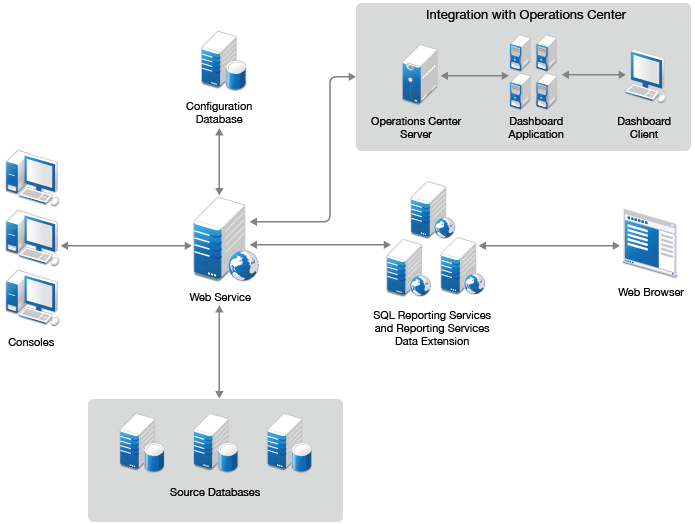
The Reporting Center Console connects to the Reporting Center Web Service, which allows you to perform queries on the source databases. You can install the Console on multiple computers. The Web Service retrieves data from the source databases and returns it to the Console, where you can configure and run reports. The Reporting Services Data Extension makes the same connection to the Web Service to publish, print, and provide Web access to reports using SSRS. You can deploy reports to multiple instances of SSRS and then view the reports in a Web browser. Reporting Center stores report configuration, security, and deployment information in the Reporting Center Configuration Database.
The Operations Center Sever, the Dashboard Application, and the Dashboard Client are the components of the Operations Center solution. The integration of the Operation Center and the Reporting Center allows you to view the Analysis Center reports in the Operations Center Dashboard The Operation Center Server connects to the Reporting Center Web Service, which collects data and displays the Analysis Center reports in the Dashboard client. The Dashboard is a Web application, which also functions as a client to the Operation Center Server. It allows users to view and manipulate data from the Operations Center Server. For more information on Operations Center, see the Operation Center 5.7 Getting Started Guide.
Review the following sections for information about the components:
Console
The Console is the Reporting Center user interface, where you run reports and perform administrative tasks, such as defining Reporting Center accounts, groups, and permissions. From the Console, you can manage connections to databases on any SQL Server. You can also configure contexts for each report, such as setting a time frame, selecting data series, and specifying parent categories of data.
Use the Console to perform the following tasks:
-
Customize the look and feel of a report
-
Determine the amount of data displayed in a report
-
Create dashboard reports that contain multiple related reports
-
Configure deployment settings
-
Configure subscriptions for SSRS
Configuration Database
The Configuration Database, NQRConfig, contains information that Reporting Center uses to run reports, including settings you configure during installation, as well as information that you define and view in the Reporting Center Console. The Configuration Database is created with case-insensitive settings. It includes the following information:
-
Security information, such as the level of privileges assigned to each user, and the permissions you define for folders and reports
-
SQL server and database names that Reporting Center uses to run reports
-
Information about folders you set up to group your reports and data source connections
-
Web Service specifications
-
Customized schedule configurations and the status of scheduled reports
Web Service
The Web Service runs on a Microsoft Internet Information Services (IIS) Web server and is the centralized point of access to all your databases. It serves as the layer between the Reporting Center Console and the source databases, running the SQL queries that gather report data and then returning the data to the Console. In addition to authenticating source database connections, it also authenticates connections to the Reporting Services Data Extension, which in turn publishes your reports to SSRS.
Reporting Services Data Extension
Reporting Center allows you to deploy reports to SSRS that lets you to create and manage reports, and deliver them on a schedule. When you deploy a report from Reporting Center, the Reporting Services Data Extension communicates with SSRS through the Reporting Center Web Service to deliver the information. SSRS publishes the report, which you view in a Web browser.