Reviewing Fortify Audit Assistant results
After you submit analysis results to Fortify Audit Assistant and the assessment of the issues is complete, you can examine the results.
To view Fortify Audit Assistant results:
Open the AUDIT page for the application version.
Use the Fortify Priority risk links, the Group by list, and Filter by lists to display the issues you want to audit.
See Viewing issues based on folders and Filtering issues for display on the OVERVIEW and AUDIT pages.
- In the issues table, if you have selected a grouping, expand a group to view the issues it contains.
To expand an issue and view its details, click its row in the table.
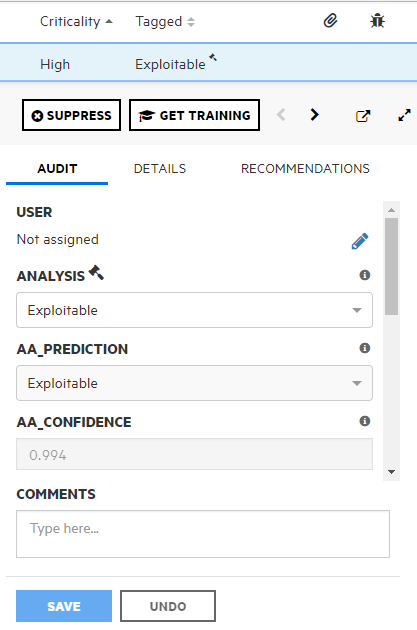
In addition to the Analysis tag and any other custom tags associated with the application version, the following tags are displayed in the Audit tab:
- AA_PREDICTION—Exploitability level that Fortify Audit Assistant assigned to the issue.
AA_CONFIDENCE—Fortify Audit Assistant's level of confidence in the accuracy of its AA_PREDICTION value.
This is a percentage expressed in values that range from 0.000 to 1.000. For example, the value 0.994 Indicates a confidence level of 99.4 percent.
- If your exploitability assessment agrees with the AA_Prediction value displayed, you can select the value that corresponds to the Fortify Audit Assistant assessment from the list of custom tag values. Otherwise, select a different custom tag value.
- Click SAVE.
See Also