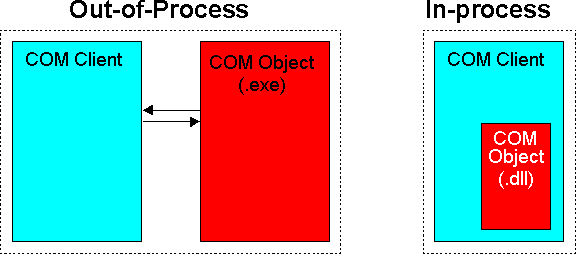
Figure 2-1: Out-of-process and In-process COM Objects
This chapter explains the creation of COM objects from OO COBOL classes.
Note: In this chapter, all methods and classes are created using the Net Express Class and Method Wizard. See the section The Interface Mapper in the chapter Using COM and COBOL together for information on using the Interface Mapper to create an in-process COM object.
You can create COM objects from an OO COBOL class that meets the following criteria:
These classes provide the code needed to enable a class to work with COM through Automation. OLEBase-s specifies a single use server; that is a new server is created for each client that tries to connect to it. OLEBase is used for multiple use servers - most servers are multiple use. Single and multiple use are not applicable to in-process servers.
Your class must inherit from class olebase. COM does not support inheritance, so you can't create subclasses from these classes.
OOCTRL(+P) forces the Compiler to provide some extra type-checking information required for programs to work with COM through Automation.
Note: Specifying OOCTRL(+P) limits the number of parameters in any method invoked or declared to 31, plus an optional RETURNING parameter.
Clients locate your class through the Windows Registry. The format of the registration depends on how the COM object is run (see below).
Use the Net Express Class Wizard to generate the class skeleton, a registry entry, type library, and a trigger program (if required). To run the Class Wizard, click New on the File menu and select Class from the New dialog box.
A COM server application can be run in one of three ways:
The object runs in a separate process space to the client using it. Out-of-process objects are built as stand-alone .exe programs. If an out-of-process object crashes, the client can recover from the error.
The object is loaded into the same process space as the client. In-process objects are built as .dll programs. Access to in-process COM objects is faster. If the object crashes (for example, if it causes a protection violation) the client is likely to crash as well.
The client and object run on different machines. Messages are passed across the network. A remote COM object can be built as either an in-process or out-of-process server. You can develop a COM object that runs locally, and convert it to a remote object when you are ready to deploy it, by following the instructions in the chapter Distributing COM Components.
If built as an in-process server, it does not run in the process space of the client, but is loaded on the remote machine by a proxy client. This improves performance as the in-process server stays loaded, and doesn't have to be reloaded for subsequent clients.
Remote COM objects are supported by an extension to COM, Distributed Component Object Model (DCOM). Not all versions of Windows support DCOM - see the section Checklist - Before You Start in the chapter Using COM and COBOL Together for details.
The source code for all three types is the same, but the way you build and register them is different. The next two diagrams contrast in-process, out-of-process and remote objects.
Figure 2-1: Out-of-process and In-process COM Objects
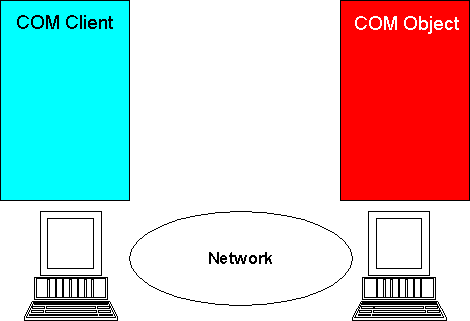
Figure 2-2: A Remote COM Object
OO COBOL COM Automation servers are OO COBOL classes. An instance of this class is a COM object. We have split writing a class into three stages:
The Net Express Class Wizard can generate an outline of your COM Automation class, and trigger programs and registry entries for you. Before you run the wizard, you need to decide the following:
If you prefer, you can create the server as a local server, and change it to a remote server when you have finished developing it. The only difference between local and remote servers is in how they are registered with Windows.
A type library provides useful information for clients of your class.
If you create the library to support dual interfaces (the default), a client can early bind to the type library, providing a significant increase in performance. You must keep the type library up-to-date with the class - see the section Working with Type Libraries. And because dual interface clients are early bound to the class through the type library, you must relink them if you change the type library. If you fail to keep type libraries and clients up-to-date with changes, programs can crash at run-time due to parameter mismatches.
Then, to run the wizard, see the Help topic To create a COM component class.
When you click the Finish button on the last wizard dialog box, the Class Wizard generates or updates the following files and adds them to the project:
If you asked for a type library, it also generates these files:
The Class Wizard also ensures that your class is built as a .dll or .exe depending on whether you elected to build it as an in-process or out-of-process server.
Note: When you create an in-process server, the Class Wizard also adds to your Net Express project directives which link in dllserver.obj to the .dll file. dllserver.obj is supplied in the Net Express link libraries (these are installed in base\lib by default). See the Help topic To convert an out-of-process COM server to an in-process COM server.
All the instance methods you add to your COM Automation server class are exposed as methods of the COM object, unless the method name starts with "set" or "get" (see the section Working with Type Libraries). Declare any parameters you want passed to or from the method in the Linkage Section of the method. The OO COBOL run-time system converts between COBOL and COM Automation data types as explained in the chapter COM Data Types.
See the Help topic To add a method to a class for information on adding an instance method.
When you add or remove methods you must update any type libraries for the object. This happens automatically when you use the Method Wizard. For more information, see the section Working with Type Libraries.
All instance methods are stored between comments like this:
*> OCWIZARD - start standard instance methods...
*> OCWIZARD - end standard instance methods
Note: COM does not support class objects and class methods. Any class methods you write for a COM Automation server are ignored. However, if your class object needs notification of new instances being created, write a class method named "new". Put the notification code in this method. You do not need to put any code in this "new" method to actually create the "new" instance as you would with a non-COM OO COBOL class.
Define Automation properties for your COM object by including "set" and "get" methods. Any COM property get or set operation from a client is mapped onto the "set" and "get" methods. There are two ways to enable setting or getting a property:
A property looks like this:
[id(DISPID_CLASSNAME_SETPROPERTYNAME), propput]
    HRESULT PropertyName (parameter_descriptions);
[id(DISPID_CLASSNAME_GETPROPERTYNAME), propget]
    HRESULT PropertyName (parameter_descriptions);
where:
| CLASSNAME | The name of the class |
| METHODNAME | The name of the method |
| property_name | The name of the property |
| parameter_descriptions | One or more lines describing the parameters used by the method |
Set methods have one USING parameter, from which the property is set, and get methods have a RETURNING parameter, used to send back the value of the property. The OO COBOL run-time system converts between COBOL and COM Automation data types as explained in the chapter COM Data Types.
See the Help topic To add a method to a class for information on adding an instance method.
When you add or remove methods you must update any type libraries for the object. This happens automatically when you use the Method Wizard. For more information, see the section Working with Type Libraries.
The following example shows a method which enables a COM Automation client to set a property called LoanTermYears, and another which enables the client to get a property called YearPayment.
 method-id. "SetLoanTermYears".
 linkage section.
 01 NewLoanTermYears pic 99.
 procedure division using NewLoanTermYears.
     move NewLoanTermYears to LoanTermYears
     exit method.
 end method "SetLoanTermYears".

 method-id. "GetYearPayment".
 linkage section.
 01 CurrentYearPayment pic $9(7).99.
 procedure division returning CurrentYearPayment.
     move YearPayment to CurrentYearPayment
     exit method.
 end method "GetYearPayment".
The type libraries generated by the Net Express Class Wizard contain the following information:
You can also generate a type library at any time for an existing COM Automation class using the Net Express COM Registry File Generator. See the Help topic To generate a COM registry file for more information.
You should use the Method Wizard to add all properties and methods. The Method Wizard automatically updates the type library with the new interface information each time you start it.
You can also delete properties and methods, and change the datatypes of parameters in a method or property set or get. See the following Help topics for more information:
You debug COM objects using Net Express. The procedure is slightly different for in-process and out-of-process COM objects.
When the COM clients and server are running as separate processes, you need to start a copy of Net Express to debug the server. There are two different ways of doing this:
To debug by starting the trigger:
invoke olesup "becomeServer"
or
invoke anEventManager "run"
The server is now waiting in an event loop to receive a message from a COM client. You can now run or debug the client application. When the client sends a message to the server, the Net Express Animator wakes up with the execution point positioned on the first statement of the COM server method invoked.
You can now debug the server method. When you step the EXIT METHOD statement, execution returns to the event loop and Net Express Animator is suspended again until the server receives another message.
To debug by adding a call:
CALL "CBL_DEBUGBREAK"
When execution in the server reaches the call to "CBL_DEBUGBREAK", a message box appears asking you whether you want to start animating.
You can either run your client normally, in which case you will only debug the server, or you can start the client inside a debugger as well, in which case control switches between the two debuggers as you step into message sends from the client to the server. If the client is written in OO COBOL, you need to start a second instance of Net Express to debug the client. If the client is written in another language, debug it using the tools provided by the language vendor.
In-process servers are loaded inside the same address space as the client. If the client is written in OO COBOL, simply debug it using Net Express, and as you step through statements that send messages to the server, the server code appears inside the Net Express Animator.
If the client is written in a different language, add a class method "new" to your OO COBOL COM Automation server. Put the following statement inside the "new" method:
call "CBL_DEBUGBREAK"
When the client starts the server, it automatically starts up Net Express, enabling you to debug server code.
Copyright © 2006 Micro Focus (IP) Ltd. All rights reserved.