Toolbar Utility
This topic describes the UI for the Toolbar Utility.
Toolbar Utility User Interface
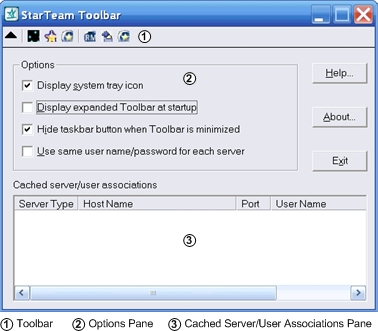
The Toolbar Utility is a component of the StarTeam and CaliberRM products which is designed to make it easier for you to log on to multiple servers and to launch different programs. The Toolbar Utility automatically caches the user name and password used to log on to each StarTeam or CaliberRM server, reducing the number of times you must log on to the same server to perform certain operations. The Toolbar Utility runs only on the Windows family of operating systems, and it is installed by default as part of the StarTeam CaliberRM, and with the StarTeam Server to be used with the Server Administration tool.
Toolbar
The toolbar is initially populated with shortcuts for the tools of the StarTeam and CaliberRM products installed on your workstation. Because the Toolbar Utility uses the standard Windows program shortcut feature, you can add any other program as a tool.
You can customize the toolbar by either:
- Using the context menu commands on the toolbar; or
- Working directly with the program shortcuts in the Toolbar Utility Tools folder, using an Explorer window.
Options Pane
The options pane enables you to:
- Specify which portions of its user interface are visible (none, system tray only, window only, or system tray and window). By default, only the Toolbar Utility system tray icon is displayed.
- Use the same user name and password for each server, so you do not have to log on to other servers where that user name and password is valid.
- Add program shortcuts as tools on the Toolbar Utility, so you can easily start those tools. (You can also modify or delete an existing tool.)
- Display the Toolbar Utility help information or About dialog.
Cached Server/User Associations Pane
When you log onto a server and you select the Save as default credentials for this server in the Log On dialog box, the Toolbar Utility caches the user name and password you have used to log onto that server. (You can override the automatic log on feature when necessary. For details, see the link “Logging On to Servers with the Toolbar Utility” at the bottom of this topic.)
When you clear the Use same user name/ password for each server, you can save a different user name and password for each server. When you have the Toolbar Utility expanded, the lower portion of the window displays the cached server/user associations information about the currently cached server/user associations. The table displays the following:
- Server Type
- Shows the type of server (StarTeam or CaliberRM).
- Host Name
- Shows the network name of the machine where the server is located.
- Port
- Shows the port number of a particular server configuration, so you can distinguish between multiple servers running on the same machine.
- User Name
- Shows the user name portion of the default credentials saved for that server.
If necessary, you can resize the columns in the table or the entire window, to better display the current information. When you select the Use same user name/ password for each server option, the Toolbar Utility automatically uses the first saved user name and password for each additional server you try to access, so you do not have to log onto other servers where that user name and password is valid.